

Windows update patches a whopping 1,400 security bugs – including 2 zero days
ZDNET’s key takeaways
- The October Windows update squashes more than 1,400 security flaws.
- This marks Microsoft’s final supported update for Windows 24H2.
- The update also fixes issues with File Explorer and Bluetooth.
Microsoft continues to break bug-squashing records, with October’s Windows update patching more than 1,400 security vulnerabilities. As usual, the actual number of bug fixes varies based on which ones are counted, but hovers around 1,410.
Also: How to upgrade your ‘incompatible’ Windows 10 PC to Windows 11 – for free
Released Tuesday, the latest update is also the first official one for Windows 11 26H2 and the last one for Windows 11 24H2 Home and Pro editions. Plus, it resolves specific issues with built-in features like File Explorer and Bluetooth, and even lets you remap the Copilot keyboard key to trigger a different action.
As usual, the updates are aimed at all supported versions of Windows 11. These include all editions of Windows 11 26H2, 26H1, 25H2, and 24H2, as well as 23H2 Enterprise and Education. Windows 10 PCs enrolled in Microsoft’s Extended Security Updates (ESU) program also receive the latest security patches.
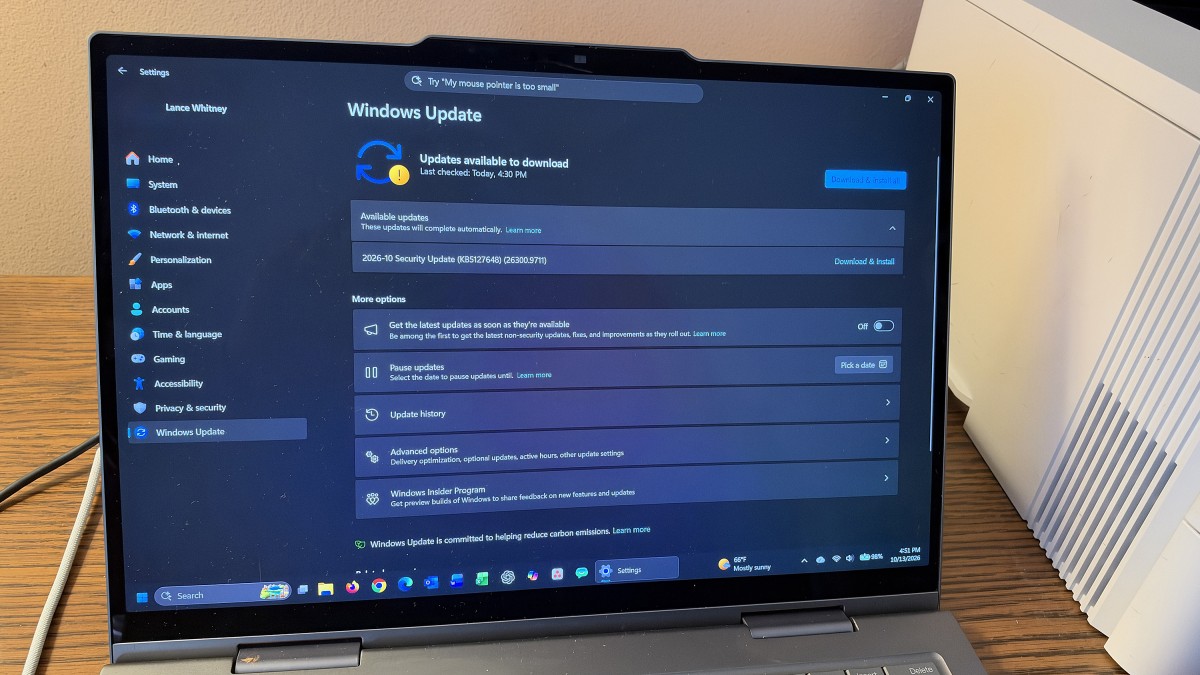
With such a large collection of bug fixes, you’ll want to install this one. In Windows 11, head to Settings and select Windows Update. You may find the update already installed and just waiting for a reboot. If not, click the button to check for updates to download and install it. In Windows 10, go to Settings, select Windows Update, and install the latest one.
Each new annual version of Windows, such as 24H2 or 23H2, loses support after 24 months, which means no more security updates or bug fixes. With Windows 11 24H2 hitting this milestone, you’ll need to jump to the latest version to keep your PC updated. For that, head to Windows Update and check for updates. You should see a notice telling you that Windows 11, version 26H2 is available. Click the link to download and install it.
Also: My favorite Windows app makes moving to a new PC so easy
The same deadline looms for Windows 11 23H2 Enterprise and Education editions, which reach end of support next month on November 10. Here, you or your organization will also need to update Windows to the latest version to stay protected.
Critical vulnerabilities and zero days
Specifically, the October update fixes 80 critical vulnerabilities and two zero-days, according to patch management provider Action1 in a new advisory.
One of the zero-days has already been exploited in the wild. Designated as CVE-2026-96951, this one could allow a remote attacker to bypass security protection by exploiting a flaw in Windows Shell.
Also: I tried the free Microsoft Word clone on Linux
“This vulnerability presents a serious security threat because it allows attackers to bypass an important Windows security defense designed to protect users from potentially dangerous files,” Action1 said in its advisory. “Attackers can exploit this weakness remotely by convincing users to open specially crafted files or interact with malicious content. Successful exploitation could weaken Windows security protections and increase the risk of malicious content reaching users without the expected security warnings.”
Labeled CVE-2026-108398, the other zero-day was publicly disclosed before the fix was rolled out and could let an attacker skirt past security measures by exploiting a flaw in Microsoft’s .net Framework.
Aside from the security patches, the October update fixes some glitches in File Explorer. You can now more easily preview downloaded files using the Preview pane. File Explorer also now retains the state of sections (expanded or collapsed), so you can more quickly pick up where you left off. Plus, thumbnail previews for cloud-based files in the Details pane will render more reliably.
Also: Microsoft’s new Nvidia PCs are cool for extreme power users
For those of you who grapple with Bluetooth issues, the update also improves the accuracy and stability of connected Bluetooth devices and accessories.
And last but not least, the update adds a new setting in Windows 11 that lets you remap the Copilot key. Instead of triggering Microsoft’s AI, the key can function as the right Ctrl key or the right-click context menu on the desktop and in File Explorer.

Lance Whitney is a technology journalist with an IT background. He's written for TechRepublic, PCMag, Macworld, and Time, among others, He also teaches classes in AI, cybersecurity, and social media. See full bio
What's Your Reaction?
 Like
0
Like
0
 Dislike
0
Dislike
0
 Love
0
Love
0
 Funny
0
Funny
0
 Wow
0
Wow
0
 Sad
0
Sad
0
 Angry
0
Angry
0











Comments (0)