

3 unofficial Android Auto apps I installed to make my car screen more useful - and how

Follow ZDNET: Add us as a preferred source on Google.
ZDNET's key takeaways
- You can sideload Android Auto apps to add functionality.
- There are apps for watching YouTube, browsing the web, and more.
- You'll need to enable developer mode to install the apps.
Android Auto does a lot of things well, but it's a little limited. Scrolling through the Android Auto section of the Google Play Store, I find a decent, but not huge, catalog of apps. Google places hard limits on what it wants your car's screen to do, yet Android Auto is capable of so much more.
This is where sideloading comes in, or installing unofficial apps from sources outside of the official Play Store. These apps significantly expand what Android Auto can do (you can sideload apps to your phone, too), and the process isn't difficult.
Also: How I customized my Android Auto in 7 ways to make it more useful when I'm driving
My car is a 2018 model, so the infotainment screen isn't as huge as in more modern cars. But even on a smaller screen, apps can change how I use Android Auto, including watching videos, browsing the web, and more.
Here's how to sideload apps, plus three of my favorite apps I've added to Android Auto.
How to sideload apps on Android Auto
To set up these apps for the first time, you will need to go through several steps. Once you're set up, though, you'll use the tools the same as any other Android Auto software.
First, you'll need to unlock developer mode on your phone. To do this, open your Settings app and find the About Phone section. Look for Build Number and tap it seven times.
Also: 6 Android Auto apps I wish I found sooner, because they make every drive easier
Second, you'll need to unlock developer mode for Android Auto. This step is much the same -- go to Settings, search for Android Auto, tap it, and choose "Additional settings in the app." Scroll down until you see Version, then tap it 10 times. From there, scroll down in your settings until you see "Unknown sources." Check that box.
Once both developer modes are unlocked, you'll need to install Android Auto Apps Downloader (AAAD). Halfway down that page, tap on "Go to Download." When the .apk file downloads, install it to access the AAAD app, which is essentially the unofficial Play Store where you can find apps. The free version of this app allows one download every 30 days, so you'll probably want to pay for Pro, which is $4.
My favorite sideloaded Android Auto apps
1. CarStream
An official YouTube app for Android Auto is on the way, but it's coming "later this year" to supported cars from BMW, Ford, Genesis, Hyundai, Kia, Mercedes-Benz, Renault, and Volvo.
If you want YouTube on Android Auto today, CarStream is your best bet. The app functions just like the normal YouTube app on your phone -- you can search for videos, access your subscriptions, and watch vertically filmed Shorts. The interface is polished and easy to use, and you can use your phone's keyboard to type your searches.
Also: I've used Android Auto with Gemini for 2 months now - it's transformed my drives in 4 ways
The app even works while the car is in motion (of course, you should never watch videos while driving). This capability allows you to put on a video for passengers. This is one app where I prefer the Android Auto to my phone's version while I'm in the car.
2. AA Browser
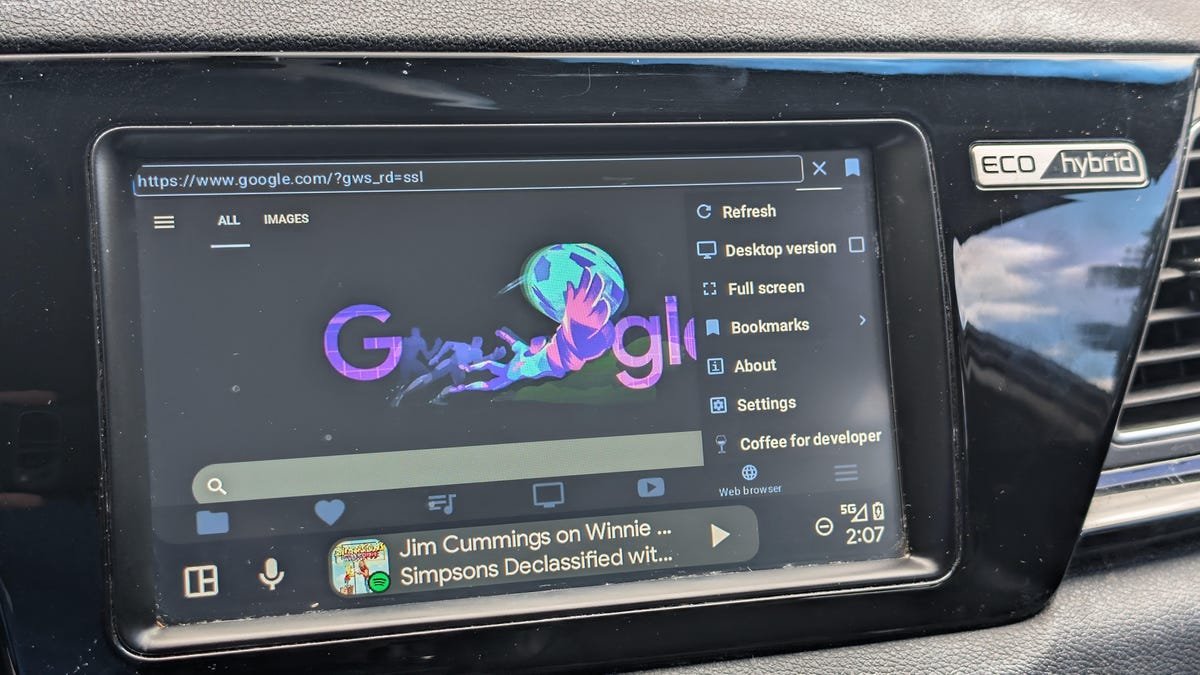
Android Auto doesn't have a web browser by default, so if you want direct internet access on your car's screen, this app is your best option. At first glance, you might wonder why you wouldn't just use your phone's browser, but AA Browser does have a few advantages.
Primarily, the app is nice to use for services that don't have official (or unofficial) Android Auto support. For example, I've pulled up Netflix for my kids before and used it for portals where the web is better than the mobile version.
Also: Android Auto runs faster and smoother now, thanks to my 4 easy tweaks
Beyond those uses, the app is good for "just let me look that up" moments. Instead of unlocking your phone, opening your browser, and dealing with a small interface, you have a larger screen that's ready and always open.
3. Fermata Auto
If you only install one unofficial Android Auto app, make it this one. Fermata Auto is an all-in-one media toolkit that lets you play locally stored videos and music, screen mirror, watch live TV via IPTV links, and more.
Also: 4 Android Auto developer settings that make driving so much easier - how to enable them
The app has dedicated tabs for YouTube and web browsing, both of which work just as well as (or even a little better than) the apps I mentioned above, and it's easy to access videos and songs on your device. I was even able to get an IPTV link working with little trouble. Instead of switching between multiple apps, Fermata handles just about everything in one place.
What's Your Reaction?
 Like
0
Like
0
 Dislike
0
Dislike
0
 Love
0
Love
0
 Funny
0
Funny
0
 Wow
0
Wow
0
 Sad
0
Sad
0
 Angry
0
Angry
0







Comments (0)