

Geekom IT13 Max 2026 review: Meteor Lake rides again in a $799 mini PC
Geekom delivers a capable older-gen Core Ultra 9 chip in a sleek compact case, supported by 24GB of soldered RAM and a 500GB SSD. More importantly, during a component crisis, you can get all of that within an $800 budget.
Pros
- +
Compact metal-reinforced design
- +
Packs in 16C/22T and Arc Graphics with 8 Xe cores
- +
Great port selection
- +
Easy access to M.2 slots
- +
Good balance between budget and performance
Cons
- -
Can get noisy under load
- -
No USB-C port on the front
- -
No biometrics
Why you can trust Tom's Hardware Our expert reviewers spend hours testing and comparing products and services so you can choose the best for you. Find out more about how we test.
The strategy of using last-gen laptop parts in mini PCs used to mean excellent performance at competitive prices. At least, it did until the RAMpocalypse swept across tech. Nevertheless, Geekom is pushing the idea that its IT13 Max, using a Core Ultra 9 185H at $799, offers a value option in mid-2026. Looking at some of the other prices for mini PCs we’ve seen recently, it might be right.
Other than the reasonable Ultra 9 tier price for the performance, RAM and storage in the current market, Geekom delivers a very competent mini PC here. It looks like an unassuming, business-like machine from the outside, but has plenty of ports, easy internal access, and is very sturdy.
Design of the Geekom IT13 Max 2026
Image 1 of 3
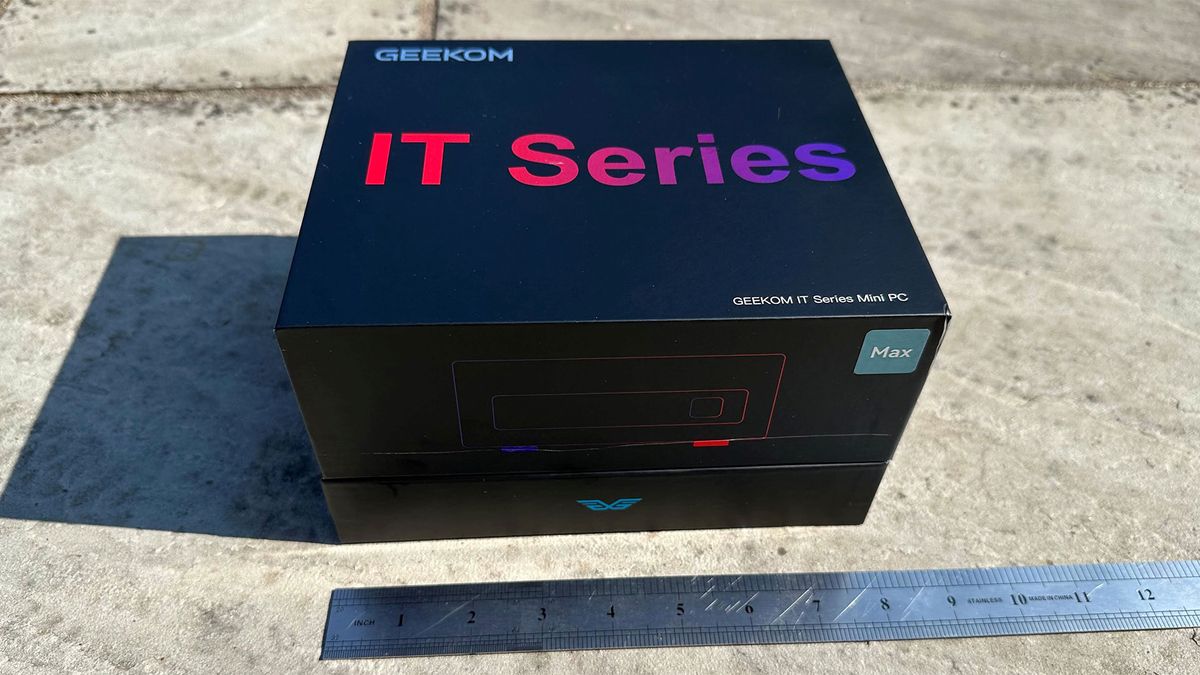
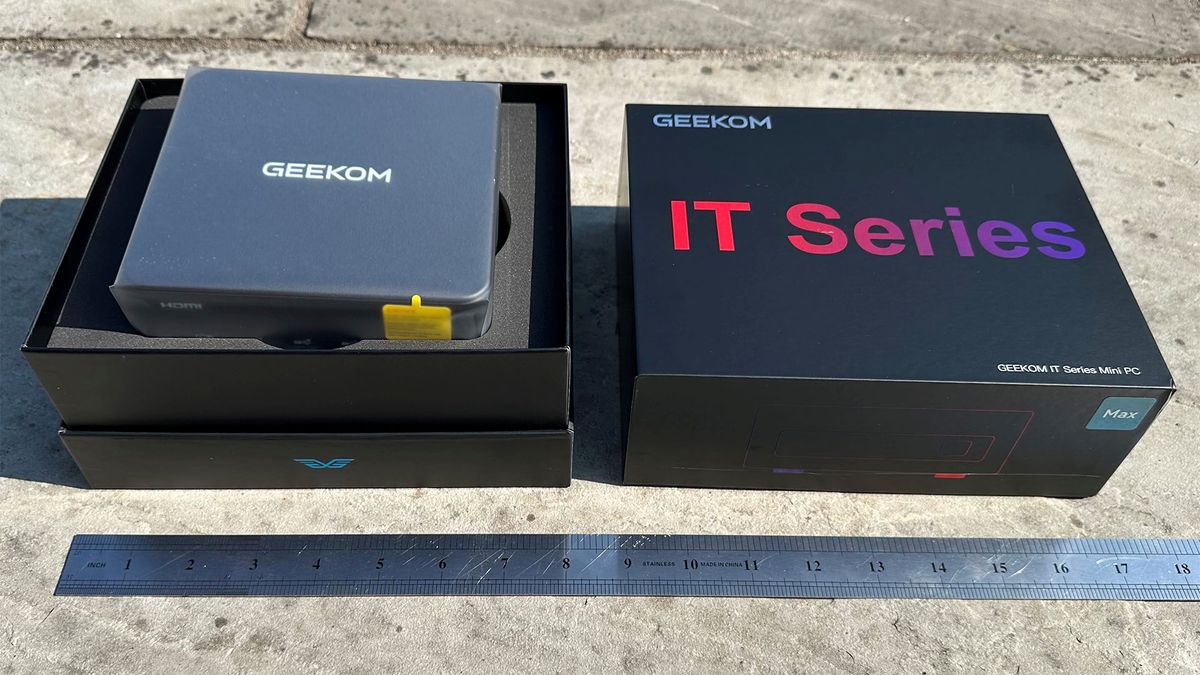
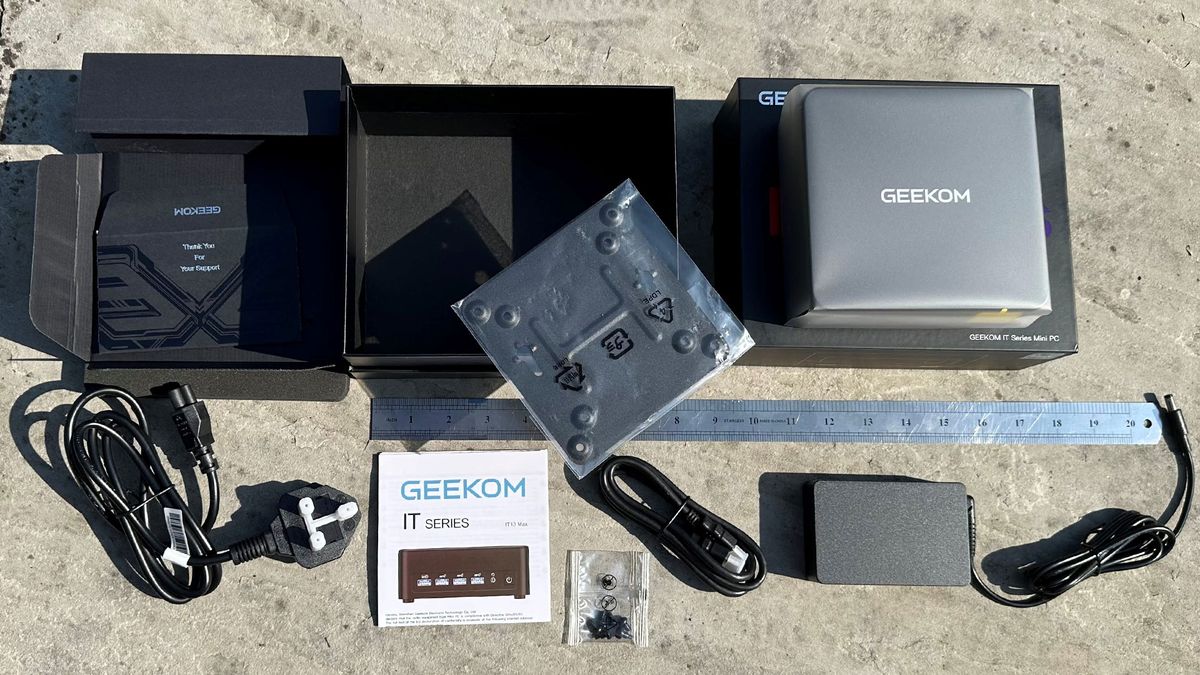
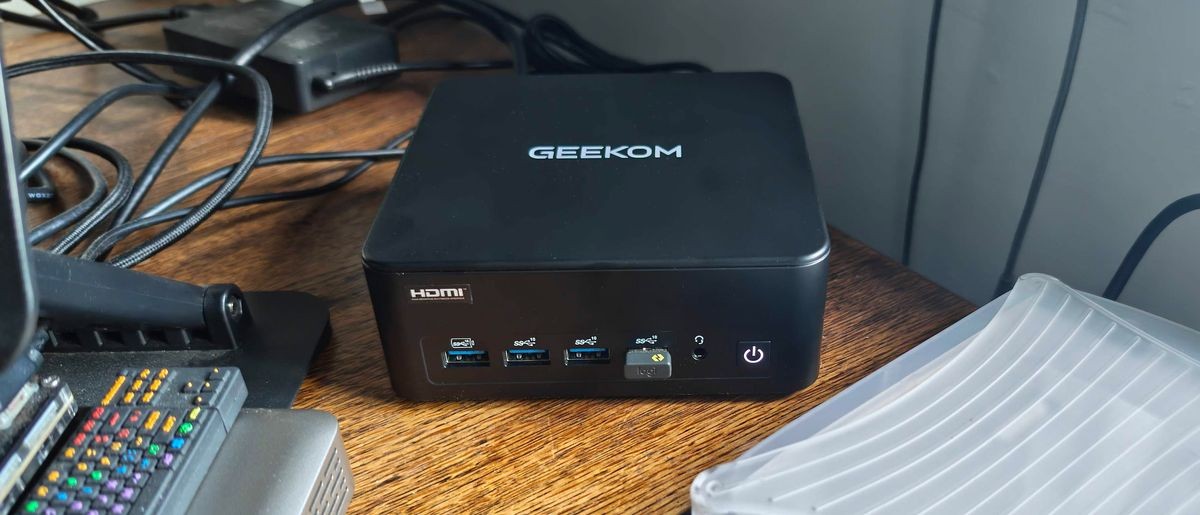
Geekom’s new IT13 Max 2026 follows a very traditional NUC design. With its just-under-a-liter volume, this black device is just slightly bigger in every dimension than the MSI Cubi NUC AI+ 3MG (0.8 L), and shares a lot of the matte dark understated design and subtle branding of that unit. Later on, you’ll notice this pair has a lot in common when it comes to performance, too, despite being two Intel generations apart and featuring a huge price gap.
Latest Videos FromTom's Hardware
Geekom uses a matte plastic outer shell here, but the perforated venting areas to the sides and removable bottom plate are metal, as is an inner chassis. It is pretty easy to get into the IT13 Max, as there are just four screws positioned in the center of the rubber feet.
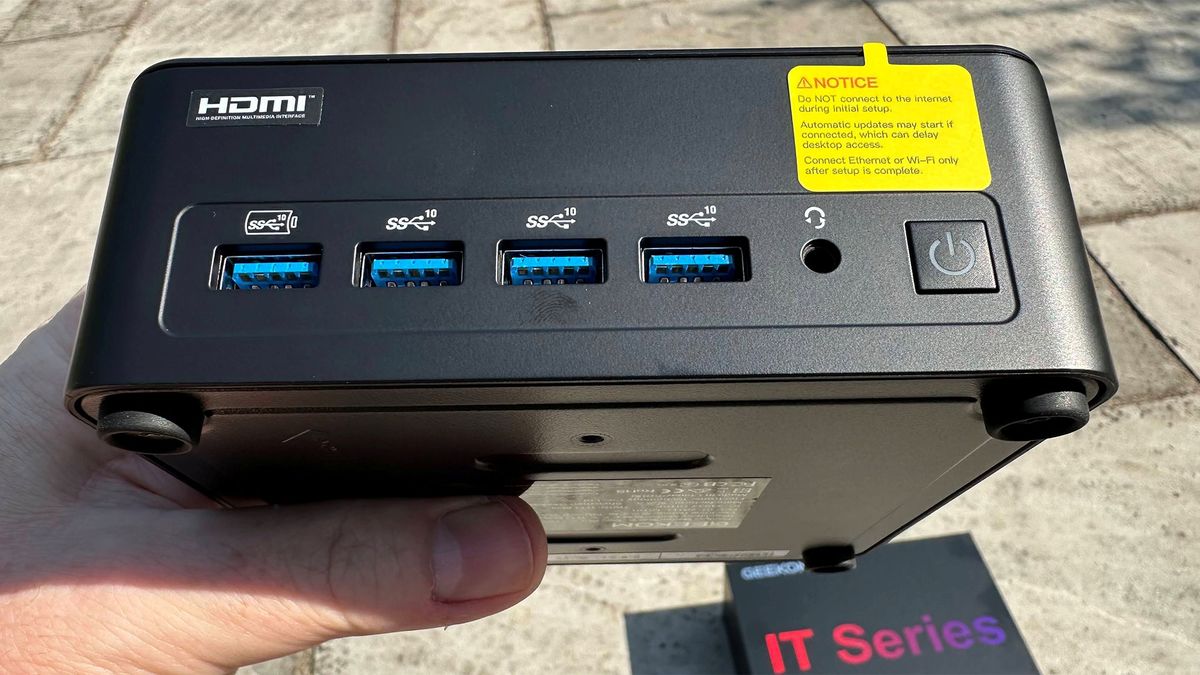
Users have access to power and headphones on the front panel, and a wide range of fast USB, networking, and monitor connection options. Geekom hasn’t implemented any biometrics in the power button, for example, and also eschews the addition of a Copilot button.
Geekom IT13 Max 2026 Specifications
Swipe to scroll horizontally
Processor |
Intel Core Ultra 9 185H (16C/22T), up to 5.1 GHz, 45W |
Graphics |
Intel Arc integrated graphics using eight Xe cores |
RAM |
24GB LPDDR5 (8x 3GB ICs, soldered, dual‑channel) |
Storage |
500GB Kingston NV3 PCIe 4.0 NVMe SSD and spare M.2 2242 slot |
Physical Ports |
Front: 4 × USB 3.2 Gen 2 Type‑A (front, one S5 Always On), 3.5 mm audio jack. Sides: SD Card 4.0, Kensington Lock, Rear: 1x USB 3.2 Gen 2 Type‑A, 1x USB 2.0 Type‑A, 2x USB4 (both with DP-Alt, one with Power in), 2x RJ‑45 2.5 Gbps, 2x HDMI 2.0, DC‑in barrel jack |
Wireless |
Intel Wi-Fi 7 + Bluetooth 5.4 |
Dimensions |
5.35 x 5.20 x 2.13 inches (≈ 0.97 L chassis) |
Operating System |
Windows 11 Pro 25H2 |
Price (as configured) |
Ports and Upgradeability on the Geekom IT13 Max 2026
Image 1 of 8
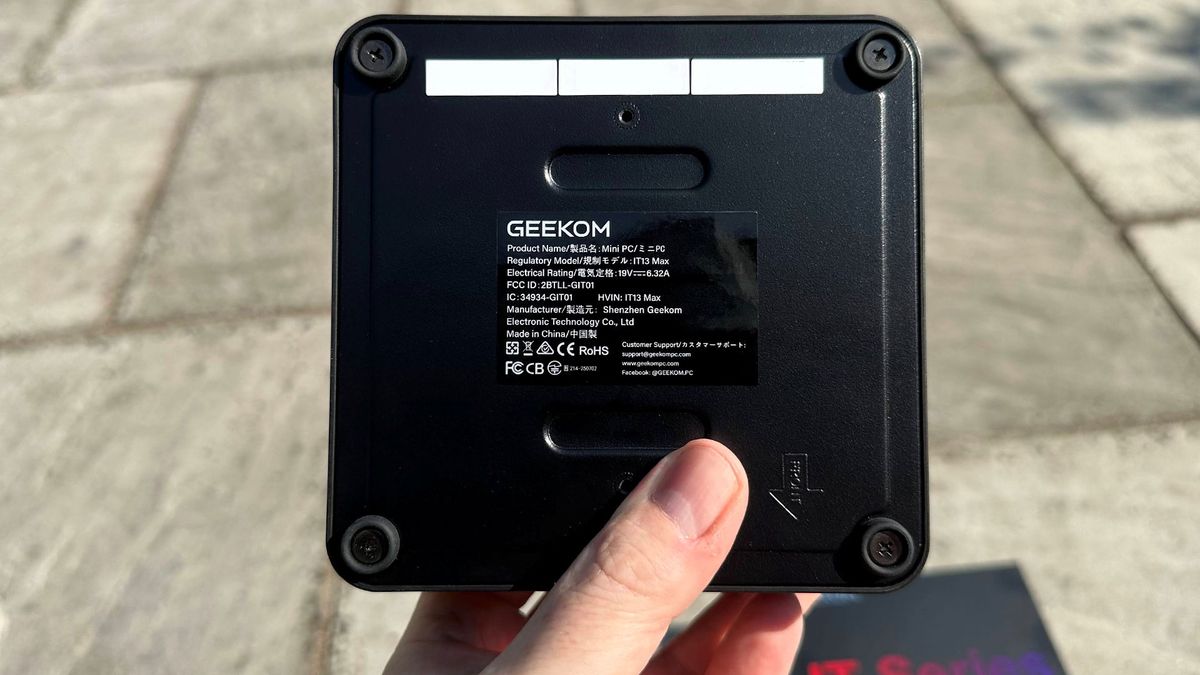
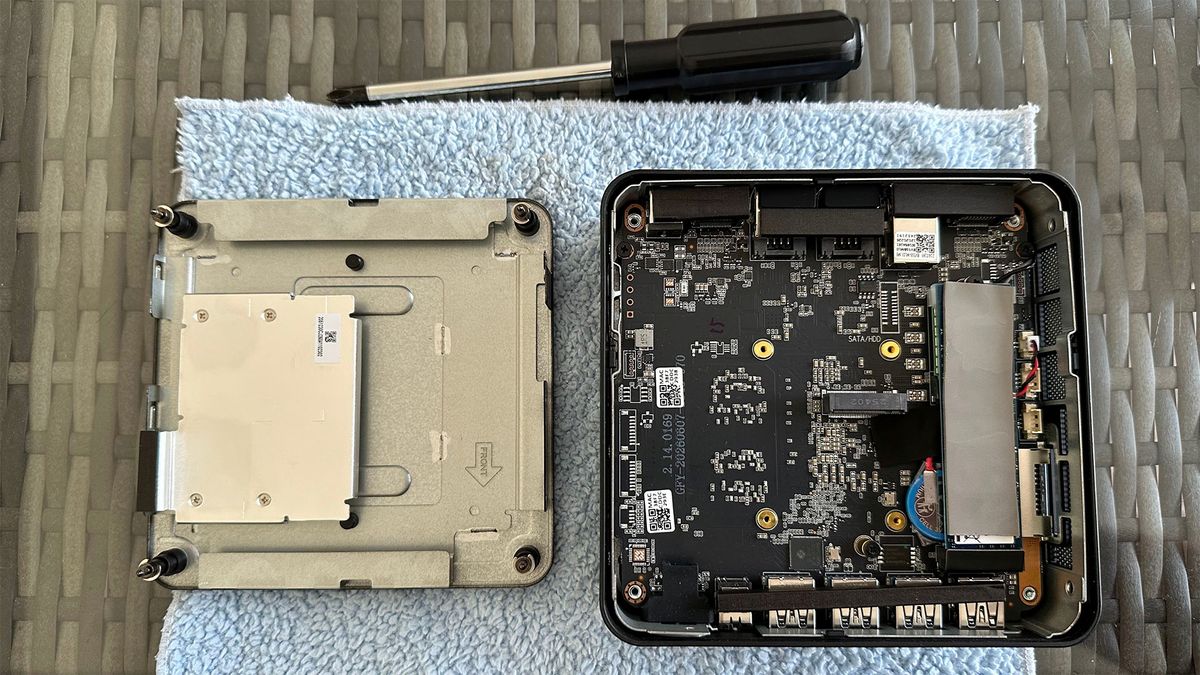
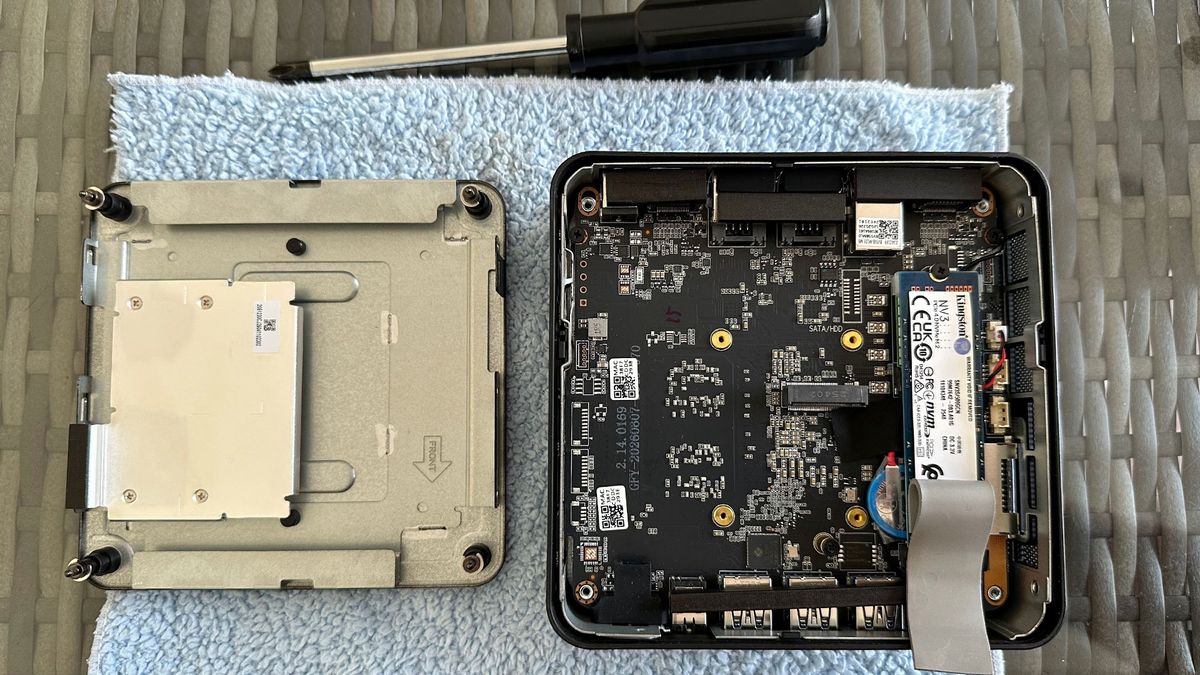
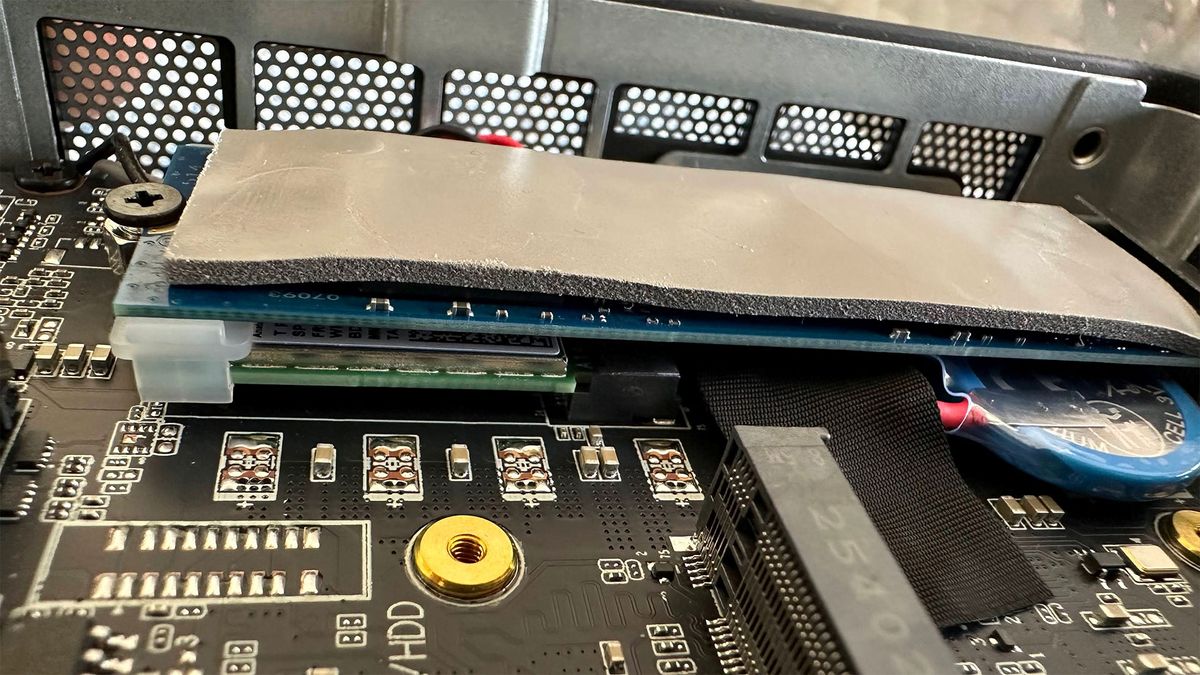
When I decided to look inside, two of the four rubber feet could be unscrewed by hand, but another pair were just a little too tight, so I had to reach for my Phillips-head screwdriver. Once you get into this Geekom mini PC, there’s not much you can do, as the RAM is soldered.
The only upgrades users have access to are swapping the installed M.2 devices. There’s an M.2 2280 SSD slot with the NVMe PCIe4 500GB Kingston drive and thermal pad in place. Under that is the system’s M.2 2230 wireless connectivity card. To the side of these, I saw a vacant M.2 2242 slot. Oddly, the spec sheet I got from Geekom mentioned 2.5-inch SATA SSD/HDD expansion options, and not M.2 2242. There seemed to be an unused SATA header area on the motherboard, so perhaps specs were changed at a late stage of development.
Stay On the Cutting Edge: Get the Tom's Hardware Newsletter
Get Tom's Hardware's best news and in-depth reviews, straight to your inbox.
The system offers a good array of ports built-in, and I didn’t want or need to reach for a docking solution during testing.
On the front of this mini PC, there is a generous row of four USB 3.2 Gen 2 Type-A ports. One of these supports always-on smart device charging. Next to these ports is a 3.5 mm audio jack and an inset power button with a white LED to indicate it is powered up.
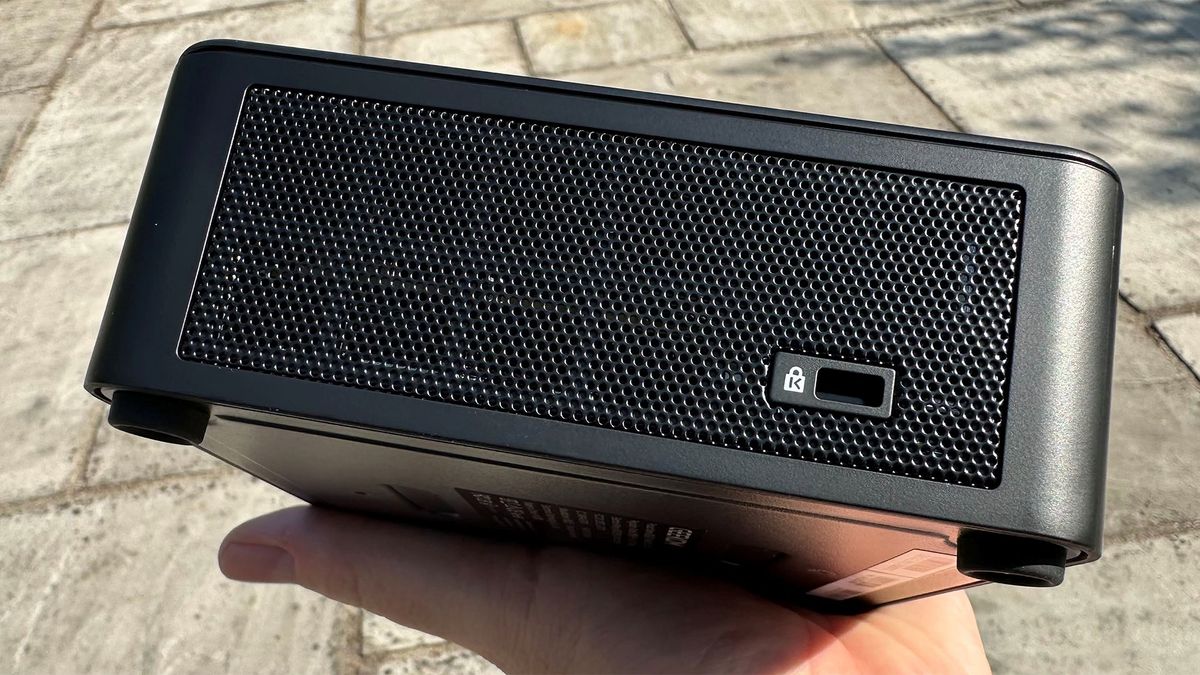
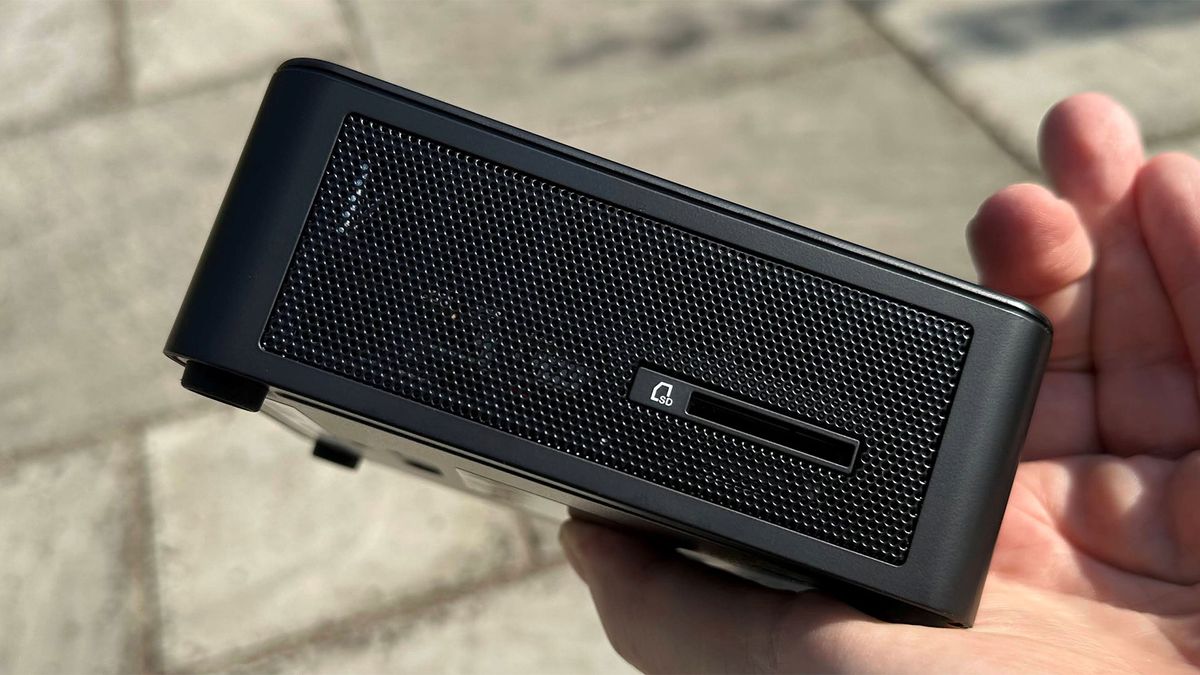
On the left side, there is a full-size SD card reader, and on the right, you will find a Kensington lock slot.
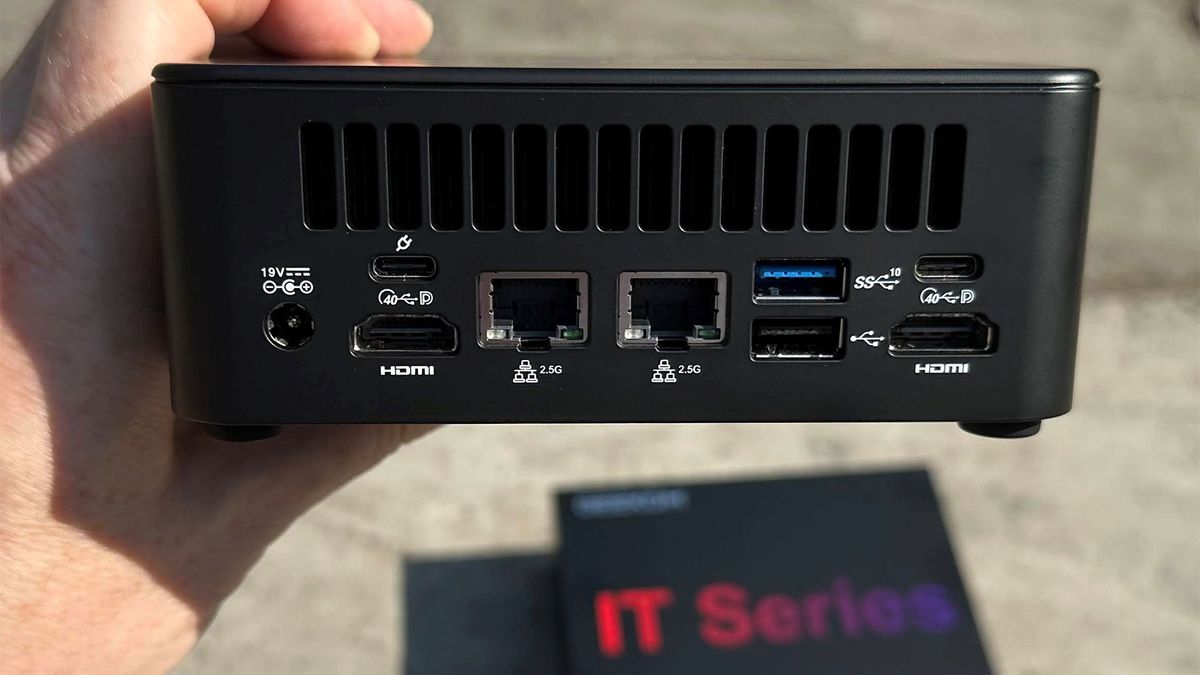
At the rear of the IT13 Max 2026, there’s a series of vents, and below them, most of the I/O. This includes a USB 3.2 Gen 2 Type-A port, a USB 2.0 Type-A, two USB4 Type-C (both with DP-Alt, one offers Power in), two RJ-45 2.5 Gbps Ethernet ports, a pair of HDMI 2.0 ports, and a DC‑in barrel jack for the supplied power brick.
Test System Setup
Swipe to scroll horizontally
System |
CPU |
(i)GPU |
Memory |
Chassis |
GMKtec EVO-T2 |
Intel Core Ultra X7 358H (16C/16T: 4P + 8E + 4 LPE), up to 4.8 GHz |
Intel Arc B390 (Xe3, 12 cores, up to 2.5 GHz) |
2x 32GB LPDDR5X-8533 soldered |
Dual-fan,1.72 liters |
MSI Cubi NUC AI+ 3MG |
Intel Core Ultra 9 386H (16C/16T: 6P + 8E + 2LPE), up to 4.9 GHz |
Intel Graphics (Xe3, 4 Cores, up to 2.5 GHz) |
2x 16GB DDR5-5600 Sodimm |
Single fan, 0.52 liters |
Geekom A9 Max 2026 |
AMD Ryzen AI 9 HX 470 (12C / 24T: 4x Zen 5 , 8x Zen 5c), up to 5.2 GHz |
Radeon 890M (RDNA 3.5, 16 CUs, up to 3.1 GHz) |
1x 32GB DDR5-5600 Sodimm |
Single fan, 0.82 liters |
Arctic Senza AI 370 |
AMD Ryzen AI 9 HX 370 (12C / 24T: 4x Zen 5 , 8x Zen 5c), up to 5.1 GHz |
Radeon 890M (RDNA 3.5, 16 CUs, up to 2.9 GHz) |
2x 16GB LPDDR5X‑8000 soldered |
Passive, 4.82 liters |
Beelink SER10 MAX |
AMD Ryzen AI 9 HX 470 (12C / 24T: 4x Zen 5 , 8x Zen 5c), up to 5.2 GHz |
Radeon 890M (RDNA 3.5, 16 CUs, up to 3.1 GHz) |
2x 32GB DDR5-5600 Sodimm |
Single fan, 0.81 liters |
Geekom IT13 Max 2026 |
Intel Core Ultra 9 185H (16C/22T: 6P + 8E + 2 LPE), up to 5.1 GHz |
Intel Arc graphics (Xe-LPG, 8 cores, up to 2.35 GHz) |
2x 16GB DDR5-5600 Soldered |
Single fan, 0.97 liters |
GMKtec Evo-X3 |
AMD Ryzen AI Max+ 395 (16C/32T: 16x Zen 5), up to 5.1 GHz |
Radeon 8060S (RDNA 3.5, 40 CUs, up to 2.9 GHz) |
2x 64GB LPDDR5X-8000 Soldered |
Triple-fan, 2.69 liters |
Productivity Performance on the Geekom IT13 Max 2026
Geekom boasts of all-round flagship performance from this new mini PC and thankfully skips any outlandish AI-related claims. Now we are getting down to testing, we shall see if there are any glaring weaknesses that come from choosing Intel’s previous-previous-gen silicon.
Geekom has opted for older silicon in the IT13 Max 2026, utilizing Intel’s Core Ultra 9 185H (16C/22T), which boosts up to 5.1 GHz, and shares die space with an Arc iGPU featuring eight Xe cores. This is quite a lot of compute and GPU resources in a little SoC, and that’s why the Ultra 9 185H was one of the top mobile processors a couple of years ago. There’s an NPU on board, too, but it can only muster 11 TOPS according to Intel’s data sheets. The question is if that chip, alongside 24GB of RAM and a 500GB, still stands up.
Image 1 of 8
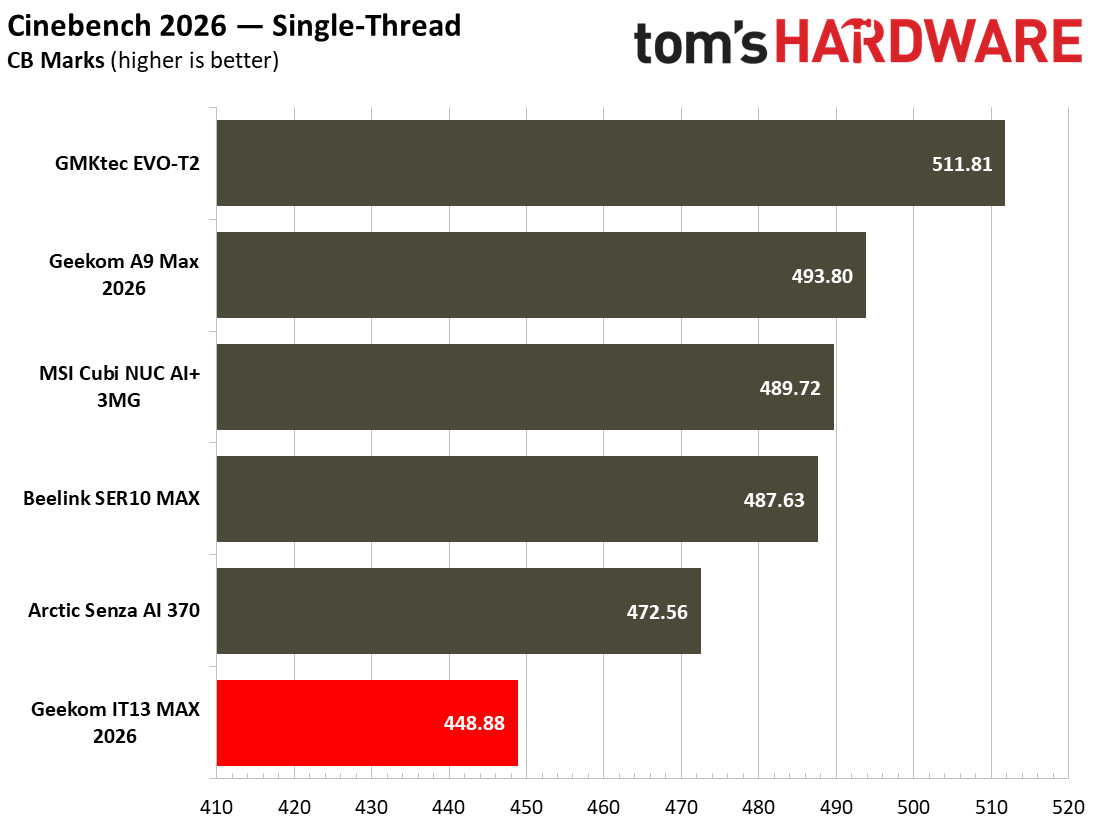
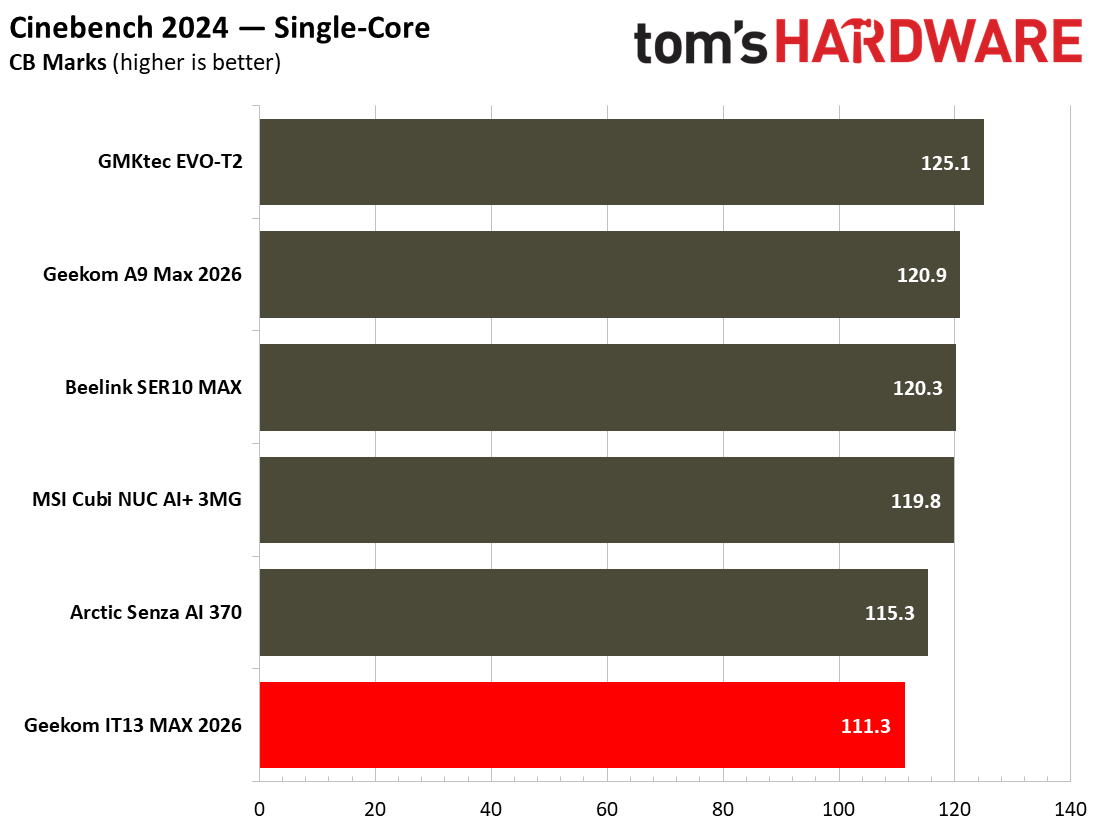
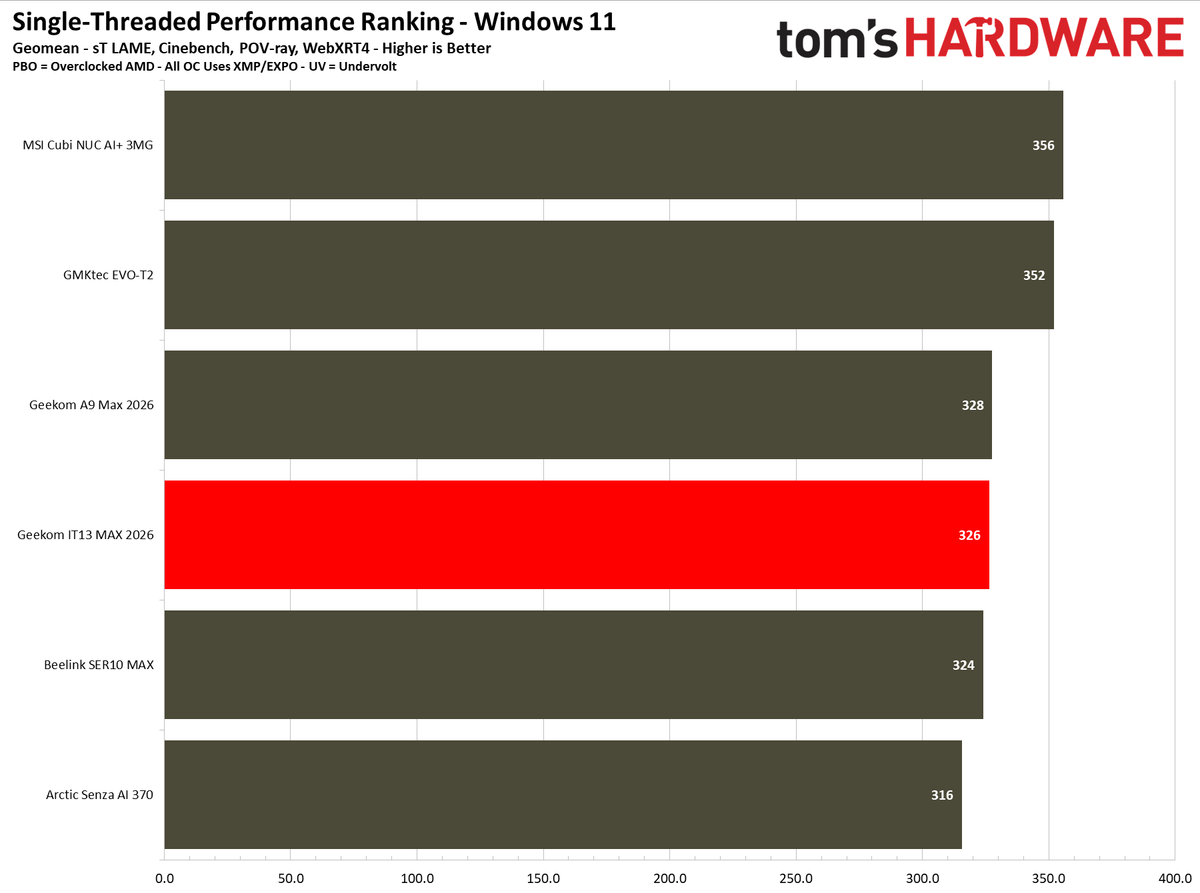
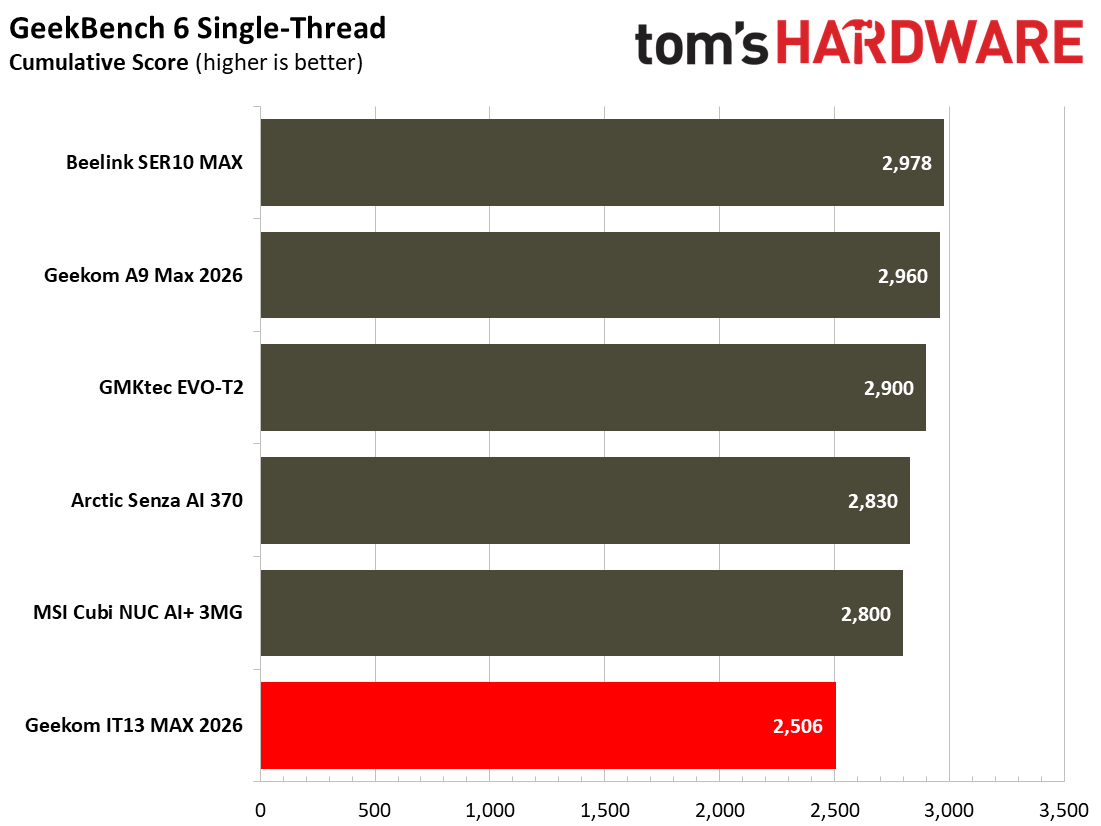
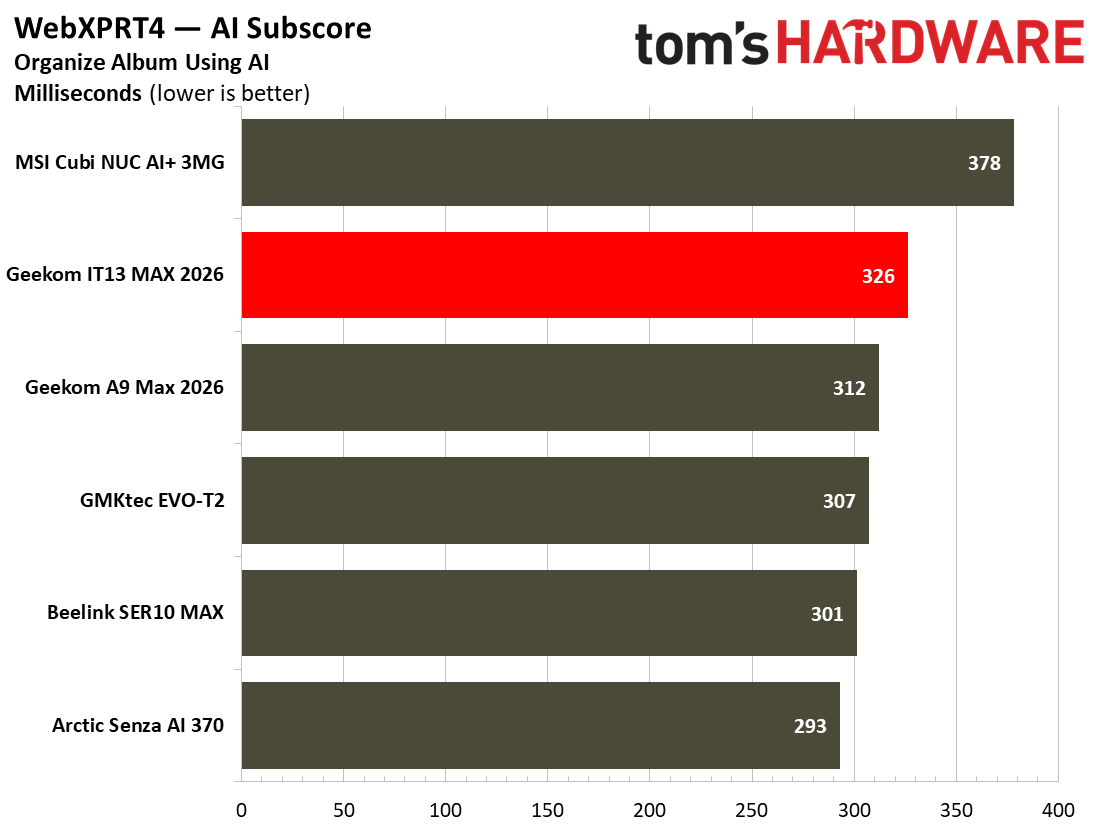
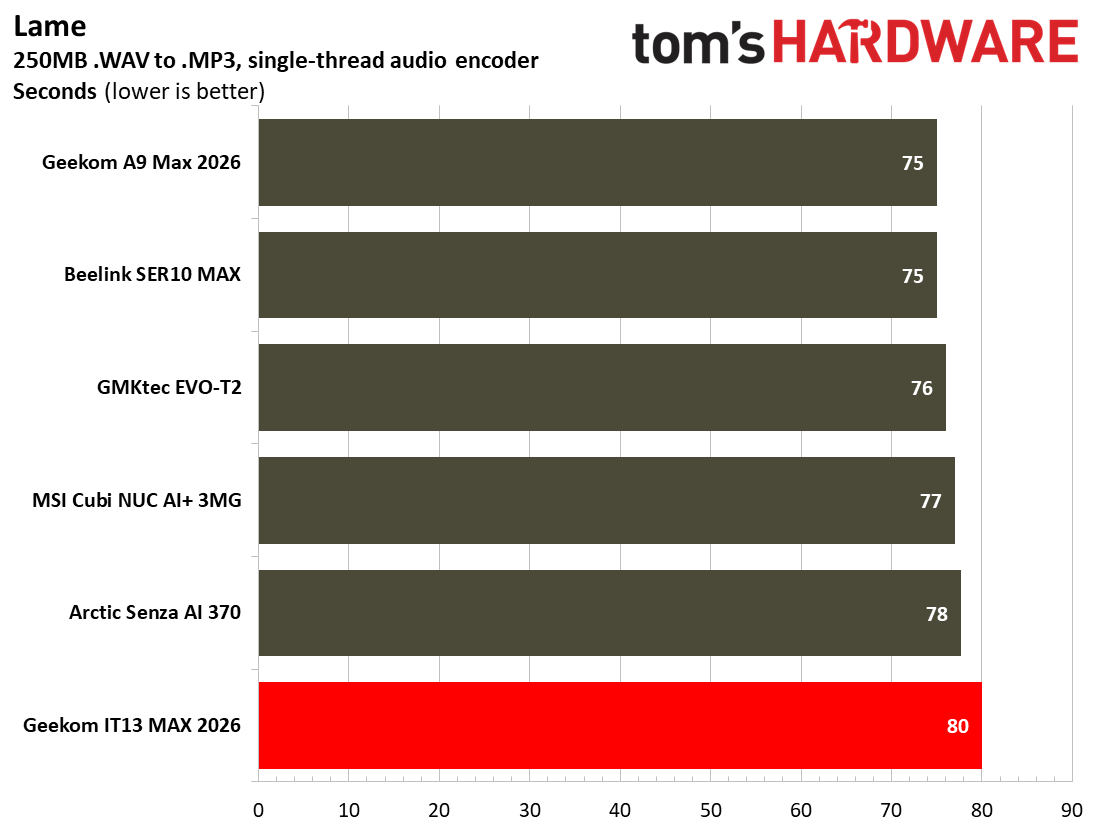
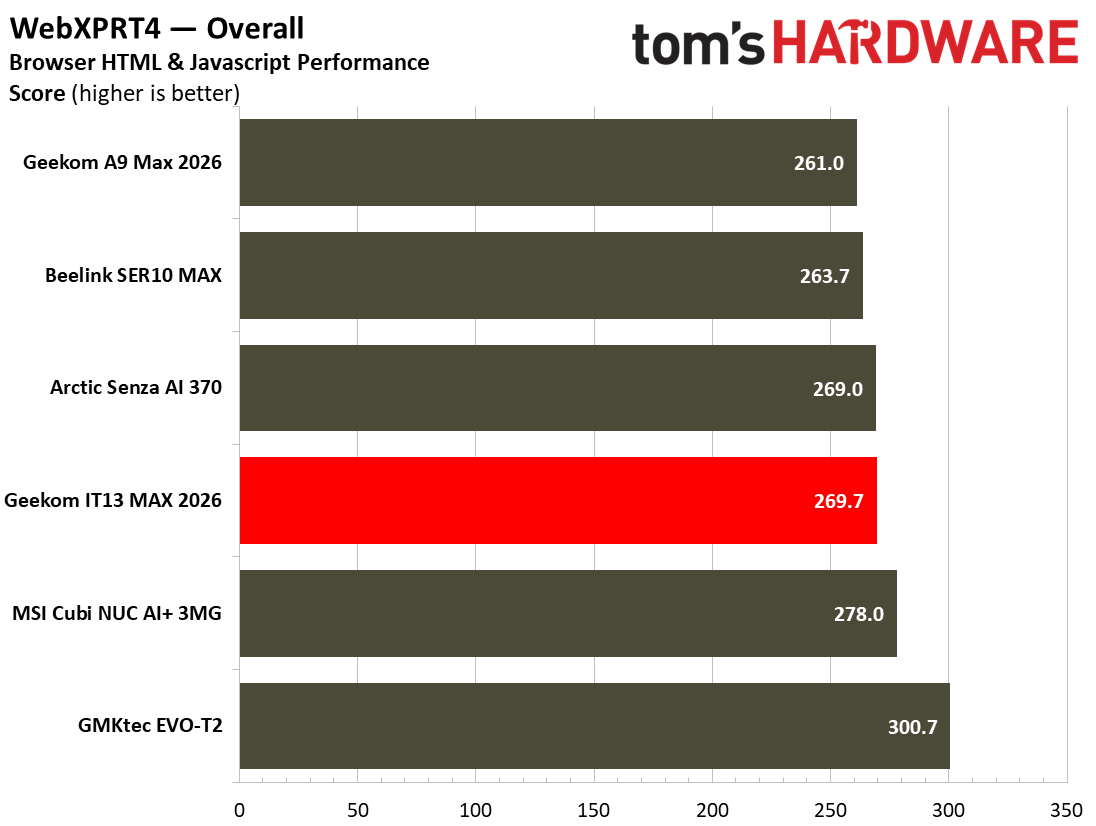
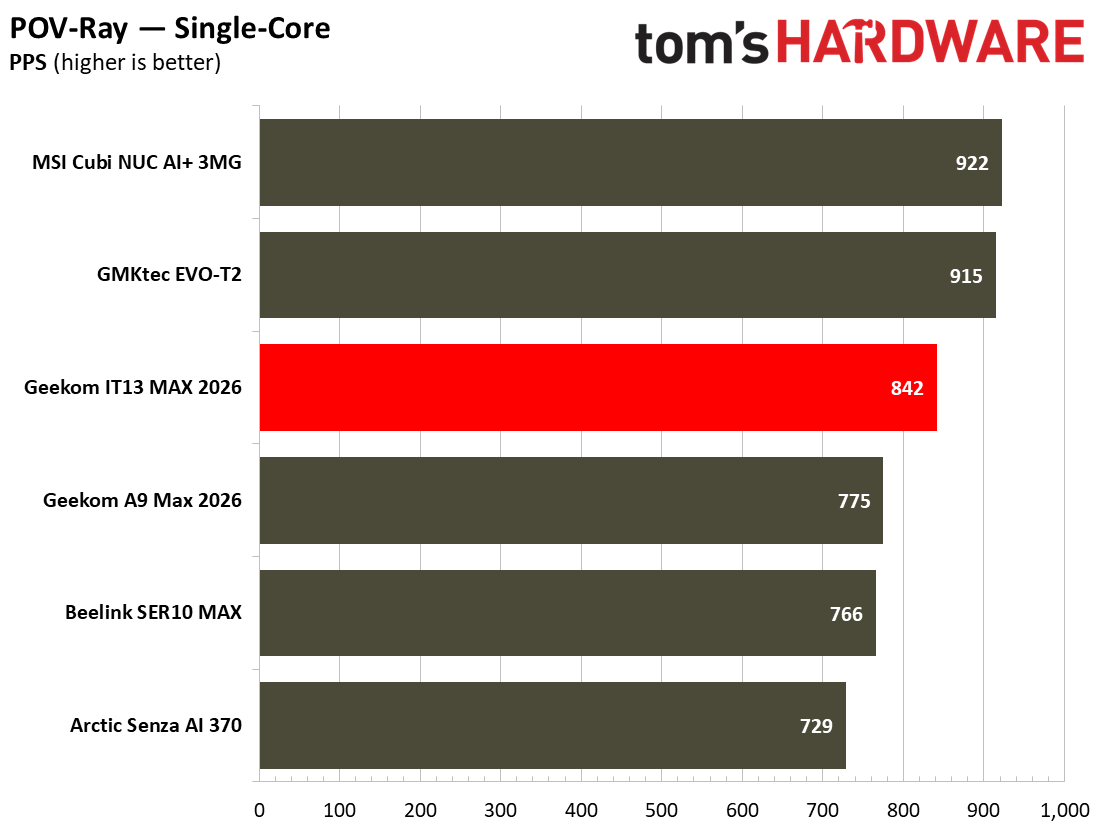
Image 1 of 11
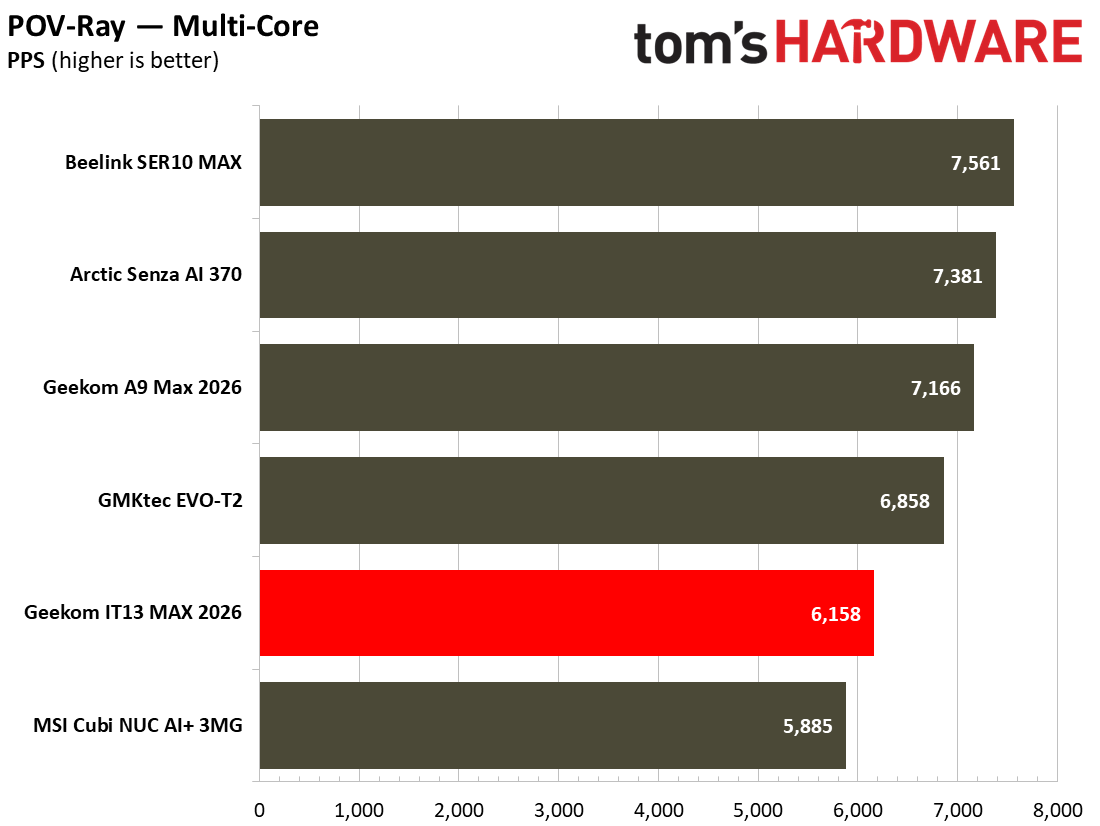
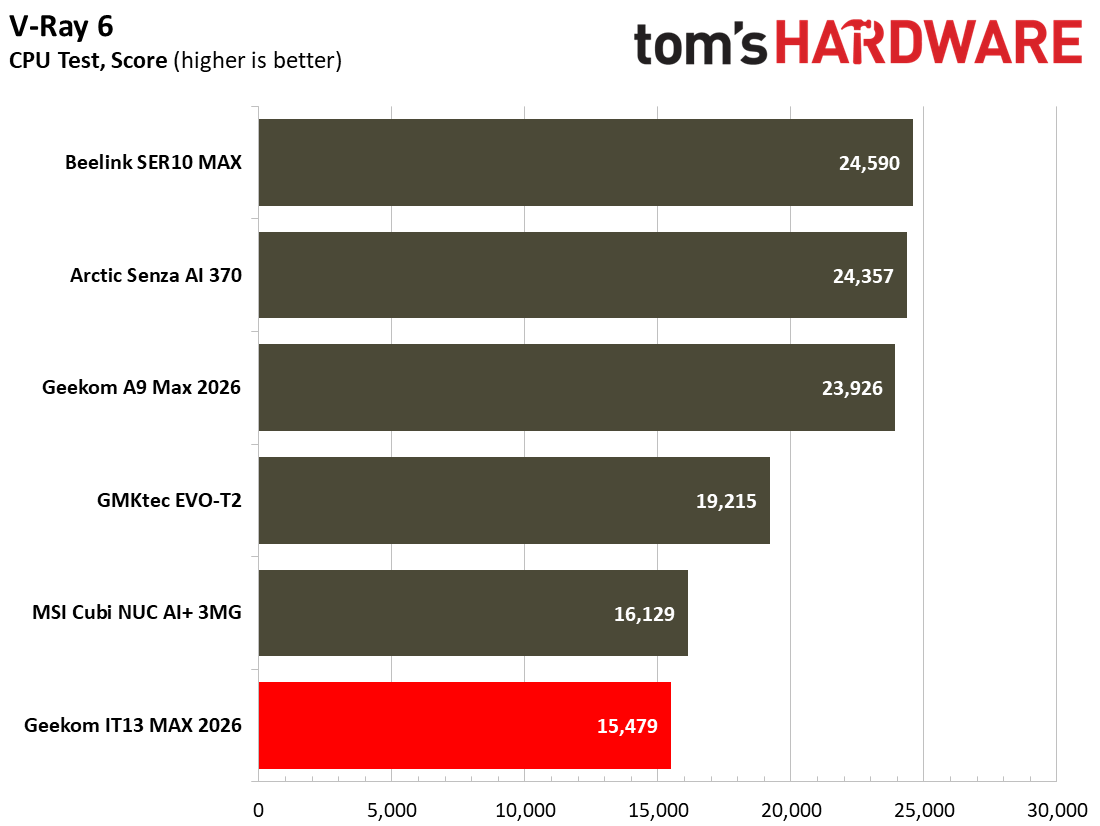
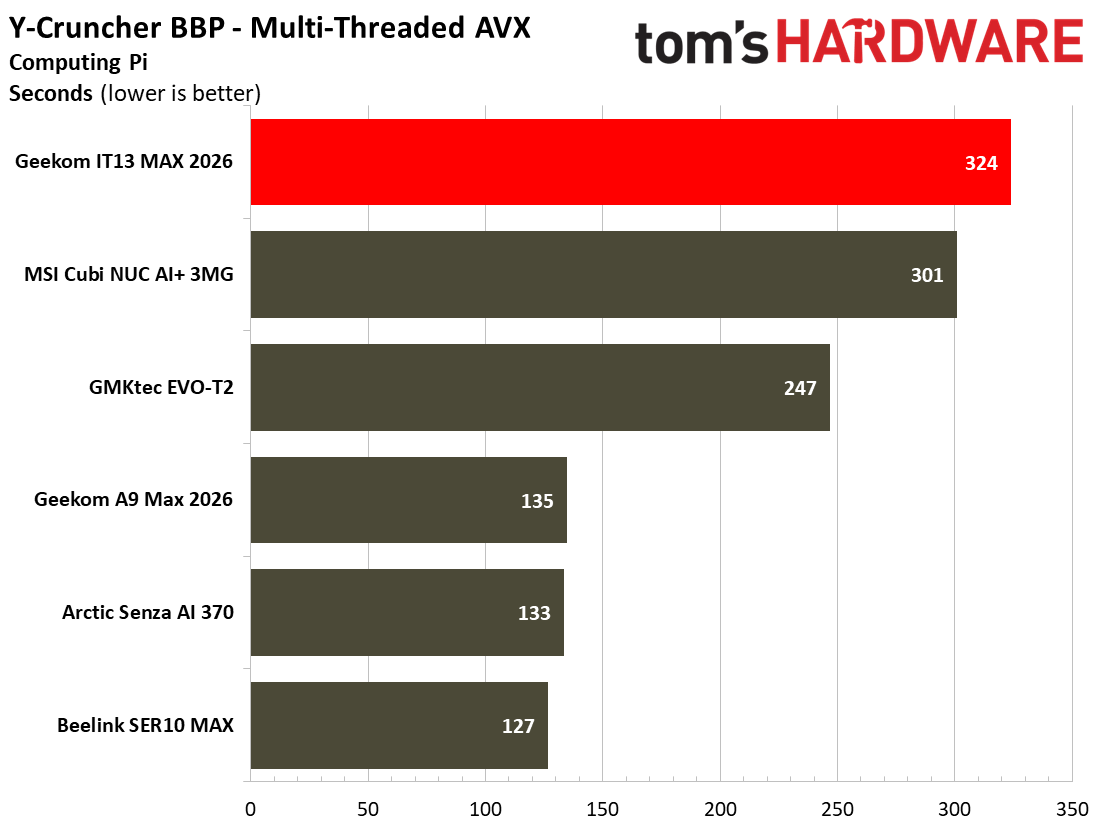
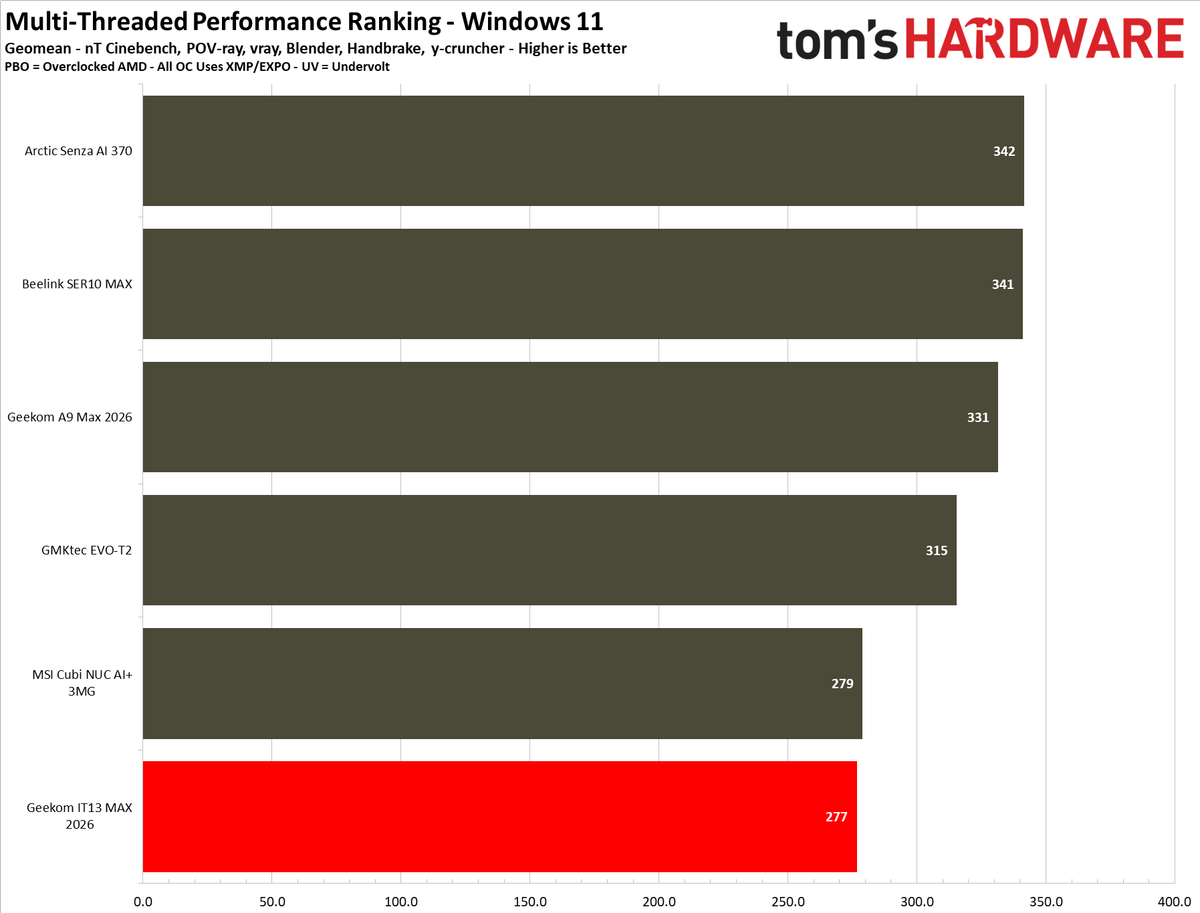
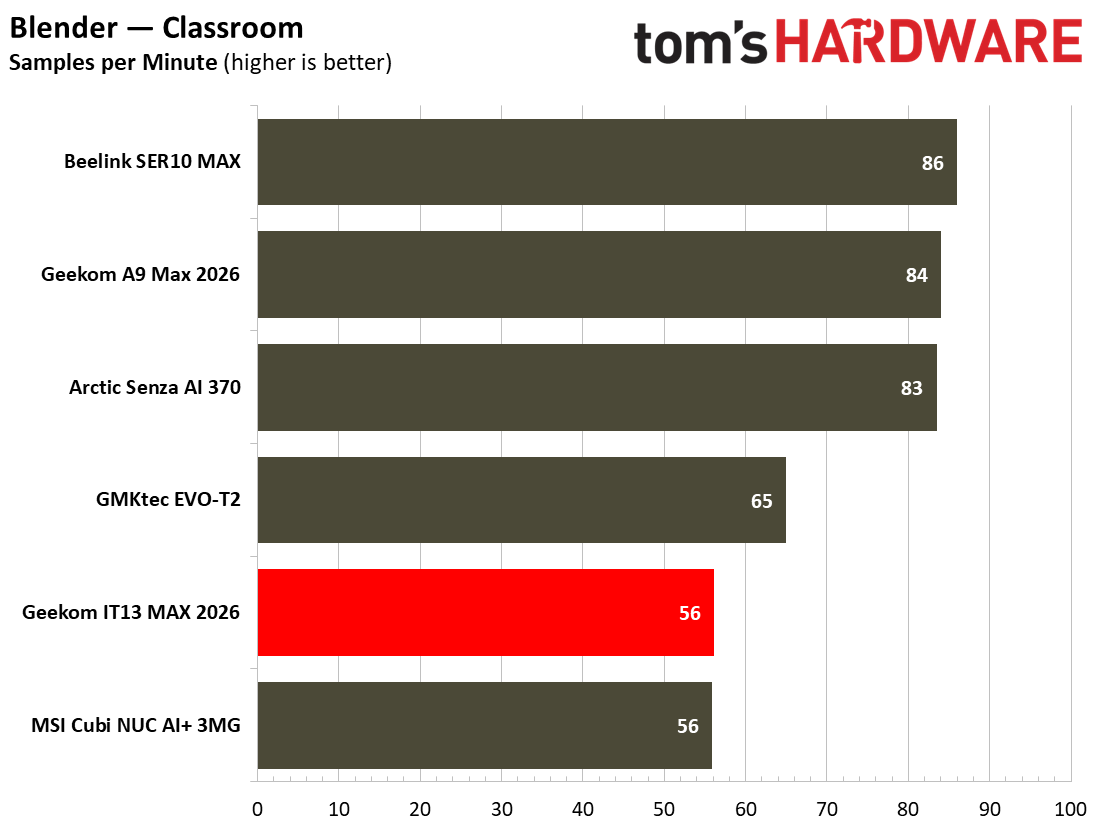
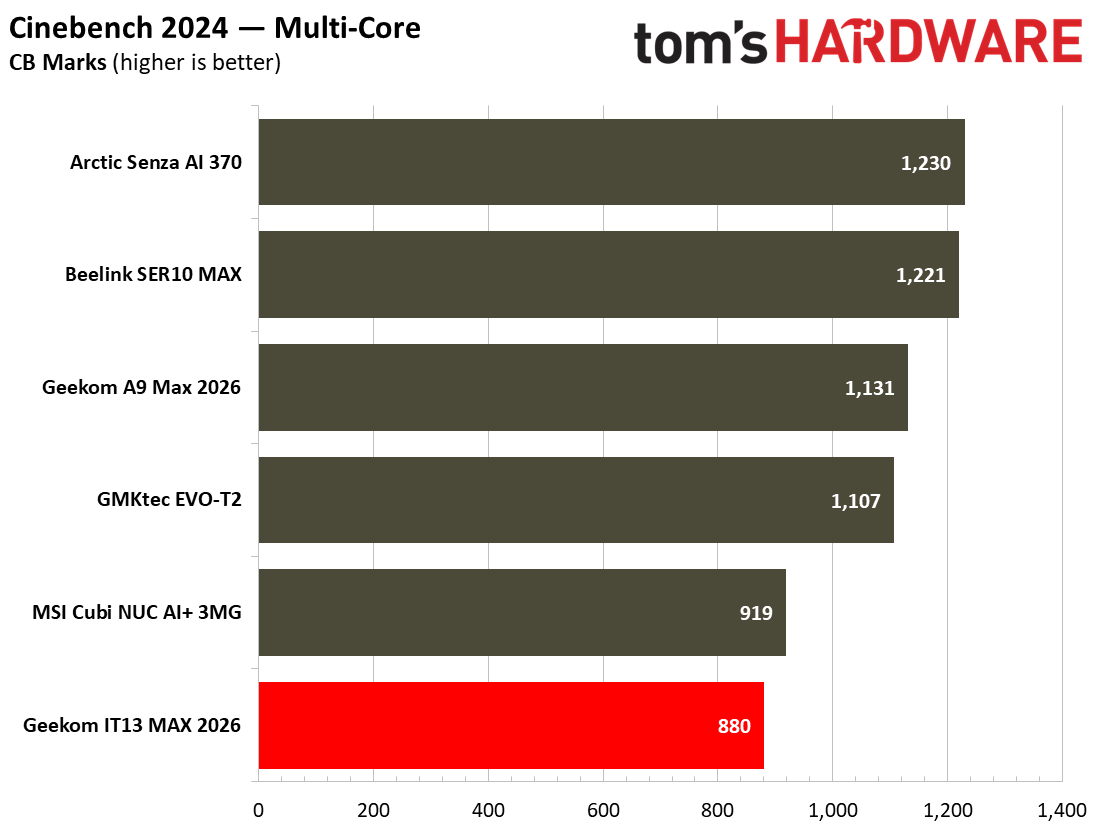
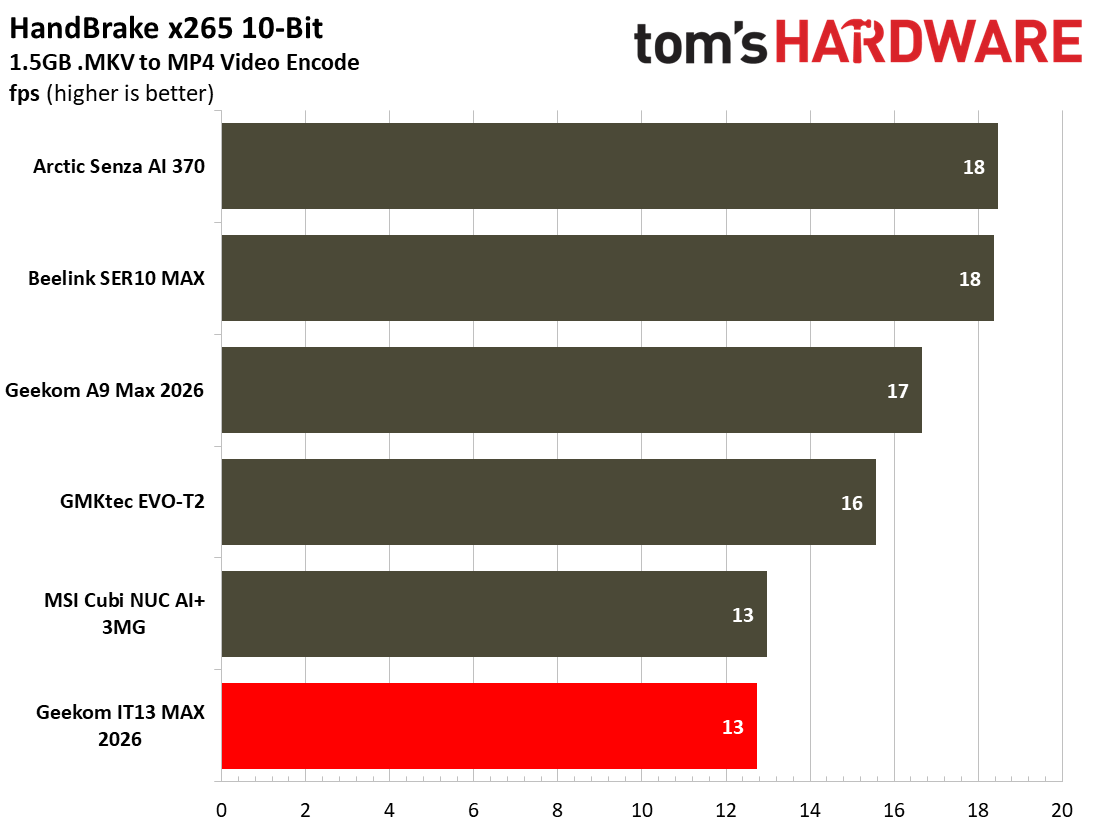
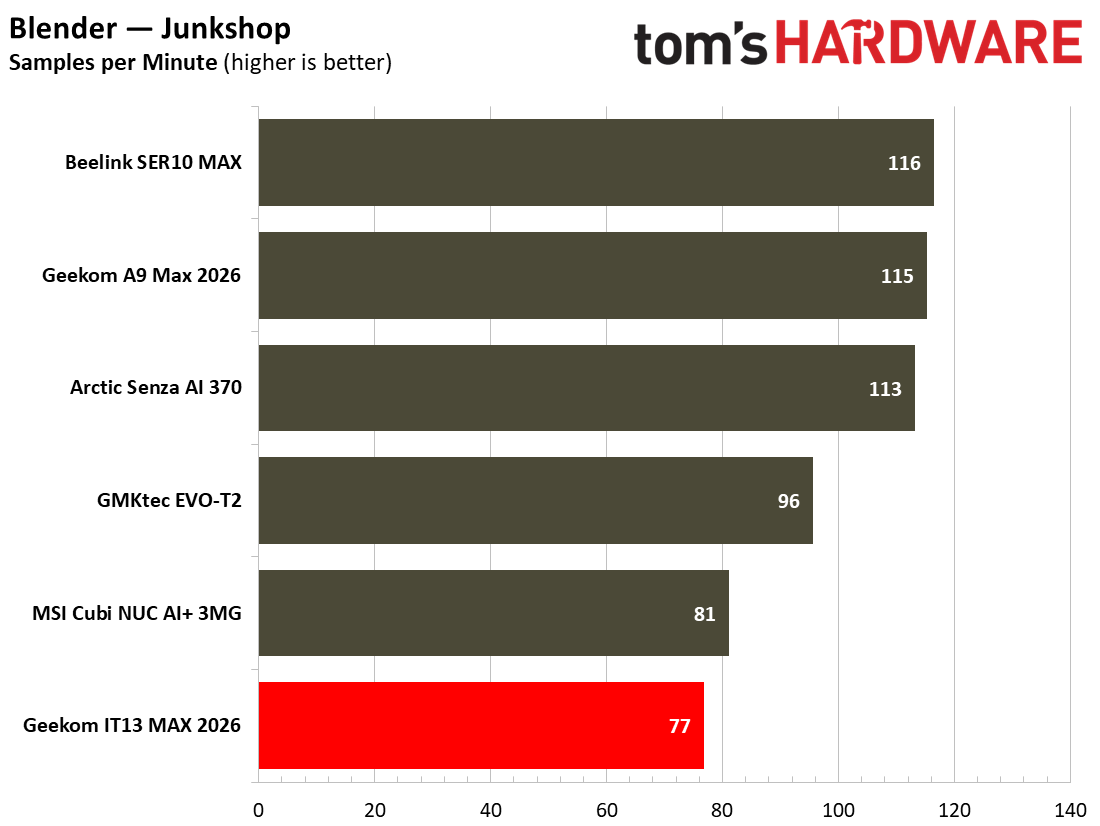
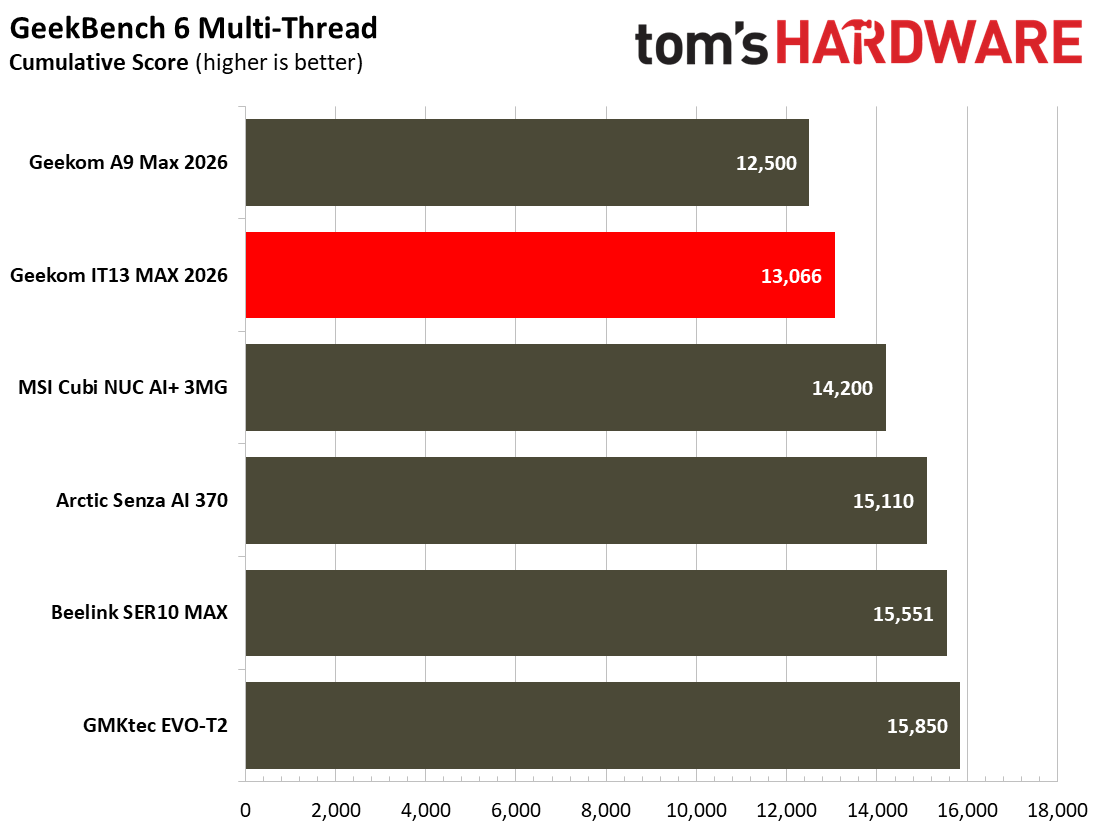
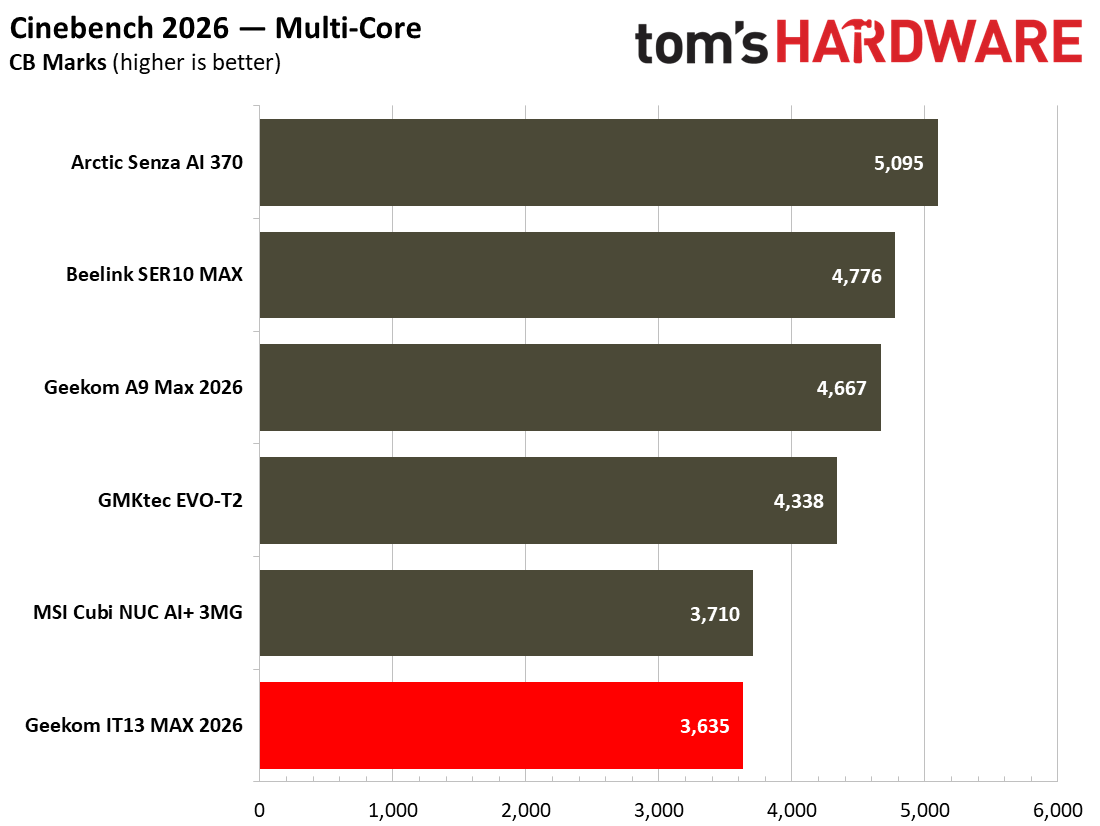
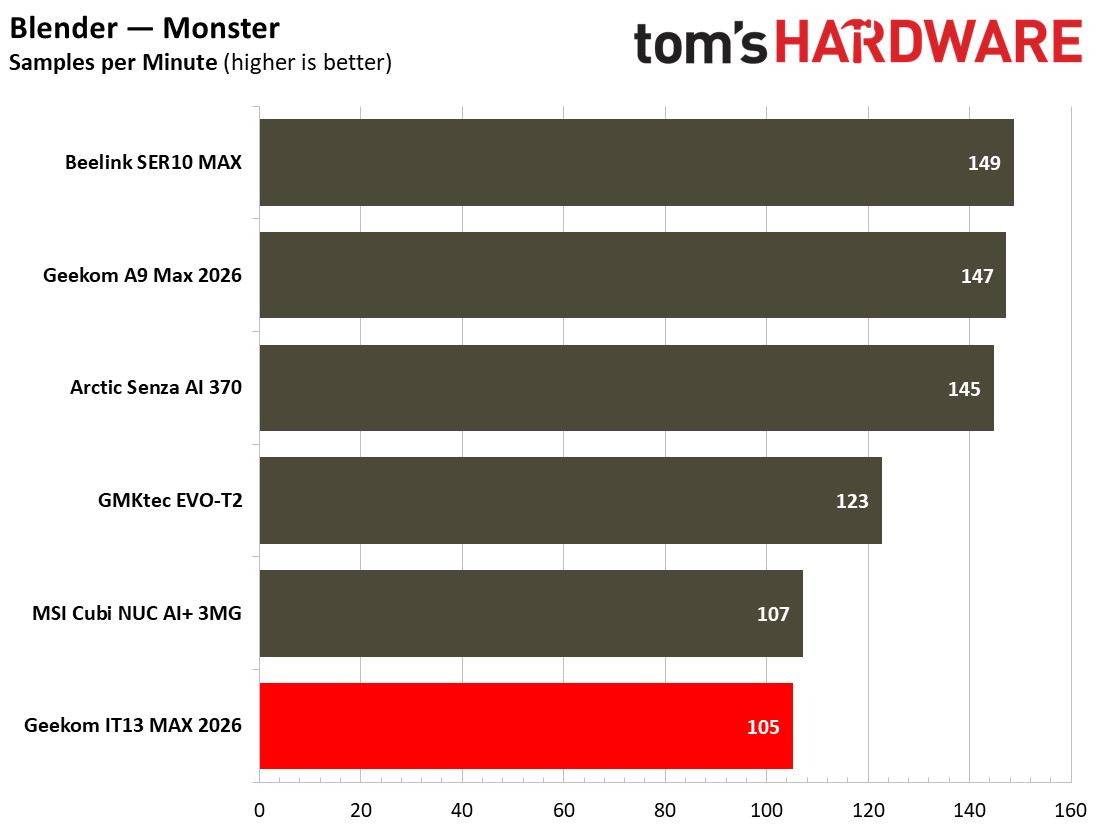
In the comparison charts above, you can see how the IT13 Max squared up to more modern rivals. In Cinebench 2026, Maxon’s current-gen CPU rendering benchmark, the single-thread result of ~450 points does mean that the Meteor Lake machine does trail the pack, but it isn’t a disaster. Turning to the multicore result in the same test, the latest Geekom mini PC with its older “Meteor Lake” chip basically matches the MSI Cubi NUC AI+ 3MG based on Intel “Panther Lake” silicon. Admittedly, the former’s 16C/22T core/thread count and higher power limits lift it against the Intel Core Ultra 9 386H with 16C/16T in the MSI.
In HandBrake, the Geekom managed 13 frames per second on our standard video transcoding test. That’s neck and neck with the MSI, again, but only with very long videos would you likely notice how it lags behind.
Gaming and Graphics on the Geekom IT13 Max 2026
The Geekom IT13 Max isn't hopeless in gaming, but it sits in the lower portion of our mini PC game benchmark comparison tables. It mostly performs better than the MSI Panther Lake mini PC, again. Not bad for something from two generations prior.
For my traditional spell of gaming fun before serious benchmarking, I decided to go on a quick adventure in Borderlands GOTY Enhanced (2019). The game ran at an average of about 80 frames per second when using the High preset at 1080p. I didn’t have any problem with frame rates mostly in the 80s, periodic dips in the frame chart looked worse than they actually felt during the game. It is definitely an older game now, and while the iGPU ran at close to its max utilization on my uncapped frame rate run, the CPU was barely burdened.
Image 1 of 2
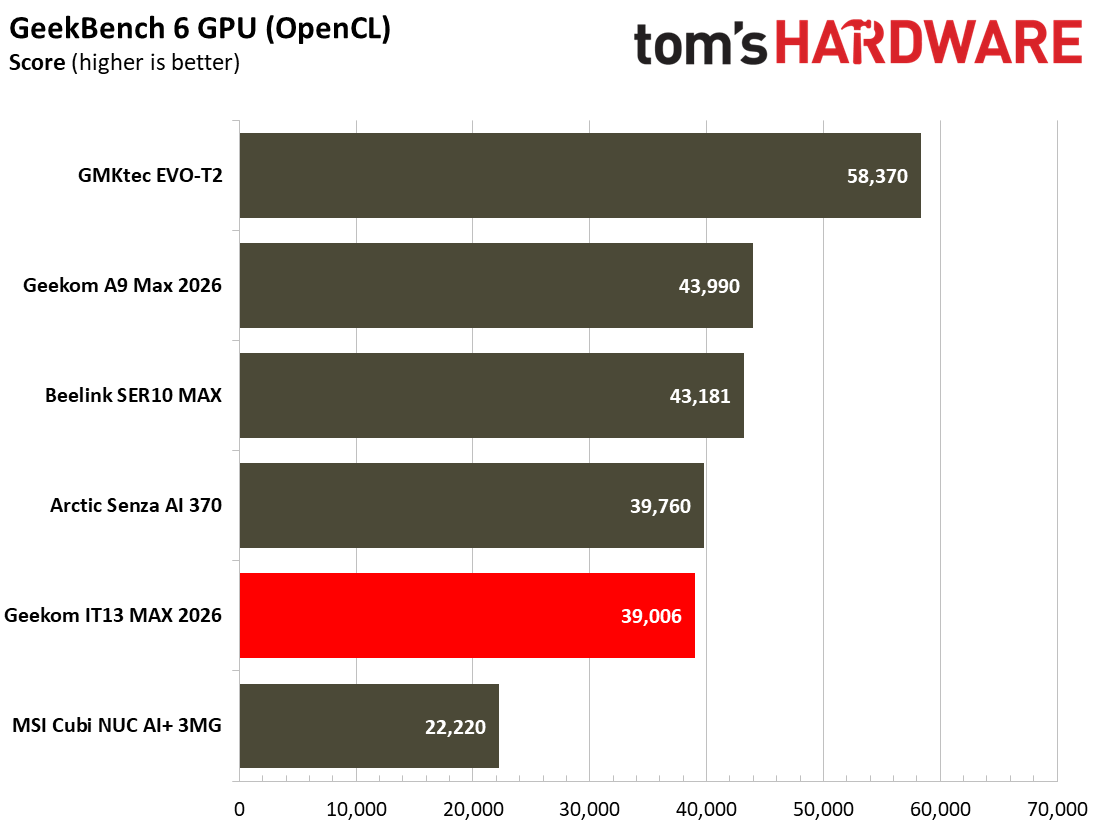
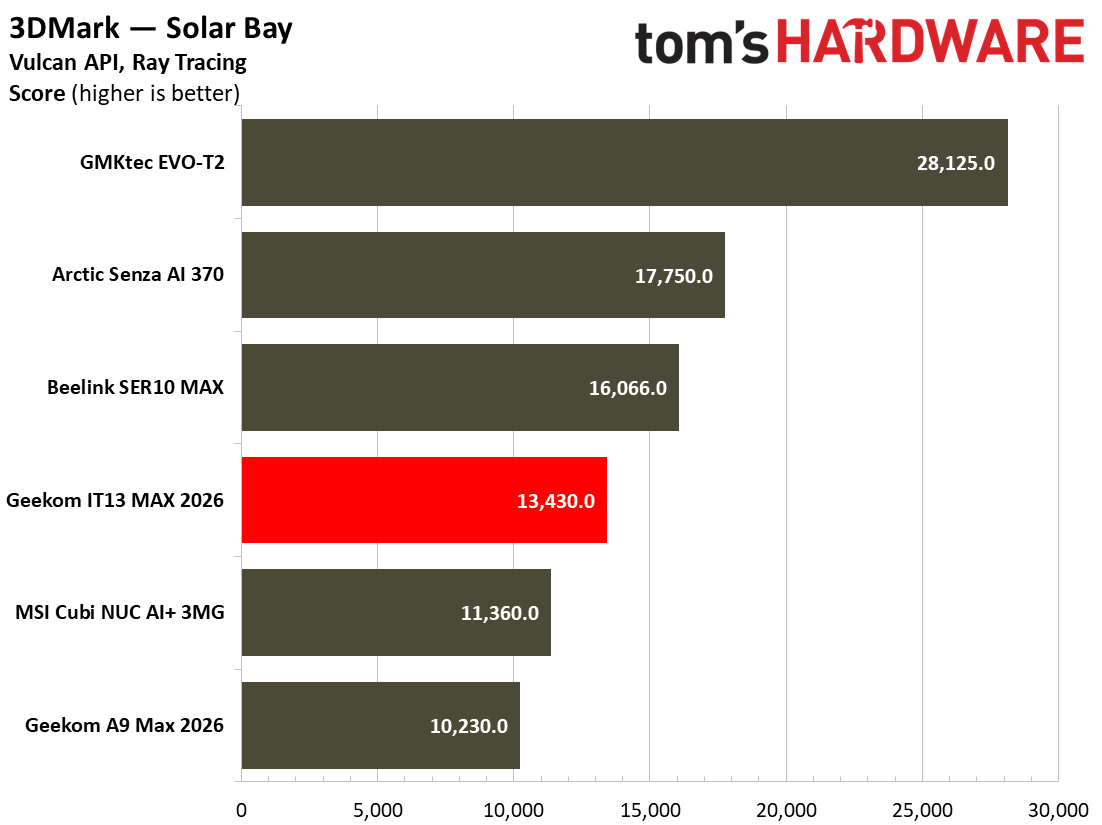
I also ran a few synthetic gaming benchmarks, a trio of 3DMark tests. One of those was the cross-platform 3DMark Solar Bay, which is well-weighted for iGPU performance comparisons, delivering playable frame rates on this type of graphics hardware.
The Geekom IT13 Max 2026 earned a score of 13,430 in this test. The Meteor Lake mini PC’s score (with eight Xe-LPG) cores is about 18% faster than the newer Panther Lake rival (with four Xe3-LPG cores). Both of them, and the AMD Ryzen AI mini PCs we have tested crumble in comparison with the GMKtec Evo-T2 with the best Panther Lake iGPU, the 12 Xe3-LPG core B390.
Moving onto some popular AAA gaming titles, I next checked how Shadow of the Tomb Raider performed on the Geekom. Its average of 37 and minimum of 29 frames per second put it once more very squarely in the same territory as the MSI Cubi NUC AI+ 3MG mini PC.
Cyberpunk 2077 was technically playable using the Steam Deck 1080p preset that we have been using for mini PC comparisons. Its average and 1% low results were 36 and 30 frames per second, respectively. Very slightly behind the Cubi NUC AI+ 3MG this time by both those metrics. Running Cyberpunk 2077 at 1080p using the high preset (no upscaling tech) is not recommended, as the IT13 Max achieved an average of 21 frames per second.
The overall picture that emerged was that the Geekom IT13 Max 2026 isn’t bad at modern gaming with low-ish settings, with upscaling if available, but is more suited to lighter and older titles.
Power, Heat, and Noise when using the Geekom IT13 Max 2026
I tested the IT13 Max 2026 with the default power profile Geekom shipped it with, which is a Processor Base Power (PBP, PL1) of 45W, a Maximum Turbo Power (MTP, PL2) of 70W, and a PL4 of 120W, according to system information tools. During testing, I measured total system power consumption with a plug-in power meter, as well as reading the CPU temperatures using a Windows utility.
Image 1 of 2
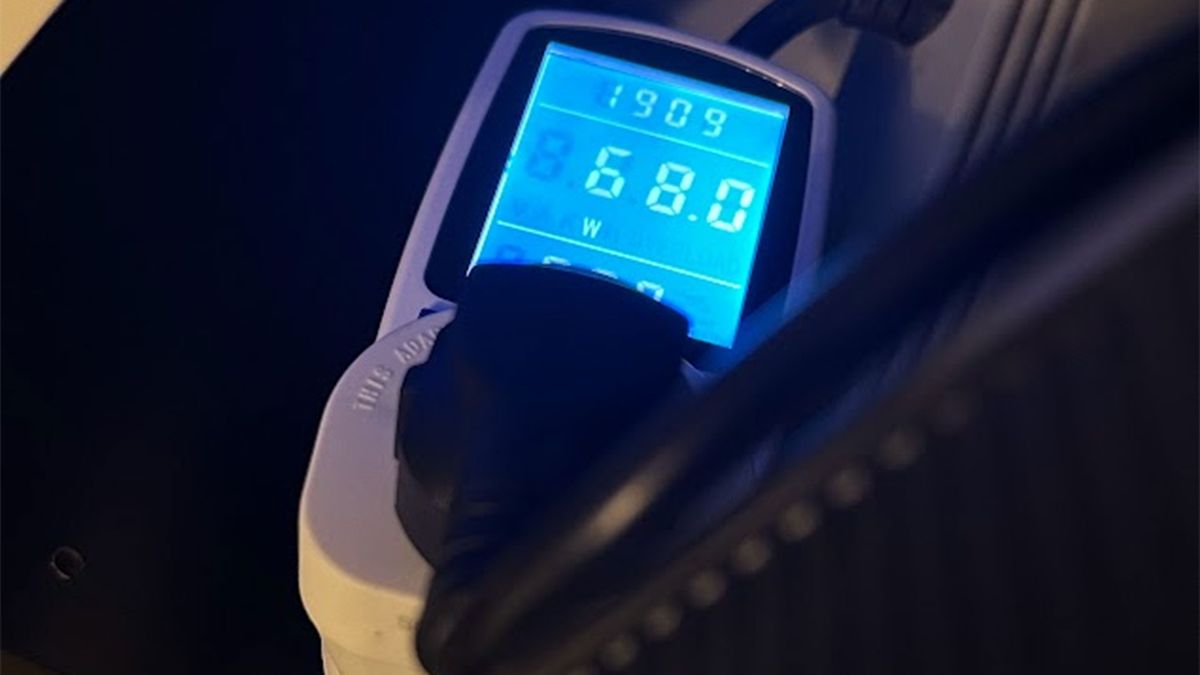
At low load, with Google Docs open for typing among a few other browser tabs, the system consistently pulled around 14W. At the same time, the CPU temperature would stick around 43 degrees Celsius.
During prolonged stress testing of the IT13 Max 2026, the highest wattage consumed by the whole system momentarily spiked to around 85W, but a stable sustained level of ~70W was generally observed. It also seemed to stabilize at approximately the 70 degrees Celsius level after initially climbing higher.
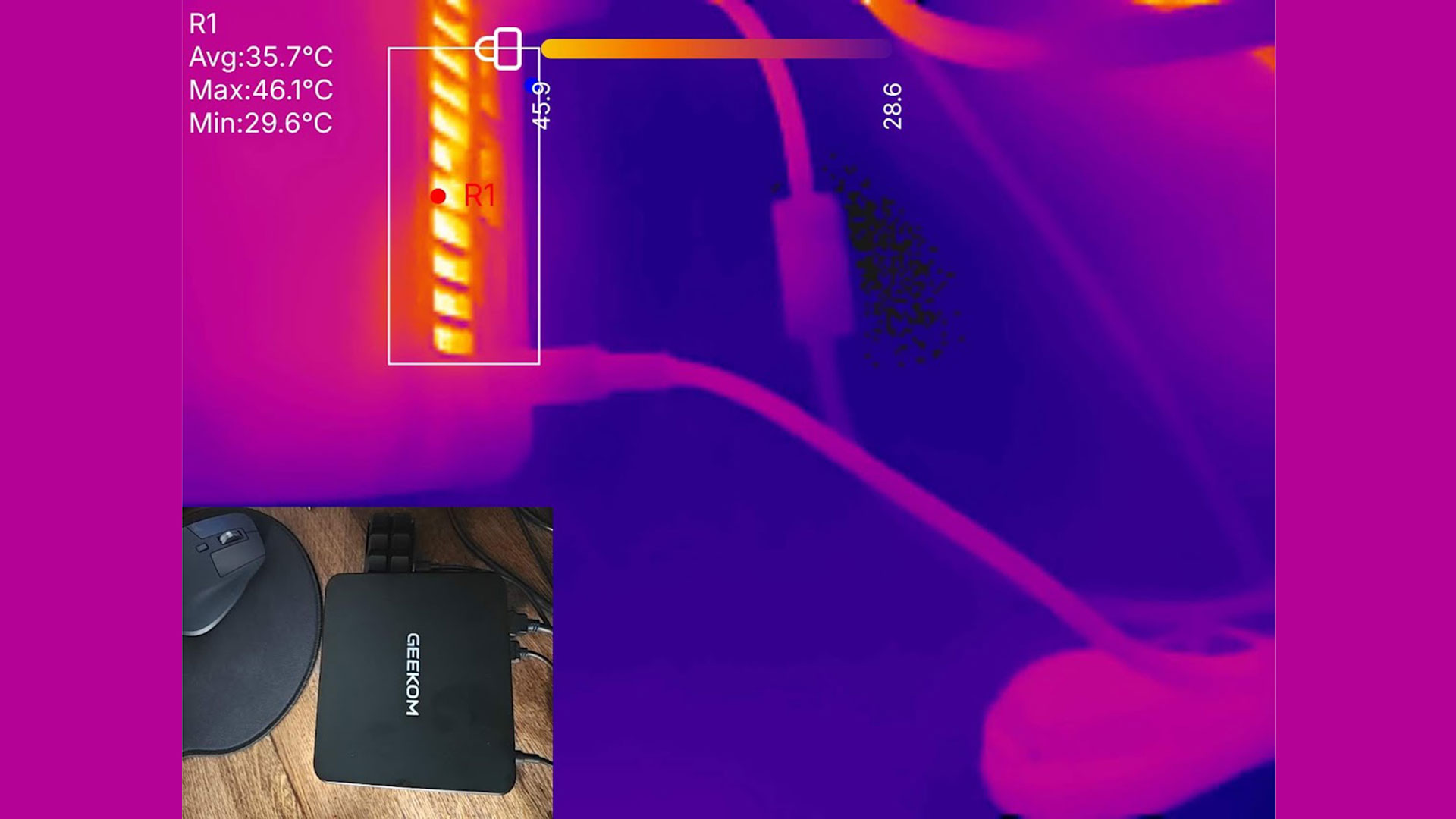
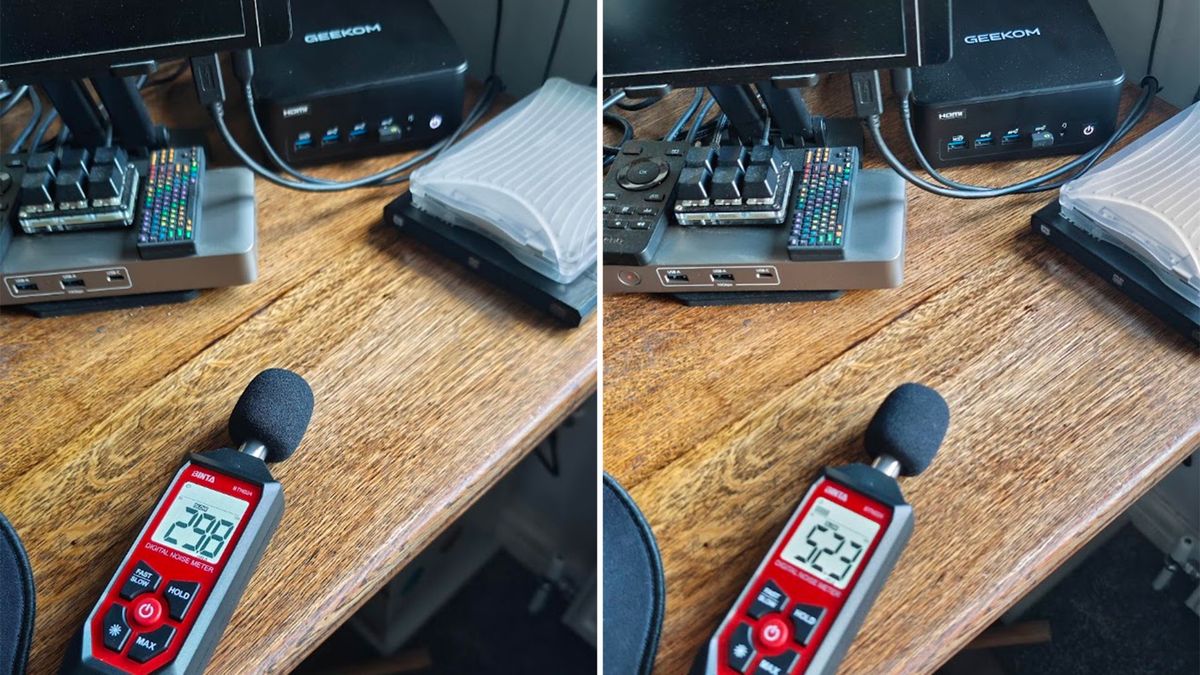
The Geekom is a quiet mini PC, but you can hear the small cooling fan blowing clearly if it is put through any demanding CPU or GPU task. My meter showed 29.8 dB when idling, which is good, but the noise level ramped to a more than noticeable 52.3 dB when the system was under a sustained load.
Software and Warranty on the Geekom IT13 Max 2026
This mini PC came with Windows 11 Pro preinstalled and activated. As usual, before testing, we ensured Windows and drivers were fully up to date.
There were no utilities added by Geekom. Checking the Installed Apps list on Windows revealed both Realtek Audio Console and Realtek Card Reader as the only non-standard components in a typical Windows install.
Linux is also fully supported, according to the official spec sheets.
Geekom sells the IT13 Max 2026 with a three-year warranty, though the company does require you to pay a return shipping fee.
Geekom IT13 Max 2026 configurations
Geekom sells just one configuration of the IT13 Max 2026 — the one we have tested with 24GB of soldered LPDDR5 RAM and a 500GB SSD preinstalled.
Those browsing and interested in this particular configuration should be careful, though. Geekom is still selling an older variant of the IT13 Max with very similar specs but with two SODIMM slots, making it expandable to 96GB of DDR5-5600 memory. This other Core Ultra 9 185H device comes with a single 16GB SODIMM and a 1TB SSD preinstalled. It is usually $899, but Geekom is currently selling this version for the same $799 if you prefer its RAM/SSD configuration.
Bottom Line
During my testing of the Geekom IT13 Max 2026, I found it to be a dependable device. In the current climate, the soldered dual-channel 24GB of RAM might be a sweet spot if you want your integrated GPU to access a decent chunk of the memory pool. It is interesting to see the prior IT Max model now moved down to the same $799 price if you don’t want to accept soldered RAM, would like more preinstalled storage, and are otherwise attracted to owning a tiny PC powered by Intel’s Core Ultra 9 185H with its 16C/22T and reasonable Arc iGPU.
It is very interesting to see this mini PC match the far more modern MSI Cubi NUC AI+ 3MG we tested recently (which costs far more, as is often the case for enterprise pricing) in many of the benchmark applications and games. The MSI uses a Core Ultra 9 386H, so this is a reasonably fair U9 vs U9 comparison. In practice, the Geekom even seemed to idle at a slightly lower wattage than the MSI, but admittedly, it would pull around 70W under load, which is 15W more than the MSI Panther Lake was observed consuming. This points to one of the biggest attractions of most mainstream Panther Lake CPUs being their efficiency, which is far more important in a laptop than a mini PC like this.
To conclude, this does indeed seem like a capable, moderately quiet under light day-to-day loads, and power-efficient offering for the ticket price in mid-2026. At $799 the prior model might offer some of the best competition if removable RAM, albeit just 16GB, and a 1TB preinstalled SSD can sway you.

Mark Tyson is a news editor at Tom's Hardware. He enjoys covering the full breadth of PC tech; from business and semiconductor design to products approaching the edge of reason.
What's Your Reaction?
 Like
0
Like
0
 Dislike
0
Dislike
0
 Love
0
Love
0
 Funny
0
Funny
0
 Wow
0
Wow
0
 Sad
0
Sad
0
 Angry
0
Angry
0









Comments (0)