

I always keep 3 devices connected to a power station - here's why

Follow ZDNET: Add us as a preferred source on Google.
ZDNET's key takeaways
- Power stations are typically reserved for use during emergencies.
- I keep a few permanently connected as uninterruptible power supplies.
- Always on has several advantages and helps avoid unwelcome surprises.
Power stations are typically used as clutch devices: When the power goes out, or you're going camping, you roll out your power station and connect the devices you want to keep running to it.
However, this approach exposes you to potential issues, such as discovering your power station wasn't fully charged, not knowing where the cables are, or losing Wi-Fi or access to other devices.
Also: I use Blink cameras at home, and this 65% off 5-camera bundle is hard to ignore
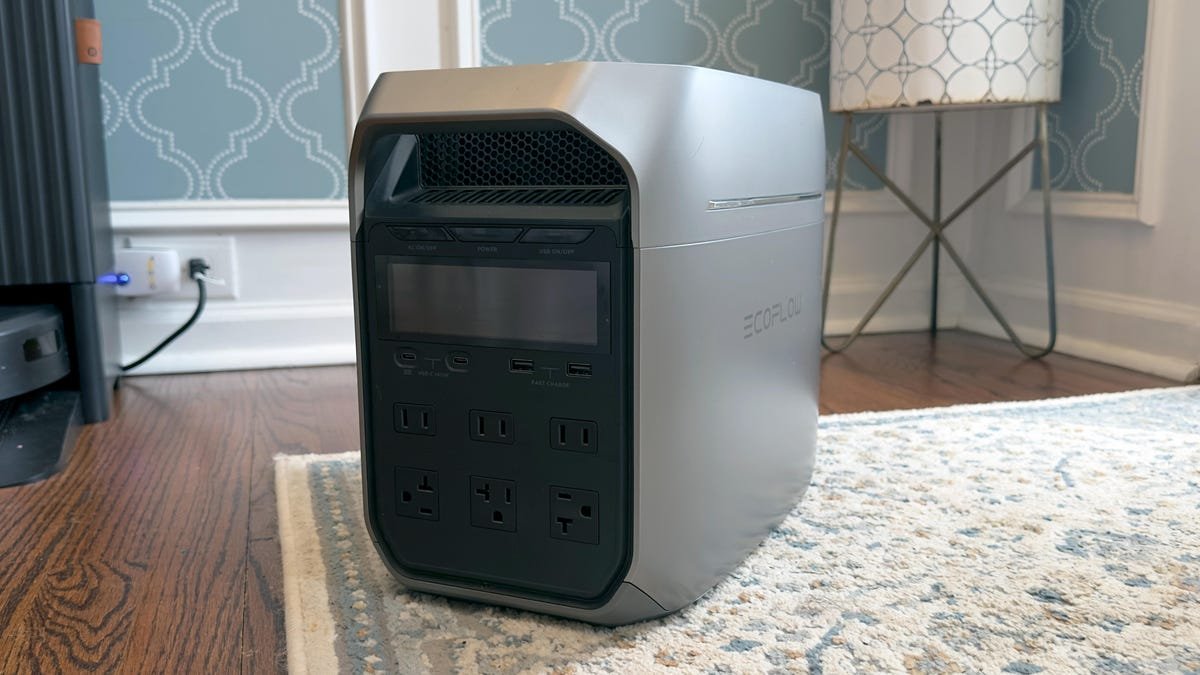
As a smart home tech reviewer, I get a lot of power stations to test, so I've gotten creative about their uses. The larger power stations are integrated into my whole-home backup system, while the smaller ones are often used as UPSs for devices that support my home's daily functioning.
Here are the three types of devices I always keep connected to a power station.
1. Modem and router
In 2026, the first device I put on a UPS was my internet modem and router. As a kid, we had a UPS on each desktop computer at home to avoid a hard shutdown when the power inevitably went out in my third-world country.
Now that our devices are portable (laptops, tablets, phones) and don't require a constant power supply, the biggest interruption in my day is unexpectedly losing my home Wi-Fi.
My husband and I both work from home and require a constant, reliable internet connection. Since power outages are relatively common in my area, I've added a portable battery as a UPS for my modem.
Also: This single router antenna adjustment improved my internet speed more than I expected
When the power goes out in a suburban or urban neighborhood, mobile networks quickly get congested and slow down from a flood of customers simultaneously losing their home Wi-Fi. Maintaining Wi-Fi connectivity keeps me online for work and ensures our kids can use their devices as needed.
The low power draw of a modem and router means that I can use a modest 1kWh battery to keep the Wi-Fi running for a few days in the event of a blackout. I use an EcoFlow River 3 Plus, which is pretty small, at 286Wh, but it can power my modem and router for a full workday. An Anker Solix C1000 with a 1,056kWh capacity would do the job beautifully and power a modem and router for three times as long.
Beyond work-from-home scenarios, I also have a smart home with a smart whole-home backup system. While the system doesn't require Wi-Fi to work and kick in when the power goes out, it does require an internet connection to control it remotely.
Also: Your iPhone is getting enhanced Bluetooth tracking with iOS 27 - but there's a catch
During a recent trip, I accidentally (and remotely) turned off the circuit for my modem and router. This left me unable to monitor my dog overnight on any of our cameras, so we had to drive back early. My neighbor checked on the pup, but she didn't have access to turn the circuit back on. Having a UPS on my modem and router would've let me turn the circuit back on remotely, since I wouldn't have lost my connection.
2. Refrigerator
Your refrigerator may be the first appliance that comes to mind during a power outage, since we all want to prevent food loss. Thankfully, modern refrigerators use between 1-2kWh a day, which is quite low compared to what most people expect from a major appliance.
The refrigerator is one appliance I recommend plugging into a portable battery charged with solar power, since it can run effectively on one and save you $8-$20 a month. However, a portable power station can also keep your refrigerator running during an outage.
Also: I've tested solar power at home for years - 12 myths you shouldn't fall for in 2026
It's important to look into your refrigerator's specifications before connecting it to a power station. Aside from using 1kWh - 2kWh a day, most modern fridges draw between 100W and 300W when the compressor is running, which cycles on and off throughout the day, though they can have surges of 600W - 1,500W.
For a refrigerator, I'd recommend a minimum of 2,000Wh, if your budget allows, to give you an extra buffer for longer outages.
The EcoFlow Delta 3 Max Series is a perfect option, with 2,048Wh capacity and a 3,000W output. You can consider smaller options, like the Anker Solix C2000 which has the same capacity and 2,400W output.
Either of these two batteries can keep a full-size refrigerator running for up to three days. A 1,024W battery can keep one running for up to 16 hours.
3. Security cameras and systems
A power outage is one of those times when you want to ensure your security cameras are up and running. Whatever the cause, power outages create uncertainty, and people like to check on their homes, monitor for storm damage, or ensure their family members arrive safely more often during an outage. Spending hundreds of dollars on a security system that goes dark when the power goes out is less than ideal.
Some systems have built-in backup systems to run for a predetermined number of minutes before shutting down. While battery-powered cameras can do the trick, they rely on a consistent network to stay connected. You can keep your network running with a power station for your router and modem, but your camera hub or individual cameras also need power.
Also: The cloud vs. clouded leopard: America's data center backlash on display at Nashville Zoo
Keeping your cameras and/or hub connected to a UPS ensures you never lose surveillance coverage, but ensure you're backing up what you need to keep the security system functioning. If you have mostly battery-powered cameras, ensure you're backing up power on a hub or base station, a PoE switch for wired cameras, or an NVR.
Since I'm a fan of Eufy's home security lineup, I recommend the HomeBase 3 as your local storage. Losing your hub means that your cameras won't be able to record new footage, motion detection may be limited, and remote access will disappear.
You don't even need a huge battery for this. A battery as small as an EcoFlow River 3 would prevent these cameras from going offline, thanks to its 3,000W output and 245Wh capacity.
What's Your Reaction?
 Like
0
Like
0
 Dislike
0
Dislike
0
 Love
0
Love
0
 Funny
0
Funny
0
 Wow
0
Wow
0
 Sad
0
Sad
0
 Angry
0
Angry
0










Comments (0)