

Raspberry Pi goes large with 10.1-inch Touch Display 2
PERSONAL TECH
More screen, more pixels, and a Pi 5 required to drive the lot
Raspberry Pi has supersized its Touch Display 2 with a new 10.1-inch model aimed at dashboards, entertainment systems, and other projects that need more room for prodding.
The panel is designed for use cases such as touch-enabled information displays. This is the big brother to the 5-inch and 7-inch variants, with a resolution to match – 1,200 x 1,920 pixels are available on the native portrait display.
The 10.1-inch panel supports 24-bit RGB color and ten simultaneous touch points, up from five on the smaller models. The in-plane switching, thin-film transistor, liquid crystal display also touts a black surface that acts as a magnet for greasy fingerprints.

Raspberry Pi 10-inch Touch Display 2
According to Raspberry Pi, the touch response time is a maximum of 35 ms, and its backlight brightness is 400 cd/m2 – not class-leading, but more than adequate at a list price of $80.
The viewing angle is 85 degrees and, as with the other Touch Display 2 variants, there is a hefty bezel. The unit is 161.8 x 247.3 mm, while the actual active area is 135.4 mm x 216.6 mm. We'd expect integrators to use that bezel when mounting the screen in enclosures.
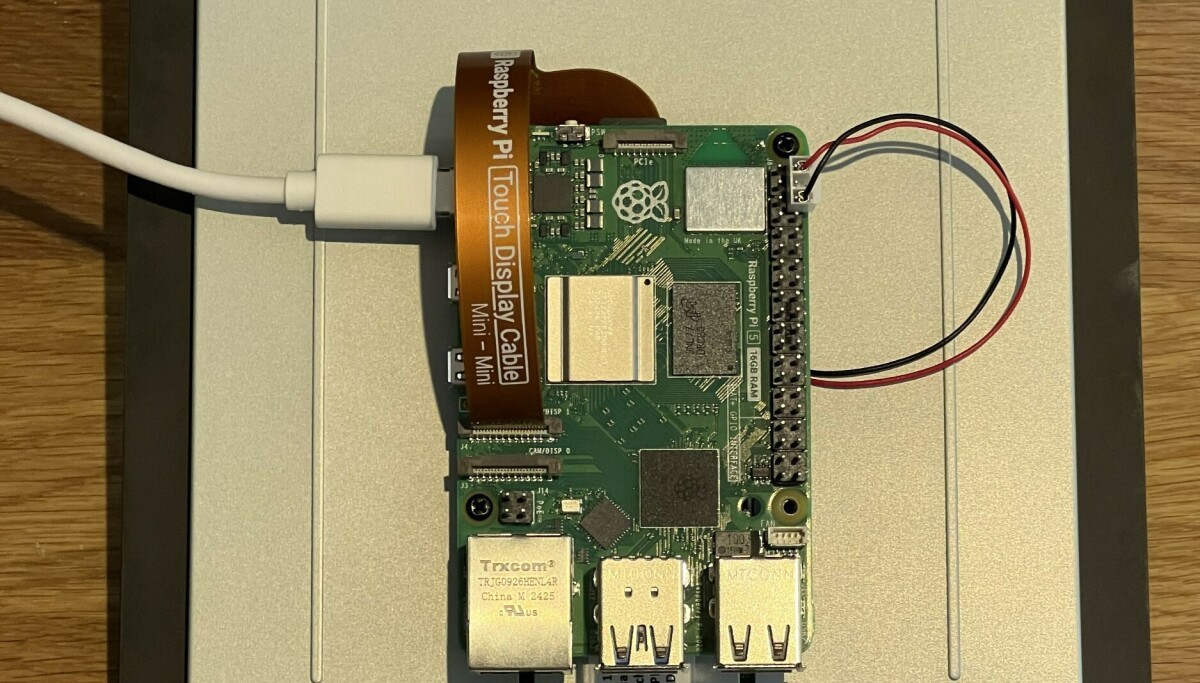
Speaking of which, while there is a handy mounting point on the back for a Raspberry Pi, the device is only compatible with the Raspberry Pi 5 and Compute Modules (not included). Since the screen draws power from a pair of GPIO pins, you'll need an IO Board or similar to use it with a Compute Module.

Back of screen with Raspberry Pi attached
The need for the Pi 5 could cause some cooling issues – we've noted before how much heat the unit can generate when under load.
According to Raspberry Pi, the justification for the requirement is all those extra pixels. A spokesperson told The Register:
"The higher resolution of the new display requires four DSI lanes of data to communicate with the host Raspberry Pi, rather than the two used by previous Touch Displays. The newer display connector on Raspberry Pi 5 and our Compute Module IO Boards support this!"
Otherwise, attaching a Pi 5 to the back of the unit and connecting it is ludicrously simple. There's just a ribbon cable and something for power (both provided in the box) before screwing the Pi to the risers with the included screws and firing up the unit…
Which didn't work initially. Does this screen come pre-borked? No. It transpired that we needed to update the EEPROM on our Pi 5 – the firmware needs to be from February 2026 or later. After a swift sudo rpi-eeprom-update -a and a restart, we were in business.
In use, the screen is bright and relatively responsive. It also needs to be kept well away from moisture, so consider the enclosure carefully in environments where that might be an issue.
According to Raspberry Pi, "Raspberry Pi OS provides touchscreen drivers with support for ten-finger touch and an on-screen keyboard, giving you full functionality without the need to connect a keyboard or mouse," which is true. It would, however, be a stretch to call Raspberry Pi OS optimized for touch (even with the pop-up on-screen keyboard). If you're expecting to build yourself an iPad out of the box, you'll be disappointed.
However, that would miss the point of the 10.1-inch Touch Display 2. It's designed for entertainment systems and information dashboards. The image is crisp, and the additional pixels will make for better clarity.
Considering the cost of Pi computers nowadays, the requirement for a Pi 5 could be irritating. It not only runs hot, depending on workload, but adding a 2 GB variant to the system will almost double the price of the screen. The technical reason is understandable, but the requirement could still hit customers in the pocket.
Still, as with the earlier models, the Touch Display 2 represents an easy way to get a touchscreen up and running with the diminutive computer. For use cases that require users to jab fingers at a multitouch screen, we'd recommend it. Just don't forget the EEPROM update – documented with the release, if not in the press kit – and spend hours as we did repeatedly reconnecting cables in search of life. ®
What's Your Reaction?
 Like
0
Like
0
 Dislike
0
Dislike
0
 Love
0
Love
0
 Funny
0
Funny
0
 Wow
0
Wow
0
 Sad
0
Sad
0
 Angry
0
Angry
0









Comments (0)