

The pricey new Apple TV 4K is still the best streamer around
I’m sitting in front of my TV, puppy nuzzled up next to me, with four HomePods spread around my living room — two flanking my TV and one at either end of my couch — connected to the brand new Apple TV 4K. Young Anakin Skywalker hits the throttle and flies through the room. There hasn’t been an Apple surround sound system until now, and since it was announced, I was excited to try it out. And let me tell you, watching a pod race with an all-Apple audio setup is a whole lot of fun.
Surround sound across four HomePods is one of the flagship features of the fourth-gen Apple TV 4K, which is out tomorrow for $300. It’s an expensive streaming box — double and in some cases quadruple the price of competing options — that tries to earn its place in your living room with premium and convenient new features: a powerful chip, lots of storage, a trackable remote, and lots of AI. If you’re deep in the Apple ecosystem and willing to splurge, the box is a solid choice. But for everyone else, I’m not convinced the added features do enough to justify that steep new price.


$299
The Good
- Easy to use and fast interface
- Supports both Dolby Vision and HDR10+
- Four HomePod system sounds great
The Bad
- Expensive for a streamer
- Siri AI is inconsistent
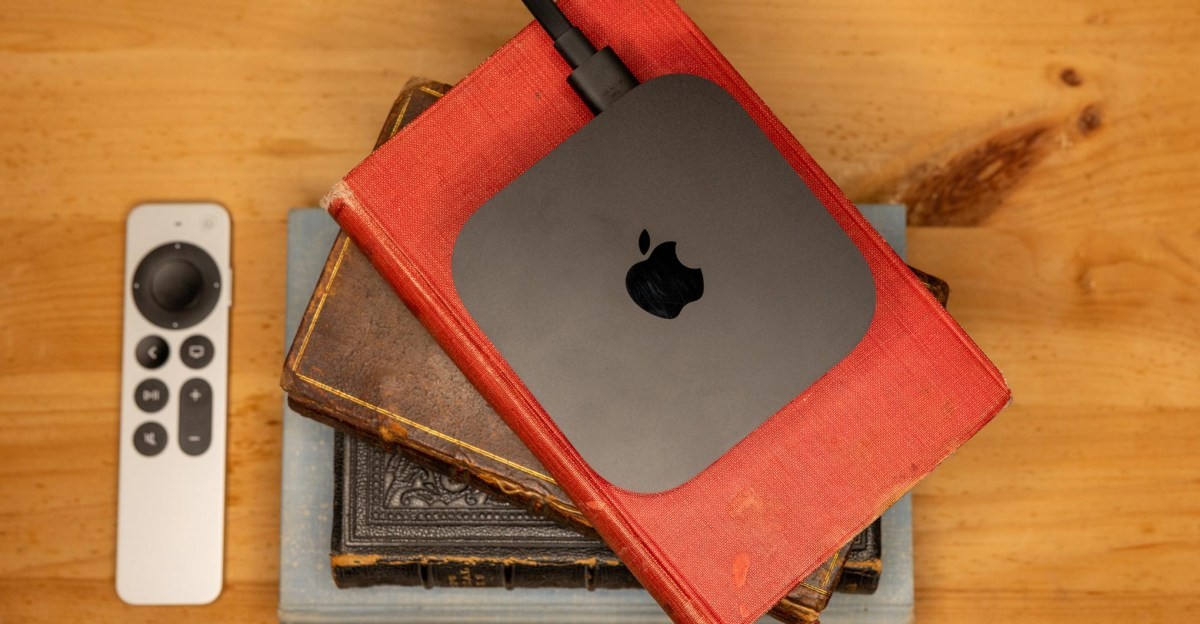
From the outside, it’s hard to tell what’s new about the fourth-gen Apple TV 4K. Compared to the 2022 model, it’s the same size, in the same finish, with the same number of ports (in the same configuration), showing the same interface, with the same HDR support. Where things are upgraded is largely on the inside: there’s a more powerful chip — the A19, which first showed up in the iPhone 17 — and 128GB of storage by default, which was previously an upgrade. The flip side is that there is no lower-cost 64GB model anymore, which is a shame because I don’t think most people need any more than that.
The included aluminum remote is visually the same as the previous one. It charges via USB-C, has a voice-activation button on its side, and its clickpad is touch-sensitive, which can thankfully be disabled in the menu. There is one small quality of life change, though. The remote now has the Find My feature. It shows up in the Find My app on your phone, which does a great job of pinpointing the remote’s location; it can also make a sound when you can’t spot it. For a busy family like mine, this is great when one of us unintentionally brings the remote into the kitchen or bedroom (or when it’s buried in the cushions or pillows of the couch).
Siri AI is here, too, though it’s also coming to second- and third-gen Apple TV 4Ks with tvOS 27.2. The new Siri can be pretty great, when it works, especially when using personal context to understand your requests. If Apple Intelligence is enabled on your iPhone or iPad and it’s on the same network as the Apple TV 4K, the box can recognize your voice and securely connect to your device to help personalize answers to you. My friend had recently texted me about a show to watch, but I couldn’t remember what it was. When I asked Siri to find the show he had recommended, it searched my messages and opened it up on the TV (it was Pluribus).

A progression of Apple TV 4K boxes, from first gen on the left to the current model on the right.
But Siri had occasional issues with personalized answers. I asked this request a few times over my days of testing, and it didn’t always give the same answer. While it opened Pluribus on a few occasions, it also once opened The Bondsman which, to be fair, he did recommend to me… just way back in October of 2025. But even when I clarified, “No, the show he messaged about yesterday,” Siri wasn’t able to find it.
The Apple TV 4K also had trouble recognizing my voice from one moment to the next. A few minutes after asking about Pluribus, I put on an episode of Bobby Flay’s The Line. I asked Siri about his competitor Marcus Samuelsson’s restaurant Hav & Mar — where it is, what type of food it serves, if it had any accolades (I found out it was awarded two stars by The New York Times), and when it would be open during an upcoming trip to New York City. But when I changed the topic to a movie my wife and I were texting about, Siri suddenly couldn’t recognize my voice to use personal context, even though it had answered my Pluribus question minutes before. My iPhone was still on the coffee table in front of me and on the Wi-Fi network, so the connection between it and the Apple TV 4K should have been strong enough for personal context to work without issue.
Requests can be misunderstood, too. My days of testing overlapped with the F1 Brazilian Grand Prix, which is broadcast on Apple TV. When live coverage of the race started, I asked Siri, “Play the F1 Brazilian Grand Prix.” Instead of the race, it started the music track “Hymn of the Racers” by the 1995 band F1. “Play the São Paulo F1 Grand Prix” played the song “São Paulo,” a collaboration between The Weeknd and Anitta. I spent more time trying to get Siri to understand what I wanted than it would take to use the remote to start it.

The new Apple TV 4K allows for four HomePods to be connected to it, as long as the front two and back two are the same.
When it hits, Siri AI is great. “Play Empire Strikes Back” started the Star Wars film on Disney Plus in seconds without having to mention the streaming service. Getting Pluribus to open from a question relatively scarce on details was awesome (when it happened). But as it stands right now, Siri AI is still very much a beta project and needs some work and refinement to be consistently useful. That’s not to say it’s much worse than alternatives like Alexa and Gemini, but right now it’s not doing enough to stand apart.
You can talk to Siri using the Apple TV remote, but the new model also has far-field microphones built into the box, so you can talk aloud from anywhere. One of the concerns I had when it was announced that the Apple TV 4K was getting far-field mics was whether it would even be able to hear me while in my home theater stand, but that wasn’t an issue for me. Whenever I said “Hey Siri,” I could see it activated on my TV screen. Now, my credenza has an open back for ventilation, which might have helped, but having a HomePod as part of the system also solves the issue. When one (or more) is part of the TV 4K system, the HomePod mics are listening for the “Hey Siri” requests, communicating through Bluetooth, and determining which device should respond.
Then there’s the new feature I had the most fun with: home theater surround. Apple added the ability to use two second-generation HomePods as a stereo pair (with Atmos) a couple of years ago. But as the hub for a home theater, the Apple TV 4K can now connect with four HomePods for a more immersive experience than what you can get with just your (almost certainly terrible) TV speakers.
This could be four second-gen HomePods, four HomePod mini 2 speakers, or a pair of each, as long as the two up front are the same and the two surrounds are the same. This is the setup I tested, with a pair of second-gen HomePods in front and a pair of HomePod Mini 2s in back.
Calibrating the system is easy. With all of the speakers connected to your Apple Home, each speaker emits a gentle pinging sound and a wash of pink noise that sounds like ocean waves, while a ripple of color moves across the TV screen corresponding to the color on the top of each HomePod to make sure positioning is correct. The process takes only a couple of minutes.
The speakers and the Apple TV 4K need to be a part of the same Apple Home and set up by the same user. My wife’s Apple account is the primary on our Apple Home, and even though we’re all a part of the same Apple family, when I set up the 4K TV with my account, it couldn’t see any of the speakers. This is not a major issue, but it can make setup more difficult.
As a unit, the two second-gen HomePods and two HomePod mini 2 speakers worked together really well. Any of the speakers can be tapped to pause the screen, and the volume controls affect the entire system. The big HomePods have far more bass response than expected for their size. I felt the massive Dreadnought’s cannon fire on the Rebel base in The Last Jedi through the floor. And the car explosions as The Penguin attempts to escape pursuit in The Batman felt deep and impactful. It’s not the same heart-rattling rumble a dedicated subwoofer can provide, but for a smaller space (and one with neighbors) it’s a good amount of bass. (I do hope Apple decides to make a standalone wireless subwoofer for the setup, though.)
The front HomePods create a very convincing phantom center channel, making dialog sound like it’s coming right from the screen. The entire spatial sound placement at the listening plane from the four-speaker system is excellent. The calibration sets the surrounds’ volume at a good level. There’s an option to boost or cut the volume of the surround speaker pair from 8dB to -8dB (in 0.5dB increments), but I didn’t think tweaking was necessary.

The new Apple TV 4K has the same ports and layout as the higher-end third-gen model.
The different iconic cars in the opening race of Ready Player One zoomed around the room — as did King Kong as he chased after Parzival and Art3mis. Podracers in The Phantom Menace bumped one another and skittered off in pieces into the desert of Tatooine. The speakers deliver a great surround experience.
Atmos isn’t as convincing. There’s still some height to the sound, thanks to the larger HomePods, but it doesn’t form a full enveloping canopy. As the sandstorm envelops Paul Atreides during the rescue of the spice harvester crew in Dune, there’s an audible shimmer as the spice takes hold and whispers encircle him. As with Ready Player One and The Phantom Menace, the sand swirls around the listener, but doesn’t extend above.
I found the same with Dolby Atmos music, such as “bury a friend” by Billie Eilish. The backup vocals in the surrounds sounds nice and supportive, but there are sonic elements (like a rhythmic drill) that are supposed to fly overhead and instead sound like they move by in front of me. The music mix still sounds great, but it isn’t quite what is intended.
The addition of engaging home theater surround performance and (hopefully) consistent Siri AI integration help to differentiate the new Apple TV 4K from the old. But unfortunately so does its price. At $300, the fourth-gen box is multiple times more expensive than its competitors, many of which are capable streamers, if a bit slower. One of the reasons to pay a premium for the Apple TV 4K in the past is that Apple has one of the best privacy policies on the market. Another is that the Apple TV 4K doesn’t serve up the same level of ads the other streaming devices or built-in TV OSes do (although it still tells me to watch Ted Lasso and Widow’s Bay regularly). Those are compelling reasons to pay more for a streaming box if you can swing it, but this is a major increase in price that doesn’t add features that home theater enthusiasts have been asking for. Adding things like audio passthrough and 120Hz support would set the Apple TV 4K apart from everyone else in capabilities and really validate the bump in cost.

It’s still an excellent streaming box, but the price increase makes it hard to strongly recommend for everyone.
And the expense extends to the home theater system. The entire price of the system I used — two second-gen HomePods, two HomePod mini 2s, and the new Apple TV 4K — costs $1,300. If you already have a couple HomePods in your home and want to repurpose them for your home theater (or you’re already using a stereo pair as your TV speakers), adding in the mini 2 speakers and the new 4K TV is a viable prospect. But if you’re looking to start fresh with a surround system and don’t mind the aesthetics of a soundbar, the Sonos Beam Ultra paired with two Era 100 speakers is an excellent alternative, both for its flexibility of adding more speakers and its superior handling of Atmos content. Plus, you can add a subwoofer later and use a cheaper third-gen Apple TV 4K instead of the new one.
There’s no doubt that Apple still makes one of the best streaming devices available. It’s fast, has a great user experience, and the additions of Find My on the remote, far-field mics, and the home theater surround capability add good value (especially if you already have some newer HomePods).
But the new Apple TV 4K is $300. And Siri AI isn’t there yet to consistently make it worth using. Right now, the Apple TV 4K is an excellent, premium-priced streaming device that doesn’t set itself apart enough from its previous model. And with every other streaming device a fraction of the Apple TV 4K’s price, most people would be well served by a cheaper Google Streamer, Fire TV stick, or Roku stick. Yes, the Apple TV 4K is better than all of them. But as it currently stands, especially with Siri AI still in beta, I don’t think it’s twice as better.
Follow topics and authors from this story to see more like this in your personalized homepage feed and to receive email updates.
- John Higgins
What's Your Reaction?
 Like
0
 Dislike
0
 Love
0
 Funny
0
 Wow
0
 Sad
0
 Angry
0











Comments (0)