

Why Every Leica M Photographer Using Third-Party Lenses Should Consider the Akara Labs 6-Bit M-Coder Kit
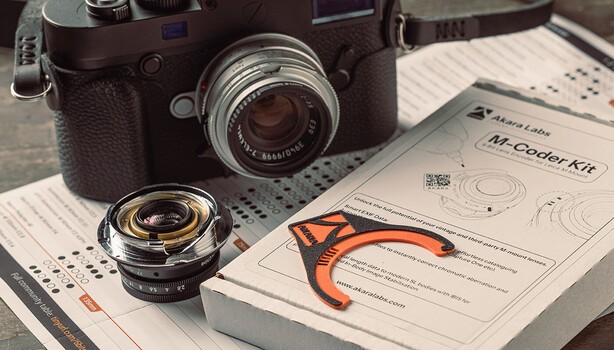
One of the joys of shooting with a Leica M is the incredible range of lenses available. The drawback for many of us, however, is that Leica’s own superb lenses are expensive. Once we’ve saved up for the camera, then we need to figure out what lens to buy. Leica lenses can cost more than some M cameras, and this is one of the main reasons many photographers who crave a Leica haven’t made the switch. Thankfully, in recent years, companies like Voigtländer, Zeiss, 7Artisans, and Thypoch have produced some outstanding M-mount lenses that offer excellent image quality, plenty of character, and far more affordable price tags.
Many photographers, myself included, enjoy adapting third-party lenses that are reproductions of vintage classics full of character. They often produce beautiful images and, in some cases, I actually prefer their rendering to modern Leica lenses. Sorry, Leica!
The Downside When Using Digital M Leica Cameras
Most third-party lenses don't communicate properly with the camera. This doesn’t stop us from using these lenses with a digital Leica M body; it just means the camera often has no idea which lens is attached. The camera treats them as an unknown lens unless you manually select a lens profile every time you mount one.
This sounds like a small issue, but it soon becomes tedious if you regularly swap lenses. It's also remarkably easy to forget. I know I have. I typically have two or three lenses on a shoot, and find it frustrating trying to remember which lens produced a particular photograph.
Why 6-Bit Coding Matters
Leica introduced 6-bit coding to allow the camera to automatically identify the mounted lens. The tiny black-and-white markings on the rear of a Leica lens tell the camera exactly what it's looking at. This means several useful things happen automatically.
Once the lens is encoded, your Leica camera will know which focal length lens it has mounted and record that information into your photos (metadata), which will then be displayed in your image editing app, allowing you to filter your photos by lens and focal length.
The appropriate in-camera lens profile is applied to compensate for vignetting and chromatic aberration, particularly with wide angle lenses. This gives you cleaner JPEG images and less post-processing for raw files.
It's one of those small conveniences you quickly begin to appreciate.
Enter the Akara Labs 6-Bit M-Coder Kit
Rather than buying expensive replacement mounts or attempting a permanent modification, the Akara Labs M-Coder kit allows you to apply accurate 6-bit coding yourself.
The process is surprisingly straightforward. Using the supplied template and permanent markers, you apply the correct code for your chosen Leica lens profile from a supplied comprehensive printed list of Leica lenses.
Once complete, the camera recognizes the lens exactly as if it were a coded Leica lens.
About Akara Labs
What appeals to me about Akara Labs isn't just the products, it's the thinking behind them. Founder Henley Bailey is a photographer with an engineering background, and that combination shows. Rather than inventing accessories for the sake of it, he designs practical solutions to problems he's encountered himself as a long-time Leica M user. Everything is designed and made in his workshop in Rochdale, England, and there's a refreshing honesty to that approach. These aren't products created by a marketing department—they're tools created by someone who genuinely uses the cameras they're designed for.
Henley told me the M-Coder came purely out of frustration. “About fifteen years ago I coded my Summicron 50mm with a Dremel, carefully measuring out where each mark needed to go. It looks messy but it worked. I thought about making a proper tool even back then but was busy with other things. Years later I had more lenses to code and assumed someone would have built something by now. I saw the opportunity to build my own and simplify the whole process while I was at it.”
More Than Just Metadata
At first glance, adding EXIF information might seem like the main benefit. For me, it actually isn’t. I enjoy looking back through photographs years later and understanding why I made certain images. I want to know which lens I used.
I appreciate that the camera automatically selects the correct lens profile without me thinking about it. Photography is at its best when the camera gets out of the way.
Anything that removes friction from the process is worthwhile, and the simple little kit from Akara does just that.
Conclusion
If you own one third-party M lens that rarely leaves your camera, you probably don’t need this kit. Selecting a lens manually in the Leica menu isn't exactly difficult. But if you're someone who enjoys collecting compact M lenses and regularly swaps between them, the Akara Labs 6-Bit M-Coder kit quickly starts to make sense.
Now that I’ve coded my three main lenses for my M10, it’s made life much easier. The kit certainly makes using third-party M-mount lenses feel much more seamless. It's a quality-of-life improvement rather than a photographic one. It’s actually a no-brainer, because it’s inexpensive, easy to apply, completely reversible, and removes one small annoyance from the shooting experience.
What's Your Reaction?
 Like
0
Like
0
 Dislike
0
Dislike
0
 Love
0
Love
0
 Funny
0
Funny
0
 Wow
0
Wow
0
 Sad
0
Sad
0
 Angry
0
Angry
0












Comments (0)