

Don’t buy the Apple HomeView expecting a tablet — it’s a completely different beast
 (Image credit: Future)
The Apple HomeView isn’t a tablet — it’s a new kind of device that’s partly a smart home hub and partly an extension of your phone, all bound together with Siri AI — and that’s an important distinction if you’re thinking of buying one.
For many years, I’ve been the happy owner of a Google Pixel Tablet — a product that’s now sadly discontinued, yet remains one of the best smart-home devices I’ve ever used. Usually, it lives on my kitchen table on a magnetic charging stand that doubles as a speaker, where it’s ideal for streaming radio stations, podcasts, or episodes of The Great British Bake Off.
Whenever I need to, I can pull the screen free and take it from room to room. During lockdown, my husband and I could detach it from the dock, prop it up on the coffee table using its kickstand, and chat to family over Zoom from the sofa.
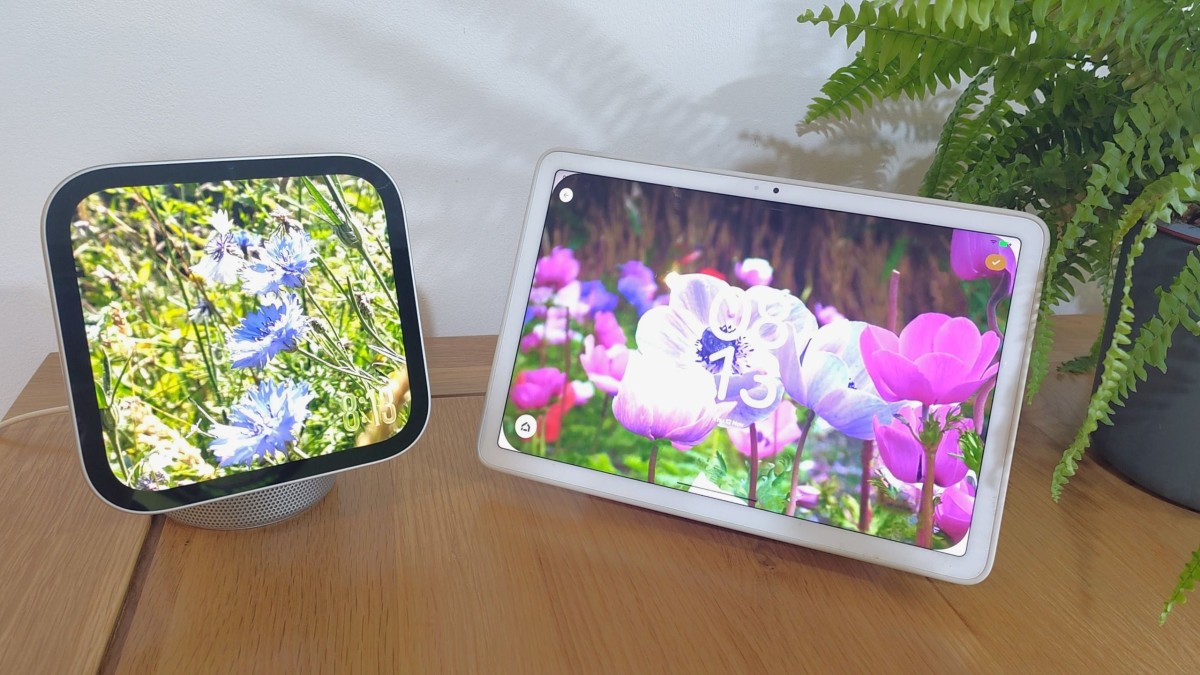
The Apple HomeView might look similar at first glance (aside from its square format); and based on Reddit comments that’s what many people are expecting. However, having used it for a week in place of the Pixel Tablet, it’s clear the two are fundamentally different beasts.
A smarter smart hub
The HomeView has plenty of advantages over my venerable Pixel Tablet. It’s much more attractive for a start, with a brighter, crisper screen that can be angled on its lovely dome-shaped base, and a speaker that’s leagues ahead of the Pixel’s.
More importantly, it’s a much more capable smart home controller. With a built-in Thread router and Matter controller, it acts as a proper nerve center for your house. Its modular smart home interface is lovely, boasting a clean aesthetic and large, tappable buttons that look far more polished than Google’s Home app. Used alongside Apple’s new co-branded smart lock and cameras, the whole ecosystem clicks into place.
Privacy is another big distinction. Both devices allow you to check your mail, but because I’m logged into my Google account on the Pixel (swapping user accounts is too much hassle), anyone in the room could casually read my emails if the fancy took them.
Sign up for breaking news, reviews, opinion, top tech deals, and more.
By contrast, the HomeView is tethered to your iPhone. Because it links directly to your handset and uses facial recognition to detect who is standing in front of it, it can shift to display content specific to whichever household member is around. It feels less like a communal family computer and more like a personal window into your phone that happens to live on the counter.
The app difference
However, that phone-tethered approach comes with a major caveat that prospective buyers need to understand before handing over their cash.
The Pixel Tablet is designed to kept within your home (it has very limited battery life and no SIM slot for mobile data), but because it runs full Android, you get unfettered access to the Google Play Store — YouTube, every major streaming service, Zoom, and games are all right there. You can even remove it from its dock, crash on the sofa, and do your nightly Duolingo lesson.
The HomeView doesn’t run iPadOS or any of Apple’s usual operating systems. Instead, it uses custom HomeView software, which means you can’t pick and choose freely from the App Store. In fact, there are just 15 pre-installed apps. They all work well, and you can access some third-party audio and video apps — but only if they support CarPlay and are running via your iPhone. You aren’t going to be casually downloading games, watching iPlayer, or scrolling Instagram with it.
I suspect that Apple will add more HomeView apps over the coming months and years, but it’s a unique device and I doubt it will gain a full app store, so bear that in mind if you’re looking for a new screen for your smart home.

Follow TechRadar on Google News and add us as a preferred source to get our expert news, reviews, and opinion in your feeds.
Cat is TechRadar's Homes Editor, covering smart home tech, kitchen appliances, vacuums, haircare and more. She's been a tech journalist for 15 years, having worked on print magazines including PC Plus and PC Format, is a Speciality Coffee Association (SCA) certified barista, and holds a professional certificate in security awareness for smart homes. Whether you want to invest in some smart lights, find your ideal hair styler, or pick the espresso machine of your dreams, she's the right person to help.
What's Your Reaction?
 Like
0
 Dislike
0
 Love
0
 Funny
0
 Wow
0
 Sad
0
 Angry
0









Comments (0)