

I tested the new modular ThinkPad, and it's the repairable future I'm hoping for
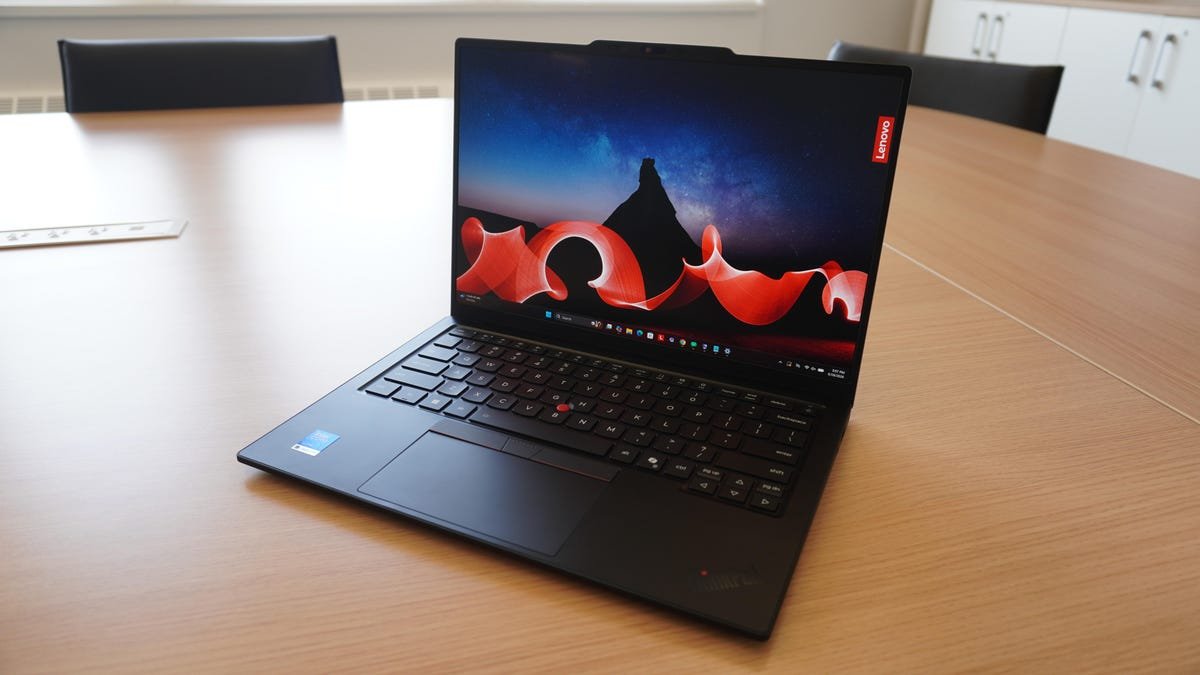

ThinkPad X1 Carbon Gen 14 Aura Edition
pros and cons
Pros
- Incredibly light.
- Modular "Space Frame" design is a win for repairability.
- Brilliant display.
- The quintessential premium ThinkPad.
Cons
- Soldered RAM.
- Average battery life.
- Gets pricey with upgrades.
Follow ZDNET: Add us as a preferred source on Google.
Lenovo announced its 14th-generation ThinkPad X1 Carbon at CES 2026 to a lot of buzz, clutching the Best laptop of CES award for its innovative modular design and commitment to repairability, while earning an impressive 9/10 from repairability standard iFixit.
Yes, it's a ThinkPad through and through, with the premium touches found on the X1 line: a 2.8K OLED, 64GB of RAM, and a haptic touchpad. But the headline feature is under the hood: a re-designed, modular build that allows users (or IT teams) to easily access and replace individual components including the battery, keyboard, and ports -- expanding its life cycle and empowering teams to replace and upgrade as they see fit.
Also: This Lenovo Yoga rivaled my MacBook Air in ways I didn't expect it to
The X1 Carbon Gen 14 introduced the "Space Frame", a double-sided motherboard to give easy access to internal components, making them individually replaceable with the standard screws on the bottom of the device.
Best laptop deals of the week
Deals are selected by the CNET Group commerce team, and may be unrelated to this article.
It's a welcome move from a major laptop manufacturer -- and on a flagship model, no less. As the cost of RAM and storage continues to soar with no end in sight (and the cost of consumer devices with them), laptops with serviceable and upgradeable components are looking more and more attractive.
But in that vein, the memory itself is not upgradeable, something Lenovo says could come to other models in the future. It's also expensive -- this is an X1 Carbon, after all -- dispatching any notions of modularity being synonymous with affordability.
A step in the right direction
For years, consumers have largely submitted to the idea that you have to replace your entire laptop if your battery fails or you lose a USB port, and manufacturers were more than happy to oblige. Devices like the X1 Carbon Gen 14 push mainstream laptops in the right direction, but they don't completely change the game just yet.
The soldered RAM in the ThinkPad X1 Carbon Gen 14 keeps it relegated to the premium tier, starting at $2,199 for the Intel Core Ultra 5 configuration with 32GB of RAM and a 256GB SSD.
Also: Lenovo showed me its new ThinkPad X1 Carbon, and I didn't see this year's upgrades coming
At least it's fast; the 64GB RAM is LPDDR5X-9600MT/s, while the 32GB runs at 8533MT/s. Users seeking longevity will probably want to opt for the 64GB of memory if future-proofing the device is your goal, increasing the price further.
Part of what makes modularity so attractive, however, is the ability to pick and choose individual elements, giving consumers the option for more inexpensive configurations. Lenovo is taking a more cautious approach by putting the Space Frame design in an expensive flagship, but I'd love to see future iterations of this modular approach in affordable devices.
Hardware and build
The hardware matches what we can expect for the X1 Carbon: 32GB or 64GB of RAM, up to an Intel Core Ultra 7 355 "Panther Lake" processor with vPro (LPE-cores up to 3.60 GHz P-cores up to 4.80 GHz with Turbo Boost, 8 Cores, 8 Threads, 12 MB Cache), Wi-Fi 7, ample I/O, and the option for 5G with embedded eSIM functionality.
There are several display options that run the price gamut. At the top end you have a 2.8K OLED touchscreen at 500 nits of brightness and a 120Hz VRR, and a 60Hz WUXGA IPS non-touch display on the low end. The OLED is certainly impressive, but the IPS display is also perfectly fine. My review unit featured the IPS at 500 nits, and it still looks and feels like a premium business device.
Also: I saw the 'MacBook Pro for Linux users' for the first time, and it's a legit Windows threat
Build quality is exactly what you'd expect from a ThinkPad: solid and premium, if no-frills. The carbon fiber construction results in an incredibly lightweight chassis that's under 1kg (about two pounds). It's also very thin, measuring just 0.6 inches at the thickest point in the back, but tapering to a thin point in the front that emphasizes its lightness.
The typical spread of ports you'd expect on a ThinkPad are all here, including USB-C Thunderbolt 4 ports on both sides of the device (a huge quality of life improvement). For the trackpad, you can choose the haptic option or stick with the classic three-button ThinkPad design, and the keyboard here is excellent, as one would expect. The 1.5mm of key travel feels fantastic, and Lenovo's iconic concave keycaps are so well-designed that the keyboard disappears from thought when you use it. It just works.
In terms of the webcam, Lenovo gives you the option to bling it out with a 10MP Mobile Industry Processor Interface (MIPI) camera with a wide-angle 110-degree field of view, but my device came with a more reasonable 5MP RGB camera. As with most Windows laptops in this price range, the camera is quite good, but can skew overprocessed depending on lighting.
Battery life
I found the X1 Carbon Gen 14's 58Wh battery to be about average compared to other business laptops in the price range. Battery capacity is essentially unchanged from the previous generation of ThinkPad X1 Carbon, instead relying on the efficiency improvements in the Panther Lake CPU to carry the efficiency.
I got about seven hours of real-world usage with it, and that's exclusively with web browsing and office apps on Wi-Fi -- no videocalls. That's good, but it's a little less than I expected, all things considered.
Also: I saw the first Nvidia RTX Spark laptops - these 4 models will lead the new ultrabook boom
Compared to the 57Whr battery in the Gen 13 model, it would seem the 58Whr here is a little on the underpowered side. Even bumping up to 60Whr might have squeezed out a little more juice, but of course, this is almost certainly a design trade-off for the Space Frame. I also wouldn't argue that a larger capacity battery should be the primary focus of the next-gen model.
Performance
In terms of performance relative to other premium business machines, the 14th-gen X1 Carbon landed more or less in line with its peers, with the Core Ultra X7 358H in the Asus ExpertBook Ultra B9 pulling ahead substantially.
I should also mention that yes, the RAM on the X1 Carbon is unupgradable, but it also caps out at double the amount as the previous generation, and is faster, at 9600 MT/s.
Also: I tried the Surface Laptop Ultra at Computex, and it's clear: Microsoft means business
You can also opt for the Intel Core Ultra X7 368H chip, which is a massive step up in GPU performance compared to the integrated GPU on the core config. If you're considering doing anything graphics-intensive at all, or just want to do some gaming in your off-time, it's a massive improvement, as the integrated card struggled with making mid-tier games feel playable in my testing.
ZDNET's buying advice
The 14th-generation ThinkPad X1 Carbon Aura Edition is a successful innovation on a mature product line, and I hope it opens the door for more repairable designs. It works so well not for how different it is, but how well Lenovo was able to integrate such a major design overhaul while keeping the best parts of the ThinkPad identity intact.
It's exceedingly lightweight, with just enough horsepower and battery life to qualify as a powerhouse business laptop. The fantastic keyboard, haptic touchpad -- and piece of mind knowing you can replace both yourself -- make it a standout choice.
On the issue of price: if you don't have an enterprise budget behind you, I'd suggest considering last year's model, the 13th-Gen ThinkPad X1 Carbon, which you can grab for half the price. Without the Space Frame modular design, of course.
What's Your Reaction?
 Like
0
Like
0
 Dislike
0
Dislike
0
 Love
0
Love
0
 Funny
0
Funny
0
 Wow
0
Wow
0
 Sad
0
Sad
0
 Angry
0
Angry
0








Comments (0)