

Nikon Z5IIC review: capability over compactness
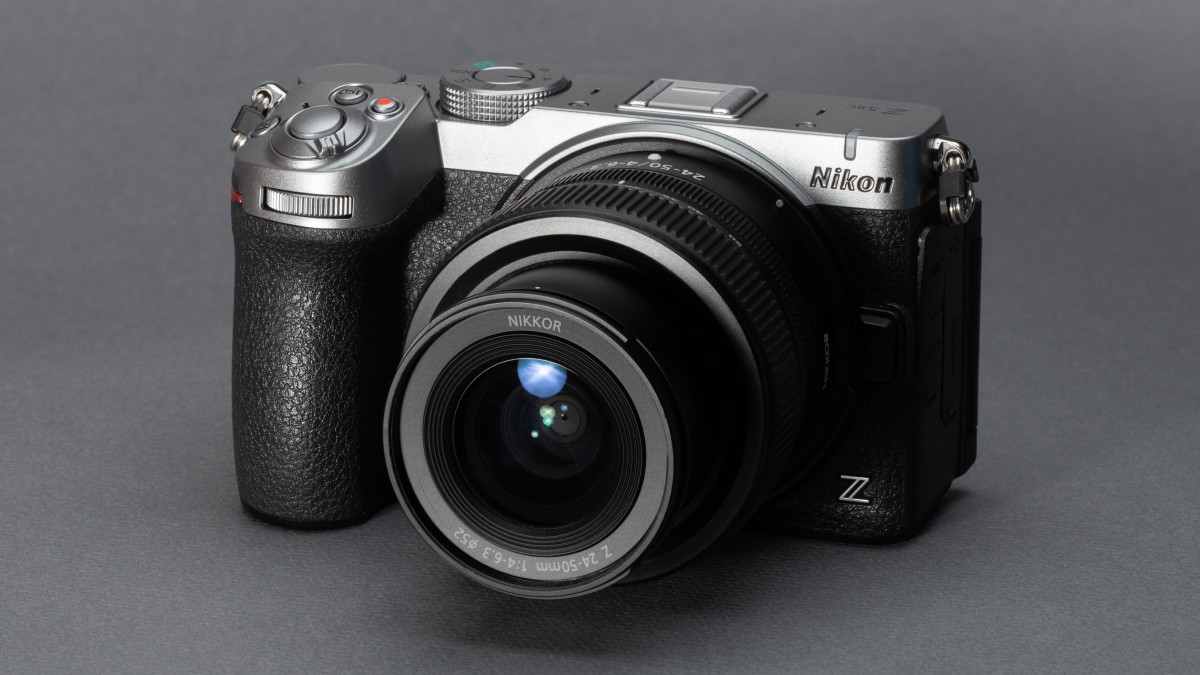
The Nikon Z5IIC is short the Z5II’s viewfinder but not much else has been cut to reduce its size and price
 Richard Butler / Mitchell Clark
The Nikon Z5IIC is an entry-level full-frame camera with a 24.5MP BSI CMOS sensor. As its name implies, the sensor, along with many of the camera’s other specs and features, are borrowed from the company’s larger, more expensive Z5II; Nikon has simply crammed it all into a smaller body, leaving off a few extras like the EVF, high-resolution screen and second card slot.
Editor’s note: at Nikon’s request, all sample photos from a pre-production camera are out-of-camera JPEGs, cropped and re-saved.
Key specifications
- 24.5MP BSI full-frame CMOS sensor
- IBIS up to 7.5EV
- Full mechanical shutter
- 3.2″ 1.04M dot fully-articulated display
- 11fps mech. bursts, 30fps JPEG-only elec.
- 4K/30 full-width, 60p w/ 1.5x crop
The Z5IIC will cost $1400, coming in below even the Z5II’s launch price and representing a $450 discount compared to its current, increased MSRP. It will be available in black or silver, and can be kitted with a variety of lenses, including Nikon’s 24-50mm F4-6.3, 24-105mm F4-7.1 and 26mm F2.8 pancake.
Index:
- What’s new
- How it compares
- Body and handling
- Autofocus
- Video
- Initial impressions
- Sample gallery
- Specifications
- Press release
Loading gallery…
What’s new
 Richard Butler / Mitchell Clark
There isn’t much new about the Z5IIC, as it’s essentially an existing camera with some features removed, rather than added. This means that the main change is its design, which we’ll mostly cover in the Body and handling section. However, as a high-level overview, the camera has a squared-off body with a grip style similar to that of the Z5II (which ends up making it feel a bit chunky in the hand).
This design, and the EVF it omits, means it occupies a new position in Nikon’s full-frame mirrorless lineup. While the video-focused ZR may appear to fit that description, the Z5IIC’s ergonomics and user experience are much closer to that of a super-sized Z30, but even more focused on stills and hybrid use. This is the first EVF-less mirrorless camera that Nikon has made aimed as much at photographers as videographers.
 We typically try to use somewhat relevant images for our screengrabs, but didn’t have time to make it to an aquarium during our time with the pre-production Z5IIC.Mitchell Clark
Beyond the design, Nikon has introduced one minor upgrade to the camera’s autofocus system: in addition to the 9 types of subject the Z5II was trained to recognize, the Z5IIC gains an “aquatic life” mode, mainly designed for taking pictures in aquariums. The camera also gains the highly-customizable grain effect the company introduced on the Zf, which is likely a bigger deal than it seems in the age of social media feeds dominated by simulations of film.
How it compares
With its price and feature set, the Z5IIC doesn’t really have any direct competitors. The Panasonic S9, with its stabilized full-frame sensor and very similar price point may seem like one, but its single top-plate command dial and focus on shooting video, rather than stills, makes it a fundamentally different camera to use once you actually have it in your hand. We’re also comparing the Sony a7C II, since it has a similar form-factor (though a much higher price-point). Finally, we’ve included the Z5II to illustrate what you’re giving up for the C’s smaller size.
| $1400 | $1850 | $2500, $2800 w/ 28-60mm lens | $1500 |
| 24.5MP BSI-CMOS | 24.5MP BSI-CMOS | 33MP BSI-CMOS | 24.2MP BSI-CMOS |
| 7.5EV | 7.5EV | 7.0EV | 6.5EV |
| N/A | 3.69M dot 0.8x | 2.36M dot 0.7x | N/A |
| 3.2″, 1.04M dot Fully articulated | 3.2″, 2.1M dot Fully articulated | 3″, 1.04M dot Fully articulated | 3″, 1.84M dot Fully articulated |
| 11fps / 30fps (JPEG-only) | 11fps / 30fps (JPEG-only) | 10fps / 10fps | – / 30fps |
| 1/200 | 1/200 | 1/160 | – |
| 2 | 2 | 2 | 1 |
| N-Raw H.265 H.264 | N-Raw H.265 H.264 | H.265 (XAVC-HS) H.264 (XAVC) | H.265 H.264 MP4 Lite |
| 4K/60 1.5x crop 4K/30 full-width | 4K/60 1.5x crop 4K/30 full-width | 4K/60 1.5x crop 4K/30 full-width | 6K/30 open gate 4K/60 1.5x crop 4K/30 full-width |
| 22.2ms | 22.2ms | 26.6ms | 21.6ms |
| Yes / Yes | Yes / Yes | Yes / Yes | No / Yes |
| 1x UHS-II SD | 2x UHS-II SD | 1x UHS-II SD | 1x UHS-II SD |
| 350 / – | 350 / 330 | 560 / 530 | 470 / – |
| 620g (22oz) | 700g (25oz) | 514g (18oz) | 486g (17oz) |
| 134 x 81 x 72mm (5.3 x 3.2 x 2.8″) | 134 x 101 x 72mm (5.3 x 4.0 x 2.8″) | 124 x 71 x 63mm (4.9 x 2.8 x 2.5″) | 126 x 74 x 47mm (5.0 x 2.9 x 1.9″) |
For video-first creators, the S9 is, in most ways, the better pick, thanks to its inclusion of open-gate modes, excellent IBIS performance and Panasonic’s unmatched toolbox of features that make shooting video easier (though all of this is slightly let down by its lack of a headphone jack, and somewhat limiting thermal performance). While stills shooters will likely appreciate the openness of the L-mount ecosystem compared to the relatively restricted Z-mount, none of our testers have really enjoyed using the S9 for photography and the lack of a mechanical shutter further cements this. It’s clearly not who the camera is aimed at.
Conversely, while the a7CII has a similarly open lens mount, it goes the opposite direction; it’s a better tool for stills than video, thanks to its quite slow readout speeds. We also appreciate the inclusion of a competent viewfinder, despite the small size and, while we miss having an AF joystick, that’s something the S9 and Z5IIC omit, too. The elephant in the room is price; the a7CII is a cut down version of an enthusiast camera, while the Z5IIC is based on an entry-level model, with the focus on more beginner-friendly scene and color modes that come with that positioning.
Body and handling
 Richard Butler / Mitchell Clark
On its own, the Z5IIC’s body looks small for a full-frame camera, but once you pick it up and attach a lens it ends up feeling relatively substantial. It’s clearly still lighter than other models, but it’s dense, and our testers found the grip filled out even their relatively large hands.
We found the (very approximately) rangefinder-style design to be quite pleasing, and it’s nice that Nikon is providing a version with a silver top plate, even if there’s only a single own-brand lens matched to the color.
Controls
 Richard Butler / Mitchell Clark
The Z5IIC comes equipped with plenty of controls. You get two configurable top-plate dials, a mode dial with two custom settings and most of the customizable buttons you’d find on the rest of the Z-series cameras, including two front-plate ones, next to the lens. Nikon has also included a button that lets you directly access its “Picture Controls” color modes (which you can add to by connecting the camera to Wi-Fi and the company’s Imaging Cloud service).
The one thing the camera doesn’t have is a joystick, so navigating through menus and controlling your autofocus point will have to be done using either the touchscreen or the multi-directional controller. While this isn’t our favorite way of controlling autofocus, it’s less of a concern on a camera where you’ll never be using an EVF.
The menus are, again, the standard Nikon fare that you’ll find across the rest of the company’s mirrorless lineup. We also appreciate another detail that Nikon kept the same: the dedicated stills/video switch, separate from the power-on switch.
Display
 Richard Butler / Mitchell Clark
The Z5IIC’s display is large and fully articulated, but isn’t as high-resolution as the one found on the Z5II, nor is it the super-sized and super-bright model Nikon used for the similarly EVF-less ZR. We found that, in bright sunlight, it was a little too dim to see clearly, though it worked well in most other scenarios.
There will be those that complain that it articulates instead of tilts, and that there’s no EVF (despite Nikon already making essentially the same camera but with a viewfinder). While both are valid preferences to have, there are undeniable benefits to a fully-articulating screen; it’s much easier to preview shots or video of yourself using one, and it can work at odd angles that can be difficult to get with just a tilting one. Plus, if you’re putting the camera in a bag, you can flip the screen inward towards the camera body to protect it.
Nikon says that its market research shows a strong contingent of users who are happy to use a screen-only camera. While they didn’t say it explicitly, it seems likely it’s mainly comprised of younger photographers who grew up using phones where the screen was the only option.
Ports and connectivity
 Richard Butler / Mitchell Clark
The Z5IIC has a relatively robust selection of ports: there’s USB-C for charging and data transfer at 5 Gbps speeds, headphone and microphone jacks for audio monitoring and input and a microHDMI socket for video out. The latter isn’t our favorite connector ever, but it’s a reasonable choice on a camera at this size and price. It also has reasonable wireless connectivity, with 2.4/5Ghz Wi-Fi (the latter of which can power faster file transfers to Nikon’s app), and Bluetooth 5.0.
The camera’s single UHS-II card slot is located on the side of the grip, where it’s easy to get at even if you have your camera mounted on a tripod.
Battery
 Richard Butler / Mitchell Clark
Like the standard Z5II, the Z5IIC uses Nikon’s standard 16Wh EN-EL15c battery, and is rated to get 350 shots out of a charge, extendable to 390 shots if you enable the power saving mode. The CIPA ratings under-represent the number of shots you’re likely to get under shooting conditions outside the lab, but work as a useful point of comparison amongst cameras. We’d expect a camera with this rating to be good for a solid day of shooting, or a light weekend, but would recommend bringing a spare or USB-C power bank for the most intensive shooting sessions. So far, Nikon hasn’t made any mention of producing a battery grip for it, nor are any of its existing models listed as compatible.
Autofocus
The Z5IIC adopts the same autofocus system that Nikon uses across its mirrorless lineup, from the Z50II all the way up to the Z9 (though we’ve found it performs a touch better in cameras with faster sensors). This means you have a range of AF modes to choose from, including a single point mode that focuses exactly where you tell it, larger points that can also take the area surrounding them into account, and zones that let you specify an area to focus on objects within. There are three fixed-size zones, and three custom-size ones, though the camera lets you remove focus point types that you don’t use from the menu so you have a shorter list to scroll through.
 You can easily change your AF area mode through the ‘i ‘ menu, though we typically leave it in 3D Tracking for most scenarios.
In addition to these modes, there’s also a wide area mode, where the camera decides what to focus on, as well as an even more automatic AF-A mode where the camera tries to determine whether the subject is moving or static and switch between single and continuous focus acquisition (though we’ve found that, in modern cameras, the latter is reliable enough that this mode isn’t particularly useful). There’s also a 3D Tracking mode, which gives you a small box that will attempt to stick to whatever you place it over, even as it or the camera moves. This is slightly distinct from what you’ll find on Sony or Nikon cameras, which offer tracking across their focus point types.
The 3D Tracking, zone and wide-area AF modes, can be used in conjunction with the camera’s machine-learning derived subject recognition system, which can track 10 different kinds of subject (though they’re categorized into six categories, making the list less overwhelming list to scroll through). There’s also an auto subject recognition mode, which will look for any of the kinds of subjects that the camera can recognize in the scene, though there’s no option to narrow that mode down to just the kinds of subjects you expect to be shooting, like you can with some other brands’ systems.
By default, the camera uses Touch Shutter, which means that if you tap on the screen to select a focus point, the camera will take a photo after acquiring focus. This can be turned off via an on-screen button (which is easy to inadvertently reset into Touch Shutter mode, but can thankfully be completely removed), but means that the camera may not work exactly as most users expect the first time they turn it on.
Video
We shot our first look video almost entirely with the Z5IIC.
Apologies if you’re tired of hearing this, but the Z5IIC’s video capabilities are again the same as you’d find on the Z5II. The top-level summary means that it ends up being very competent at videography, with 10-bit recording that uses the full width of the sensor up to 4K/30p, and a 1.5x crop to achieve 4K/60p that can be used for getting an unpleasantly soap-opera-like look or for slowing as slow-motion footage.
While those specs aren’t groundbreaking, Nikon has built a pretty extensive set of workflow tools around the camera’s core recording modes. It has a waveform monitor for more accurately judging exposure – especially handy if you’re recording in N-Log – HLG recording for HDR playback, a tally light to make it obvious when you’re recording and the ability to use its autofocus subject detection modes in video. It even supports recording in N-Raw, though it’s hard to imagine most of the Z5IIC’s target audience ever having a use for it or the SD card slot really enjoying the experience.
In use
 Richard Butler / Mitchell Clark
Given the Z5IIC’s name and appearance, I was surprised by its heft when I picked it up. At 620g it’s almost 100g heavier than the EOS R8 II that I’d been testing immediately before, and that camera has an EVF. The Canon’s minuscule battery is probably a large part of that difference, but Sony’s a7C II is similarly lighter, despite its full-size battery and viewfinder. This isn’t to say that the Z5IIC is heavy by any means, and it feels quite solidly built, but it’s worth noting if you’re interested in it as an ultra-portable everyday carry camera.
Of course, any full-frame’s claims of being light and small will be challenged when you put a lens on it. Nikon’s sub-$1000 S-series primes are quite nice to use, unlike those of some particular competitors, and it does have a fair number of relatively reasonably-sized zooms. However, the latter often have maximum aperture numbers that you’d struggle to be excited by. And if you want a lens that will let you easily fit the Z5IIC in a purse or small-to-medium sling bag, your options quickly dwindle.
 Nikon Z5IIC | Nikon 24-50mm F4-6.3 | 32mm | F4.8 | 1/125 sec | ISO 100 | Out of camera JPEG, croppedMitchell Clark
While there are benefits to Nikon’s menu system, which has a dedicated set of pages for core photo and video settings, then banks of Custom Settings covering different aspects of shooting, it can take a while to get used to or remember where particular options live. This is exacerbated by the fact that those menus range from settings 95% of users will never need to relatively vital functions; an issue that’s particularly acute in video.
 The Custom Settings menus won’t be exactly the same across camera models, but the letters, numbers and color-coding can help you find your way back to frequently-used options, and make it easier to find them in-camera after reading about them in the manual or a forum.Mitchell Clark
It essentially feels like Nikon has used Custom Settings as a dumping ground for every new thing it comes up with, and I worry that newcomers that pick this camera up as an inexpensive option might be overwhelmed by just how extensive the menus and submenus are (though this is broadly true for most cameras on the market these days). The upside is that, if they take the time to learn them – something made easier by the color coding and initial letters for the sections – the Z5IIC offers a lot of room to grow, with features like pre-capture (unfortunately still JPEG-only), customizable burst rates and a highly customizable “i ” menu that you can use to quickly access your most-used settings while remaining on the shooting screen.
Initial impressions
 We’re not quite sure about the exposed screws on the top plate marking where the Z5II’s viewfinder would be. But I think they at least look a bit better on the black version of the camera.Richard Butler / Mitchell Clark
It’s easy to look at the Z5IIC and think that it asks you to give up quite a bit for what wind up being minor reductions in size and weight. This would, however, be missing half the point; removing things like an EVF and second card slot also help Nikon hit an aggressive price point that makes the Z5IIC one of the cheapest full-frame mirrorless cameras ever launched.
For that price, you get a lot of camera. Top-tier autofocus, very good image quality, IBIS, fast burst rates, a full mechanical shutter, competent video, I could go on. When the Z5II launched for $1700, I found it hard to believe how much it offered for the money. Now, you can get a whole lot of what made it so good for a lot less. And if you don’t like those trade-offs? Great news! Nikon still makes the Z5II.
 The inclusion of things like customizable color modes and the grain effect help you get the kind of JPEGs you want straight-out-of-camera, which seems to be an increasingly important selling point.
Nikon Z5IIC | Nikon 24-50mm F4-6.3 @ 45mm | F8 | 1/125 sec | ISO 100
Out of camera JPEG w/ Grain effect, cropped.Mitchell Clark
The one thing that dampens my excitement is lens selection. Yes, Nikon appears to have been unsuccessful in preventing unlicensed third parties from building lenses for Z-mount, and as a result there are a fair number of lenses on the market that are small and nice to use. That makes the Z5IIC more appealing than if you were stuck with the options Nikon itself has made, or that have its blessing. But because that clearly happened against the company’s will, there is always a risk that future software updates could reduce compatibility with those lenses in some way*.
Still, if you’re happy with the lineup of lenses Nikon and Tamron provide, or are willing to use unlicensed third-party options, the Z5IIC is an exciting option to have on the market. Full-frame cameras aren’t liable to ever be the best option if you’re looking for something truly small and portable, but Nikon has undoubtedly packed a lot into a camera that’s small for what it is. While I still personally believe that first-time camera buyers and anyone seriously focused on portability should give more credence to crop-sensor options, its undeniable that there are people who just want a full-frame camera that’s as cheap (and small) as possible. The Z5IIC manages to fill that role in Nikon’s lineup without giving up too much… unless you absolutely need an EVF.
*And Nikon has, lately, been quite good about providing meaningful software updates that you’ll want to be able to install. Though our advice remains that you should never buy a product on any assumption of what it might do in the future.
Sample gallery
Please do not reproduce any of these images on a website or any newsletter/magazine without prior permission (see our copyright page). We make the originals available for private users to download to their own machines for personal examination or printing; we do so in good faith, so please don’t abuse it.
Note: unlike all other manufacturers, Nikon does not allow full-resolution samples from its pre-production cameras. The samples provided below are slightly cropped, though not resized, out-of-camera JPEGs to comply with this rule. Our final review will include full-size JPEGs and Raws.
Loading gallery…
Nikon Z5IIC specifications
Quick Specs
What's Your Reaction?
 Like
0
Like
0
 Dislike
0
Dislike
0
 Love
0
Love
0
 Funny
0
Funny
0
 Wow
0
Wow
0
 Sad
0
Sad
0
 Angry
0
Angry
0










Comments (0)