

OM System PEN Review: somewhat throwback, for better and worse
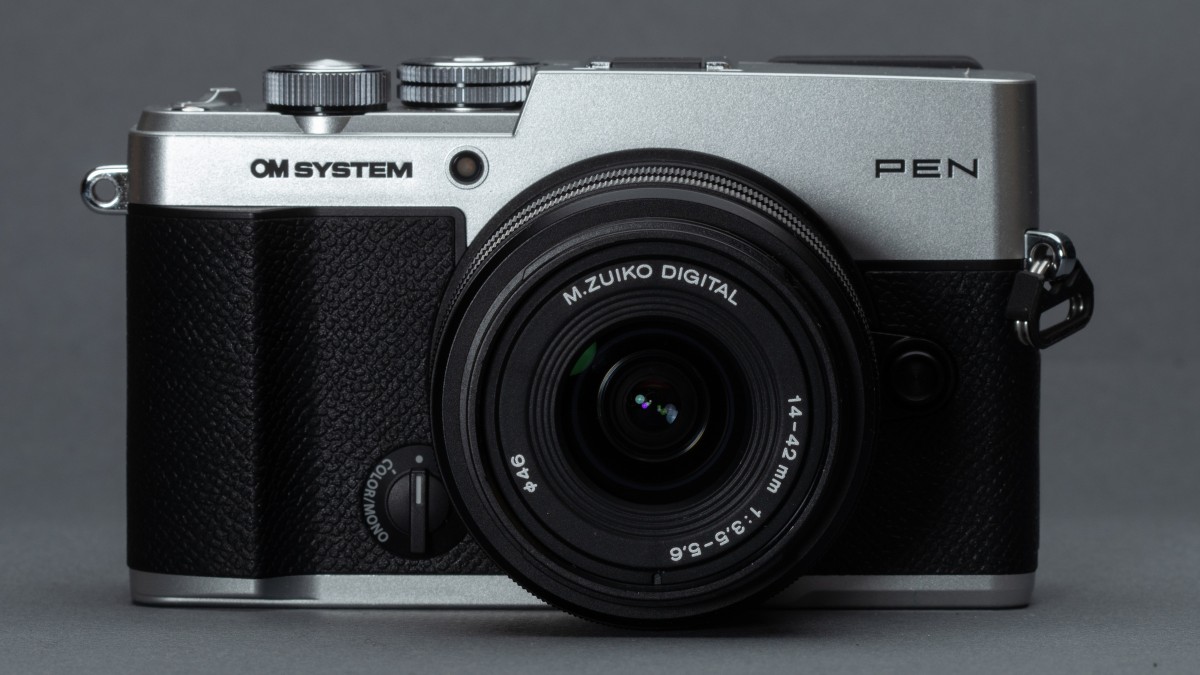
OM System adds a hint of PEN-F to the E-P7 formula.

Product photos: Richard Butler
The OM System PEN is a compact, Micro Four Thirds camera built around a 20MP sensor and aimed at travel and everyday use. It riffs on the concept of the much-loved PEN series but delivers something a little distinct from its predecessors.
It’s not a like-for-like replacement for 2016’s PEN F, but it brings some of the ideas from that model to the more affordable end of the market.
Key specifications
- 20.4MP Four Thirds (226mm2) CMOS sensor
- In-body image stabilization rated to 5.5EV
- 2.36M dot EVF
- Up to 30fps shooting (with AF and AE locked), 8fps mech
- Multi-shot modes, including high resolution, Live ND, Live Bulb, Live Time, Live Composite
- 410 shot/charge battery life rating
The PEN will be available immediately for around $1000, body-only. This is significantly lower than the $1200 launch price of the PEN-F back in 2016, especially once you consider that inflation makes that equivalent to around $1700 today.
Index
- What’s new
- How it compares
- Body and handling
- Autofocus
- Image quality
- Video
- In use
- Initial impressions
- Sample gallery
- Specifications
- Press release
Loading gallery…
What’s new
The PEN is the first top-tier entry into the line in five years, and the first time in a decade that the series will be sold in North America. It’s essentially a blend of the two models that preceded it: primarily the mid-priced E-P7 but also the enthusiast PEN-F.
From the E-P7 it gets the lighter, lower-cost plastic construction, rather than the metal body that had marked out the ‘big’ PENs before it. It also inherits the two-position color mode switch on the front plate, and the simpler dial layout. But, crucially, from the PEN-F it gets an electronic viewfinder, built into the top corner of the body: making it only the second PEN model to feature one.
It also foregoes the stacked sensor features in the OM-1 and OM-3 models, presumably also in the name of cost reduction, meaning it has more in common with the OM-5 II.
The PEN’s color mode switch gives you access to eight color and mono modes that can be modified in interesting ways
These changes start to make sense when OM System talks about its target audience for the camera: a mixture of enthusiasts who want a small mirrorless camera and users looking to buy their first camera for travel and everyday photography.
The lower-cost construction and significant overlap with the OM-5 II’s componentry are reflected in its significantly lower launch price (there’s enough of a difference that it’s less expensive in money terms, despite a decade of inflation).
The ninth-generation TruePic processor means it gains more up-to-date autofocus than the PEN-F or E-P7 (now with Dogs & Cats recognition mode, rather than just human detection) but the camera is still limited to 8-bit video at up to 4K/30 and its multi-shot modes are less extensive and significantly slower than on more expensive stacked-sensor models such as the OM-3.
How it compares
There’s no direct competitor to the OM System PEN, if you’re looking for a small, rangefinder-style mirrorless camera. You can either opt for a similarly-priced APS-C model, such as the Fujifilm X-T30 III or Nikon Z50 II, but those are both SLR-styled models with no image stabilization. The alternative is the more expensive, metal-bodied X-E5, which is much more in keeping with the PEN’s styling but closer to the PEN-F market positioning, in terms of price.
Finally, if you just want a small, stylish camera and can live without the ability to change lenses, the Panasonic L10 comes into play.
| $999, £899 (body only) | $1699, £1299, €1550 (body-only) | $1500, £1300, €1500 | $1199 (body only) ∼$1690 in 2026 prices |
| Four Thirds (224mm²) | APS-C (366mm²) | Cropped Four Thirds (183mm²) | Four Thirds (224mm²) |
| 20.4MP | 40MP | 20.3MP | 20.4MP |
| Engineering plastics | Aluminum | Metal | Magnesium alloy + aluminum |
| 28-84mm F7.0-11.2 | 35mm F4.2 | 24-75mm F3.8-6.2 (Not changeable) | 35mm F3.6 |
| 5.5EV | 7.0EV | Not specified (optical) | 5.0EV |
| • High res (Hand-held/tripod) • Live ND • Focus stacking • HDR (pseudo) • Multiple-Exp | • Multiple-Exp | No | • High res (Tripod) |
| 2.36M dots 0.69x | 2.36M dots 0.62 | 2.36M dots 0.74 | 2.36M dots (0.69x |
| 3″, 1.04M dot Fully Articulated | 3″, 1.04M dot Tilting | 3″, 1.84M dot Fully Articulated | 3″, 1.04M dot Fully Articulated |
| 1x UHS-II SD | 1x UHS-II SD | 1x UHS-II SD | 1x UHS-I SD |
| 4K/30 8-bit | 6.2K/30 4K/60 10-bit | 5.2K/30 Open Gate 4K/120 10-bit | Up to 1080/60 8-bit |
| No | Via inc. adapter | No | No |
| 2.0 (480Mbps) | 3.2g2 (10Gbps) | 3.2g2 (10Gbps) | 2.0 (480Mbps) |
| 410 shots | 305 shots | 420 shots | 330 shots |
| 126 x 75 x 43mm (5.0 x 3.0 x 1.7″) | 125 x 73 x 39mm (4.9 x 2.9 x 1.5″) | 127 x 74 x 67mm (5.0 x 2.9 x 2.6″) | 125 x 72 x 37mm (4.9 x 2.8 x 1.5″) |
| 393g (13.9oz) | 445g (15.7oz) | 508g (17.9oz) | 427g (15.1oz) |
Despite its more modest pricing, the PEN stacks up pretty reasonably against its peers, on paper. It’s interesting to note that you get the same viewfinder panel, regardless of how much you spend, because it’s the only one made in this smaller size. The PEN is the only camera in this cohort to offer a standardized rating of environmental protection, even if it is the relatively modest IPX1 level.
However, while the PEN’s multi-shot modes are more sophisticated than its (quasi) peers, its video is distinctly outdated. And, though it doesn’t necessarily show through in the specs, so are some aspects of its autofocus performance.
Body and handling
 Richard Butler
The PEN feels pretty solid, despite its construction primarily being engineering plastics, rather than metal casing used from the E-P1 up to the PEN-F. The body gives the sense of being made of quite thick material, meaning it feels suitably weighty in the hand, without being overly heavy.
The small front grip and thumb rest make the camera easy to keep hold of, and we found the two (customizable) command dials to be well-placed, whether you’re holding the camera to your eye or not.
The back of the camera is somewhat cluttered, though, with a CP button (accessing your choice of Computational Photography modes) next to the thumb rest being just one of six buttons crammed into the right-hand control array, in addition to a small four-way controller that is also used to access key features. In the absence of an AF joystick, this four-way controller, along with the camera’s touchscreen, becomes the main method for positioning the AF point.
 The PEN has a USB-C socket for charging and data transfer Richard Butler
The PEN still has a single SD card slot, supporting UHS-II cards, as you’d expect. Its USB connector is modernized to a Type C socket, but the underlying interface is still a distinctly dated 480Mbps USB-2.0 type. There’s also a micro HDMI port and a mic input, but there’s no headphone socket for audio monitoring, which should give a pretty clear signal about the PEN’s focus.
Viewfinder
 Richard Butler
The PEN becomes only the second model in the series to feature a built-in viewfinder. It’s the same 2.36M dot (1024 x 768px) finder as in the PEN-F, ten years ago. It’s worth noting, though, that this is the highest resolution finder made in the smaller 0.39″ format, which is why we continue to see it appear in cameras where size is the key focus of the design.
Screen
The rear screen is the same, fully-articulated 1.04M dot touchscreen that featured on the PEN-F. This is likely to divide audiences, with some people interpreting flip-out screens as being a sop to video shooters. However, we’ve been told by multiple manufacturers that, in surveys, about 50% of photographers prefer this screen arrangement. So, while street and candid shooters are likely to miss the tilting screen that allows more discreet camera operation, the wider target audience, looking to use the PEN for travel, are likely to appreciate the ability to fold the screen inwards, to keep it protected.
Battery
 Richard Butler
The PEN uses a new battery pack, the rather compact BLS-7, it’s a 7.74V, 1285mAh unit, which means it has a capacity of 10Wh, rather than the 8.7Wh of the older, physically larger BLS-50 or the 9.0Wh of the PEN F’s BLN-1.
OM System says this delivers a battery rating of 400 shots per charge, when tested using the standard CIPA method, presumably based on the use of the more power-efficient rear screen. As usual, these ratings tend to significantly underestimate the real-world endurance of a battery, and getting twice the rated number is pretty common, depending on how you shoot.
In use
The PEN’s operation will be immediately familiar to OM System (and Olympus) users, though potentially somewhat overwhelming to most newcomers. For instance, the barrage of icons and settings displayed when you turn the camera on includes L8 in large letters at the top right of the screen, indicating that if you press the REC button on the top of the camera, you’ll get 8-bit video in a Long Group-of-Frames codec. Which doesn’t feel like essential information in stills mode, on a fairly stills-focused camera that can only capture 8-bit video.
 The PEN’s Super Control Panel screen puts most key settings close to hand
Still, once you’ve learned your way around the screen, you’ll probably come to appreciate the Super Control Panel: a settings display showing most of the camera’s key settings in an interactive array. Tap on the setting you want to change, spin one of the command dials and you’ll find you have semi-quick access to just about all the settings you might want to change. Which makes me wonder if the camera needs quite as many buttons as it has. But still…
Six of the camera’s buttons are customizable, plus the button on any lens that has one. Alternatively, you can give up two of your custom buttons (and the ISO button) and dedicate the four-way controller to give direct AF point control, rather than having to press ‘left’ first. Buttons can be customized to have a different function in video or Slow & Quick modes, too.
This degree of customization extends to the dials, whose function can be dictated per exposure mode, and again, separately for stills and video. Likewise, once you’ve worked out which of the camera’s computational photography modes you actually use, you can narrow the function of the CP button to only invoke those.
 Richard Butler
The menus are relatively easy to navigate, with a decent degree of signposting, meaning you’ll quickly get a feel for where different types of setting are likely to live. However the number of options and the level of customization is extensive, bordering on the excessive, so things can seem a little intimidating, initially.
Like the more recent OM cameras, the PEN’s ‘film’ color modes, selected with the switch on the front of the body, can have the saturation levels of different hues adjusted, to tailor their response. You can also tweak the highlights, shadows and mid-tone response, giving you a lot of flexibility. This comes especially handy in conjunction with the in-camera Raw conversion feature, as it means you can make very specific adjustments to your images while still using the camera’s choice of attractive JPEG modes.

In keeping with the camera’s attempt to attract first-time camera users, the PEN has a series of Scene modes on its dial. These cover a decent range of common shooting scenarios and are able to invoke the multi-shot modes, if needs be. But we’re still not sure how many people will buy a dedicated camera, only to use restrictive preset modes that are less clever and flexible than the ones on their phones.
In-camera Raw conversion
Most brands offer in-camera Raw conversion at this point, but OM Systems’ remains one of the most comprehensive and powerful. This is especially useful on a camera designed with travel in mind, where you may want to be able to share the things you’ve seen without wanting to boot up your laptop.
OM System’s JPEG color, particularly its Neutral and Film modes can deliver really attractive results, so it’s nice to be able to tweak and exploit these, rather than trying to match them in a 3rd-party Raw converter.

The camera gives you a choice of simply applying your current settings to an Raw file, or defining two presets, so that your preferences are saved or can be applied to multiple images from a batch. There are a few awkward inconsistencies, though: the camera’s standard color modes let you adjust hightlights, shadows and midtones from within the conversion interface, the Film modes don’t, and instead take their highlights, shadows and midtones settings, along with any hue-specific saturation adjustments you’ve made to them, from the camera’s current settings, even if you’re trying to use a preset.
This means that you can, for instance, make WB fine-tune modifications or adjustments of the film modes that aren’t in the Raw conversion interface by changing the camera’s current settings, but it means applying the result, backing out of the converter, adjusting the camera’s settings, then trying again: meaning making iterative adjustments can be quite frustrating.
This doesn’t give the near infinite level of flexibility that, say, Panasonic’s LUT-based image processing does, but means you don’t have to mess around with exploring and downloading profiles: you can just tweak the already pleasant in-camera options.
Autofocus
The PEN uses the standard OM System AF interface, which gives you a choice of 6 AF point sizes, from small to covering the entire area over which the camera can focus. The smallest size isn’t especially small and can be moved to one of 121 positions, which puts a limit on the maximum level of precision you can achieve.
Human or Pet recognition can be engaged on top of this system. However, unlike most cameras, recognized subjects are prioritized over your AF point. So if the camera thinks it recognizes a subject, it’ll focus on that, irrespective of where you’ve asked it to focus. If there’s more than one subject in the frame, your chosen focus point will dictate which subject it should focus on. There’s a menu setting to specify whether the camera prioritizes recognized subjects or your AF point (and you can assign the AF-On and shutter button behaviors differently), but if you choose to prioritize your chosen AF point, subject recognition is completely ignored: it won’t focus on an eye or face where you’re asking it to focus.
 The PEN gains Dogs and Cats as a subject recognition mode
OM System 14-42mm F3.5-5.6 III @ 20mm | F4.0 | 1/320 sec | ISO 200Richard Butler
In practice, we found they were both recognition modes quite prone to false positives and trying to focus on irrelevant subjects. Between these two factors, it becomes essential to position your AF point precisely (made a little more frustrating on a camera without an AF joystick), and to have a means of disengaging or over-riding the subject recognition system. It’s eminently usable, once you’ve got a feel for how it works, but it’s nothing like as effortless as the best modern cameras that simply focus where you ask them and then utilize subject recognition when appropriate.
The PEN’s general AF tracking system (for subjects the camera hasn’t been trained to recognize) feels pretty dated. We’ve become used to leaving cameras in tracking mode, selecting a target and recomposing at will, which isn’t something we’d recommend doing with the PEN. Other than a few shots where flare and bright highlights seemed to have confused the AF system, we were able to get a decent hit rate with the PEN, but don’t expect it to be action-ready and do be prepared to have to make more interventions to get the result you want.
Image quality
We’ve already shot and examined our standard studio scene shots from the PEN, and will be publishing them as soon as we have final Raw support. In the meantime, the OM-5 II, which uses the same sensor and processor, should give a very good idea of how the PEN performs.
In the meantime, you may not be shocked to learn that there are no great surprises. The 20MP sensor performs in line with most of its peers from the past decade or so, delivering image quality proportionate to its size. As with all formats, there’s a fairly direct size / image quality trade-off being struck, meaning you lose something in terms of peak image quality in order for the camera to be able to maintain its travel-friendliness, even when you take lenses into account.
For many people, that’ll be a trade-off worth making: the use of a Four Thirds sensor defines both the upper limit of its image quality, but also how small the camera/lens combinations can be. So while some manufacturers are focused on trying to make smaller cameras built around larger sensors, there’s a physical limit to how small the appropriate lenses can be, meaning you’re likely to carefully pick and choose to keep the package small, and you’ll need to revert to larger setups to attain their full IQ potential.
 The PEN’s multi shot, hand-held hi-res mode lets you boost the image quality in circumstances that allow it. Even better results are possible if you can use the tripod-based high-res mode.
Hand-held high-res mode. Olympus 12mm F2.0 | F4.0 | 1/1600 sec | ISO 200Richard Butler
The hand-held high resolution mode, that shots a series of shots in e-shutter mode, then combines them, in-camera, means it’s possible to boost the PEN’s image quality a little for select shots of relatively static subjects, and the tripod-based high-res mode, which is able to precisely position the sensor for optimal alignment, does an even better job. Both take a long time to process, but are nice to have in your back pocket, when the situation suits.
Video
Video is perhaps the most glaringly outdated aspect of the PEN, with the camera limited to 8-bit capture and topping out at 4K/30. There’s also no headphone socket, so no way of monitoring audio, when you’re recording, which risks you getting back to your computer and finding that distracting noises or incorrect recording levels have rendered your footage unusable.
The PEN can capture video using the OM Log400 curve, which offers some additional flexibility, in terms of tonal adjustment and color grading, but it’s limited, to say the least, in an era where 10-bit Log is pretty much standard. On the plus side, you can apply almost all of the camera’s color modes and even Art filters to your video, if you want distinctive-looking footage, straight out of camera.
There’s an S&Q (Slow and Quick) position on the power/mode switch but the available options are limited by the camera’s relatively modest video speeds. You can capture 1080 footage at up to 120 frames per second, for 1/5th-speed slow-mo.
Between the modest spec and less-than-dependable autofocus performance in video, the PEN wouldn’t be on our list if we were recommending a camera for someone looking to shoot a lot of video. Its strengths lie much more on the photography side of the spec sheet, so we would have preferred that the video mode wasn’t given such a prominent position on the power switch.
Initial impressions
 The OM System PEN has more in common, in terms of design, construction and componentry with the E-P7 than that camera’s predecessor, the PEN-F. But it does, at least, regain the PEN-F’s viewfinder.Richard Butler
The OM System PEN is likely to be a disappointment to Micro Four Thirds enthusiasts hoping for a direct PEN F successor with premium build and cutting-edge features. That’s absolutely not what the OM System PEN is trying to be.
But if you see it instead as a relatively small, still rather attractive and comparatively affordable mirroless camera, designed to attract people into the system that’s best able to deliver small lens/body combinations, then it’s an interesting proposition, especially with the inclusion of a viewfinder.
Much of the technology is familiar and the autofocus performance is both less dependable and more likely to need user intervention than the best modern cameras. But it’s only really Fujifilm’s X-E5 that comes close to offering this style of body a viewfinder and this much direct control, in a package that can remain small when you attach lenses, and that’s a significantly more expensive camera.
 With the large silver block to the right of the lens, you can see how the OM System PEN (front) takes some styling cues from the original film PEN-F (rear). It’s less intricate than the digital PEN-F (middle) though.Richard Butler
Trying to target both enthusiasts and first-time users means the PEN has to balance simplicity and customizability: something we’re not sure it always gets right. While most customization options can be ignored when you’re first learning the camera, we feel the camera is lacking a couple of fundamentals that would really help beginners. For instance, it would have been nice to have a shutter mode (ideally as the default) that switched to anti-shock mode at the shutter speeds most prone to shutter shock and then back, rather than expecting users to work out what they are and how to work around the problem.
I’ve been shooting the PEN with a mixture of the 14-42mm kit zoom (the latest, Mk III, version of which is compatible with focus stacking), the 17mm F1.8 and 12mm 2.0 lenses, and have found them to make a pleasantly small travel kit. Each of these lenses is small enough to throw in a jacket pocket, meaning I wasn’t having to carry with me to maintain a good level of flexibility. On other days it meant I could keep the complete kit with me while still having space in my bag for other things. Swap out one of these for the 45mm F1.8, if you like to take portraits, and you can create the kinds of compact, versatile combinations that would be very difficult to match with a larger sensor system.
The autofocus system, which requires rather more adjustment of area mode, point position and engagement/disengagement of subject recognition mode than we’re used to is, for us, the biggest off-note on a camera that otherwise does a great job of delivering a lot of camera – and not a lot of camera – for a keen price.
Sample gallery
Please do not reproduce any of these images on a website or any newsletter/magazine without prior permission (see our copyright page ). We make the originals available for private users to download to their own machines for personal examination or printing (in conjunction with this review); we do so in good faith, so please don’t abuse it.
Loading gallery…
OM System PEN specifications
Quick Specs
Want to stay up to date on the latest product news and releases? Add DPReview as a preferred source to ensure our independent journalism makes it to the top of your Google search results.

What's Your Reaction?
 Like
0
Like
0
 Dislike
0
Dislike
0
 Love
0
Love
0
 Funny
0
Funny
0
 Wow
0
Wow
0
 Sad
0
Sad
0
 Angry
0
Angry
0











Comments (0)