

OpenAI’s Dot agent is enterprise software that can also order your dinner
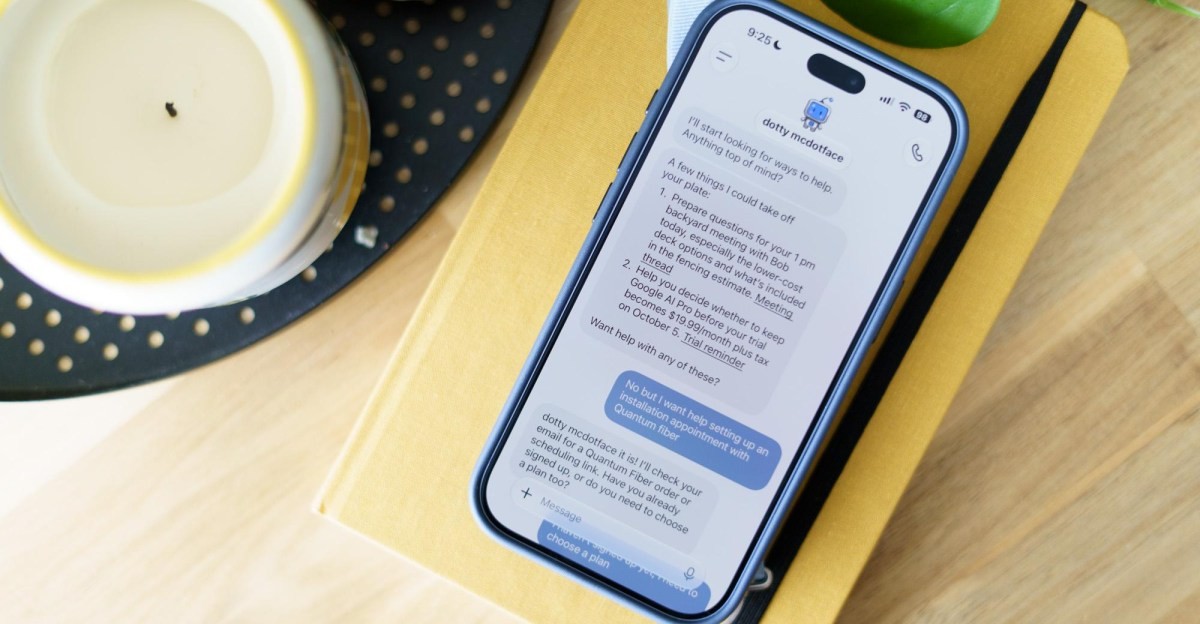
It’s a tale as old as last week: OpenAI’s new agent platform, called Dots, is full of cute little guys who can do your bidding.
But unlike the ultra-approachable Meta Muse, Dots feel very much like using workplace software that happens to be able to order you a burrito — emphasis on work.
OpenAI announced Dots earlier this week. Like Muse, Dots have blobby, anthropomorphic avatars and customizable names. In the future, OpenAI says you’ll be able to have multiple Dots, but right now you get one. I named mine Dotty McDotface.
The interface looks similar to Muse’s; you chat with the agent in one window and follow its work in another as it clicks around on a virtual machine. But Dots are less personal shoppers, even though they can help you buy stuff. They’re more like coworkers: business software that can use other software. Your Dot’s virtual machine can access apps like Blender and GIMP right off the bat. You can also give it access to your own computer through the desktop ChatGPT app, and you can call your Dot if you need to work through things out loud. And OpenAI is offering Dots first to users on its highest-tier accounts, including the $100-per-month Pro account I expensed to test it. Muse and its buzzy competitor Instinct cost you nothing — at least now, and at least until Meta can get it off the ground and presumably start using it to serve you ads, etc. But OpenAI’s gated rollout says a lot about who the product is for, cute avatars notwithstanding.
I’ve been testing other AI agents with day-to-day personal tasks — yielding mixed results — and I was curious how OpenAI’s bot would compare. Despite its more enterprise-y vibes, OpenAI says Dots “can do nearly anything” with its cloud computer and access to apps, so I gave it a shot with some more pedestrian use cases.
To start, I had Dot try to schedule an installation appointment for a new internet service provider at my house (you hear that, Comcast? You’re on notice). It almost got there, and even found a $100 promotional discount in my email that I had mass deleted, but got stuck at a “human check.” Which is problematic for a bot. “This particular check needs a sustained mouse hold that my browser controls don’t support,” it said. “Please open my browser here and hold ‘Press & Hold’ until it completes, then tell me and I’ll continue with installation dates.” I obliged, but it felt a little bit like some teenagers outside of the convenience store asking me to buy them some wine coolers.

With my human ability to click and hold a button, Dot got all the way to the checkout screen, where it asked me to input my bank account details. Turns out there’s no slick Stripe integration like Muse has to save your credit card info and use a virtual card for checkout. And in any case, the new provider needed my bank account to get a $5 discount on my bill every month. Dot paused to let me enter the numbers into the virtual browser; I didn’t trust it well enough to punch in my checking account number and decided to just do it all myself on my own computer. Not exactly a spectacular start.
I gave Dot a few other personal tasks, and the results were mixed. It couldn’t find the option for a free tour and entry at a coworking space I’ve been meaning to try out, and instead offered to sign me up for a $35 day pass. I had Instinct’s agent, which I’ve also been testing, look for the trial option; it found it and set up an appointment within minutes. “Why did you miss this option?” I questioned Dot over the phone after the incident. “I jumped to the wrong conclusion,” it said. I hung up.

Later, I had it try to retrieve some information in my Ikea account about a hanging planter I bought. It reported that it was unable to log in to my Ikea account because it got stuck in a looping security check. Elsewhere on the internet, the neighborhood teriyaki spot wouldn’t allow Dot onto its ordering page. Something about Dot’s footprint seems to get it tripped up on security checks more often than Muse or Instinct; Dot offered a link to OpenAI’s page about websites blocking its cloud browser traffic as an explanation. Whatever the reason, it required more manual input and browser takeovers than other AI agents, possibly because it wasn’t purpose-built for ordering teriyaki or handling your Ikea returns.
I really saw Dot come into its element when I gave it access to something fully within my control: my personal website. It is embarrassingly outdated and I asked Dot to pull together a new, more streamlined design. It did, and when I sat down to type out some changes I want made for the next version, I thought, “To hell with it. I’ll just give it a call.” I hashed out the changes I wanted section by section over 10 minutes, walked away to do some dishes, and got a ping that the next iteration was ready for me to review. Not perfect, but better. Once again, AI proves most helpful when you give it a large dataset (me rambling for 10 minutes) it can turn into something useful. I carried out a few more rounds of iterations chatting with Dot in a browser window on my computer and using voice-to-text on the phone app as I walked around the house cleaning up Brio train tracks and stuffies.
Something about Dot’s footprint seems to get it tripped up on security checks more often than Muse or Instinct
Dot made a lot more sense once I gave it access to my computer. There, I gave it two tasks: Put together a handful of video files on my desktop featuring a TV hit I did into one clip sized properly for social media, and deploy the changes to my personal website that we had worked through in a prototype. I had to give it a shocking number of permissions, but it worked. I watched it click around the website backend and re-create the prototype block by block. I walked away from the computer and got updates on the ChatGPT app on my phone — the consolidated video clip was ready, which I reviewed while I drank a coffee. It was the most Silicon Valley I’ve ever felt in my life.
I absolutely could have figured out how to put all those clips together myself. In fact, I did the first time around, but it looked janky and was too big to upload on any social media website. Dot did a much better job and I had a clip to share within minutes. It handled the website update, too. The new design is basic, but it’s miles ahead of the complicated, out-of-date version I’d been rocking until yesterday. Gotta hand it to Dotty McDotface.

Dot makes a lot more sense when you think of it and use it as “Codex, but for regular people” — a cute little blob that can take care of some part of your business while you do other things. Where the more personal AI agents like Muse feel like glorified autofill and a universal online shopping cart, Dot seems like a harbinger of the future of work.
Or a future of work. Presumably, since you pay for it upfront, it won’t be subject to the kind of monetization pressure as Muse and Instinct eventually will, which makes sense for enterprise software. Nobody wants to be nagged by AI while they work. That is, assuming you do the kind of work that AI can help you with, and you trust OpenAI to do it. Big caveats!
It helped me out with some tasks that, if I’m being honest, I would have just not gotten around to doing. That’s pretty handy. But I don’t think it’s $100-a-month handy, at least in my line of work. I can see how it would be much more useful to someone like our friend Casey Newton, who’s in the thick of launching a new business.
And with some help logging into my Uber Eats account, it did actually order my teriyaki in the end.
Follow topics and authors from this story to see more like this in your personalized homepage feed and to receive email updates.
- Allison Johnson
What's Your Reaction?
 Like
0
Like
0
 Dislike
0
Dislike
0
 Love
0
Love
0
 Funny
0
Funny
0
 Wow
0
Wow
0
 Sad
0
Sad
0
 Angry
0
Angry
0










Comments (0)