

Same light, same result: iPhone 18 Pro’s sensor isn’t outplaying larger ones
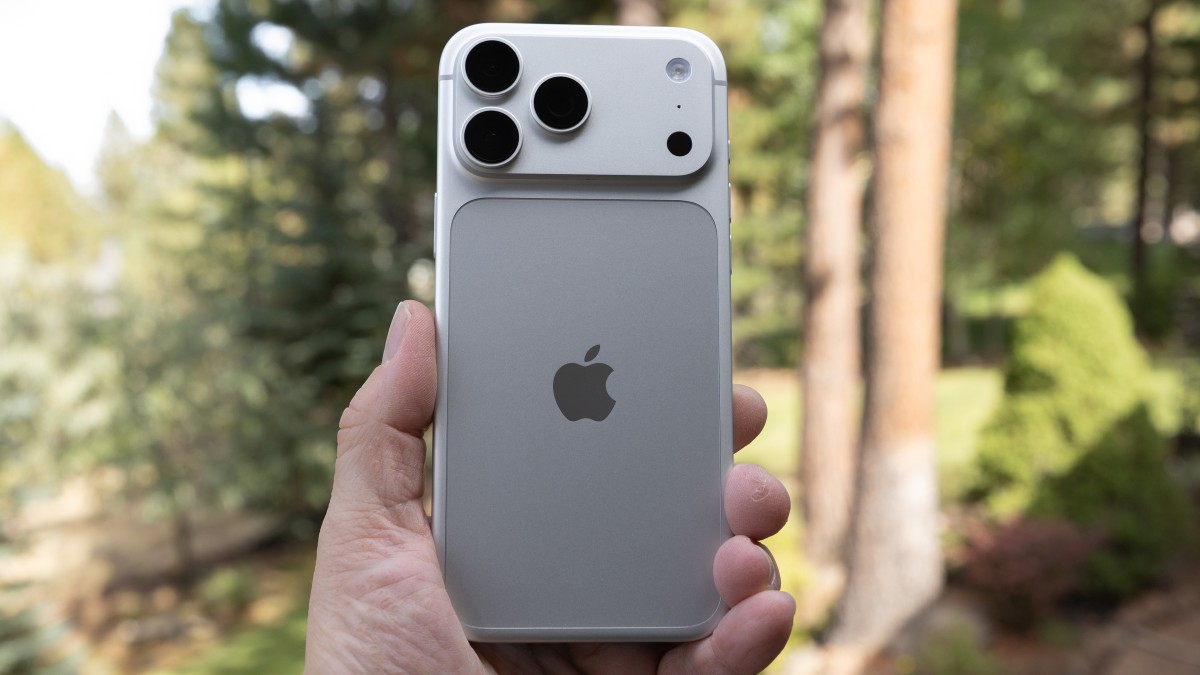
We shot the iPhone 18 Pro against a larger-sensor camera at equivalent settings to see whether the latest sensor developments allow smartphones to outperform larger sensors. It turns out the differences are in Apple’s processing.
 Dale Baskin
With the release of the iPhone 18 Pro earlier this year, Apple introduced Pro controls, which let users manually set aperture, shutter speed and white balance inside the iPhone’s Camera app, without turning to a third-party app. (ISO remains automatic.)
A few weeks ago, we published our finding that using Pro controls to manually set the shutter speed comes with a trade-off. It bypasses an important part of Apple’s computational photography pipeline: the system that stacks multiple frames to produce higher-quality, lower-noise photos.
 Manually setting the shutter speed in the iPhone 18 Pro’s Camera app bypasses the frame-stacking process that iPhones use to produce higher-quality, lower-noise photos. This makes sense: If the intent is to give users true manual control over exposure time, blending in frames captured outside that exposure time would undermine that control.Dale Baskin
As we explained in that article, there’s a defensible logic to that approach. If the intent is to give users true manual control over exposure time, blending in frames captured outside that exposure time would undermine that control.
However, it got us thinking. With frame stacking out of the picture, could we compare a photo shot on the iPhone 18 Pro to one shot with a camera with a larger sensor and see how it performs relative to what equivalence would lead us to expect? This would tell us whether the iPhone’s sensor is in a different league or if it performs about the way its size would predict.
The setup
We compared the iPhone to a Micro Four Thirds camera, the OM System OM-1. We chose Micro Four Thirds largely because it shares the iPhone’s 4:3 aspect ratio, which let us closely match framing between the two cameras.
The OM-1’s Four Thirds sensor has about 3.15 times the surface area of the Type 1/1.28 sensor in the iPhone’s main camera. That works out to a 1.65-stop advantage in total light captured at the same aperture and shutter speed. We shot the iPhone 18 Pro at F1.8, so to capture the same total amount of light, we needed to stop the OM-1 down by that same amount, to F3.2.
 The OM-1’s larger sensor gives it a 1.65-stop light-capture advantage, requiring the OM-1’s aperture to be stopped down from F1.8 to F3.2 to capture the same total amount of light as the iPhone.Richard Butler
Both cameras were set to a 24mm equivalent focal length: the native focal length of the iPhone’s main camera, and 12mm on a Panasonic 12-35mm F2.8 lens on the OM-1. Both were set to 1/60 sec. Taken together, these settings mean that both cameras viewed the scene through an aperture of the same physical size and for the same length of time, with both sensors receiving the same total amount of light.
Pro controls don’t include manual ISO, so the iPhone stayed on auto; in this test, it selected ISO 1250. Because the OM-1 spreads the same light over a larger area, it needs a correspondingly higher ISO for the same image brightness, requiring ISO 4000.
The full set of equivalent settings:
- iPhone 18 Pro: 24mm equiv., F1.8, 1/60 sec, ISO 1250 (auto), ProRaw
- OM-1: 24mm equiv., F3.2, 1/60 sec, ISO 4000, Raw
Noise and detail
We shot the same twilight scene with both cameras. Because both captured the same amount of light, any meaningful difference in noise between them, viewed at the same size, has to come from one of two places: the sensors themselves, or the processing.
We opened the Raw files from both cameras in Adobe Lightroom Classic, which uses the same processing engine as Adobe Camera Raw, adjusting the white balance and brightness of the OM-1 file to closely match the iPhone image. We then exported both as high-quality JPEGs: the OM-1 file at its full resolution, and the iPhone file resized to the exact same dimensions.
Without any additional processing, the iPhone image looks noticeably cleaner than the OM-1 image, but it also holds slightly less fine detail, a signature of noise reduction. Even with frame stacking bypassed, Apple applies heavy, sophisticated noise reduction to its images, including ProRAW files. There’s no way to turn it off.
You can compare the results in the rollover below. You can click any of the images to view the image at full size.
To see whether the difference in image quality comes from the sensor or the processing, we ran the OM-1 Raw file through the AI Denoise feature in Adobe Camera Raw until it closely matched the iPhone image (AI Denoise = 65). Apple doesn’t disclose how its own noise reduction works, so this isn’t an identical process, but it gives the OM-1 file the benefit of modern noise reduction too.
Viewed at the same output size, the two images are very similar, with noise levels and fine detail matching closely. If the iPhone’s sensor were dramatically more efficient than the OM-1’s, it should hold noticeably more detail at the same noise level, but it doesn’t.
The takeaway
This helps explain why smartphones seem to perform so well. Multi-shot merging helps them punch above their weight, but even without it, they have the advantage of sophisticated (though heavy) noise reduction, applied right on the device. On the iPhone 18 Pro, that processing is baked into ProRAW files as well, whether you want it or not.
So where does that leave larger-sensor cameras? For a start, equivalence is just a framework for comparison. No one is suggesting that you have to – or even should – use equivalent settings. With an F1.8 lens, the OM-1 would capture about 1.65 stops more total light than the iPhone 18 Pro did in our test, and about a stop more than the 18 Pro at its widest aperture, F1.48. But more to the point, you retain greater control over how you shoot and how you process the results, including how much noise reduction to apply.
Conversely, iPhone users should think hard about whether the added control of manually setting shutter speed is worth the loss in image quality. Doing so switches off the frame stacking that produces cleaner low-light images, leaving a single frame and Apple’s noise reduction to do the work.
Follow DPReview to ensure our independent journalism reaches your feeds.


What's Your Reaction?
 Like
0
 Dislike
0
 Love
0
 Funny
0
 Wow
0
 Sad
0
 Angry
0







Comments (0)