

Sleek and Smooth: We Review the Gaomon Pro 19 4K Pen Display for Editing and Retouching
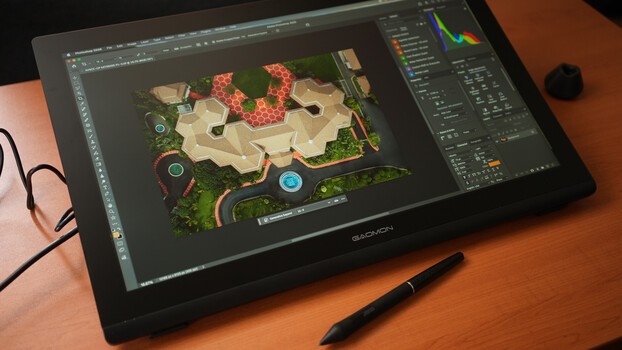
In the age of AI editing and retouching, high-resolution pen display tablets still offer an irreplaceable user experience. This one from a brand called GAOMON checks a lot of the boxes of what we look for.
Nothing beats the convenience of using a pen display for editing and retouching. However, if that pen display is bulky and huge, then it might defeat the purpose of having the screen in the first place. The right pen display for a specific user will always be based on their size preference; however, it is undeniable that one that does not require too large a movement to make inputs can greatly affect the user experience.
This pen display from a brand that I had personally only heard of and tried for the first time, GAOMON, checks those boxes. The GAOMON Pro 19 offers a high-resolution screen with accurate colors without taking up much space on your desk.
Build and Design
The GAOMON Pro 19 comes in the form of a 452.33 x 286.52 mm slate with a thickness ranging from 14.7 to 28.7 mm. This houses a 408.96 x 230.04 mm active area that is also the size of the IPS display panel housed in anti-glare etched glass. Around that, on the upper-right-hand edge, is a single power button and a pen holder right next to it. Other than that, the panel itself has no extra buttons or physical features in front.
On the back is a central hub that houses the three input ports: one port for the power supply, one port for the full-sized HDMI connection, and another USB-C port. While all three ports are available, it is not necessary to use all of them. Inside the box is an HDMI cable and a USB-A to USB-C cable that supports the more traditional connection. However, with the right kind of full-featured USB-C to USB-C cable, it can function without the need for HDMI. As for power, the display still relies entirely on the power brick, which makes sense given the size.
This central hub is also where the adjustable stand is connected, along with the button that unlocks it for adjustments. The stand offers viewing angles from 20 to 80 degrees, allowing the display to sit almost upright like a standing monitor.
Resolution and Color
The display has an aspect ratio of 16:9 with a resolution of 3,840 x 2,160 (4K UHD). It has a maximum brightness of 220 cd/m²; however, like a typical IPS panel, perception of this brightness varies depending on the viewing angle. It’s capable of displaying 1.07 billion colors (8-bit with FRC) and covers 99% of sRGB, 96% of Adobe RGB, and 98% of the DCI-P3 color gamut. GAOMON rates the display at Delta E < 1.5, indicating a low level of color error and strong color accuracy.
Pen Technology
The GAOMON Pro 19 comes with a single G-Pro Pen that has 16,384 different pressure levels, requires just 2 g of initial activation force, and has nibs that retract up to 0.35 mm for pressure variability. In combination with the display, the pen has a resolution of 5,080 lines per inch and uses battery-free EMR technology that makes the pen lighter, thinner, and easier to use.
The panel does not support finger-touch input, unlike some other similar pen displays of its size, which may or may not be a factor for some users, as there are users who prefer inputs to come exclusively from the pen.
Setting Up
This pen display is probably one of the most plug-and-play models we’ve tested so far, and this is primarily because it doesn’t require much customization due to the lack of programmable buttons on the display itself. If the pen display is to be used exclusively with a laptop, the keyboard would have to be within reach, or a separate shortcut remote/console must be used. Once connected, it can be configured as an extended display on a laptop, with the pen inputs taking effect on the pen display. For better configurations, such as selecting the working area, rotating the display, and customizing the pressure sensitivity, the user can download the driver from GAOMON's website to properly set things up.
User Experience
The best things about this pen display are the fact that it comes in a slim and sleek form yet still has an adjustable stand. Of course, this is paired with the fact that it has a 4K display with significantly good color accuracy when properly calibrated to the lighting environment. Both as a display and as a pen tablet, it comes in a space-saving form that can potentially allow the user to be comfortable using the device.
On the other hand, it would have been better for the device to have at least a handful of customizable shortcut buttons so that it can function independently without the user needing to reach over to a keyboard or a laptop while using it. Another option would have been to bundle it with a dedicated shortcut remote that can do wonders for ergonomics and user comfort.
With those external matters aside, the GAOMON Pro 19 pen display is a noteworthy option for users who want the convenience of working with a good screen that works with a pen without having to work on a massive, bulky fixture. It offers a sleek design, versatile functionality, convenient connectivity (although the most convenient cable option does not come in the box), and resolution that is fit for its size. While it seems to be most functional with a Windows or Mac computer, it also supports Linux and compatible Android devices with USB 3.1 and DisplayPort video output.
As a photographer who likes to use a pen display to make sure that every bit of detail is as intended and enjoys the efficiency of making direct inputs when editing and retouching, this display is a great option, especially considering its price.
What I Liked
- 18.4-inch 4K display
- Delta E < 1.5 color accuracy rating
- Sleek design with an adjustable stand
What I Didn’t Like
- No programmable shortcut buttons on the display or included shortcut remote
- Full-featured USB-C to USB-C cable not included despite capability
What's Your Reaction?
 Like
0
Like
0
 Dislike
0
Dislike
0
 Love
0
Love
0
 Funny
0
Funny
0
 Wow
0
Wow
0
 Sad
0
Sad
0
 Angry
0
Angry
0








Comments (0)