

What Can You Legally Remove From a Real Estate Photo?
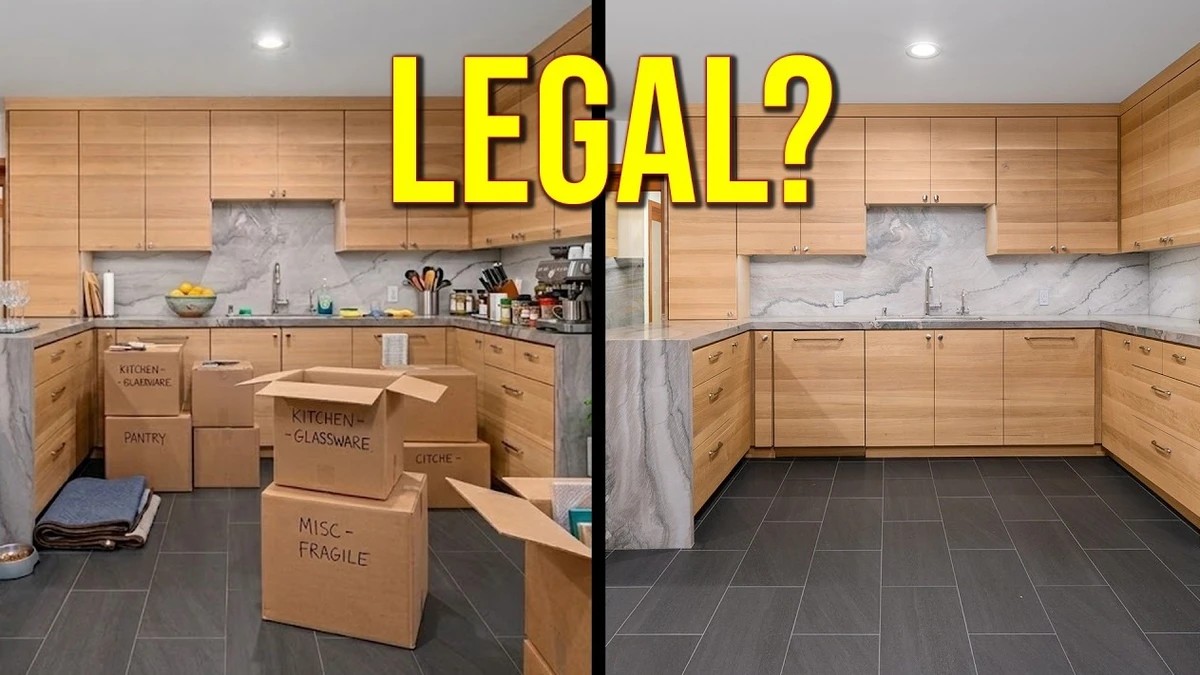
California's AB 723 put real estate photo editing under state law, and similar restrictions are now showing up in other states and in MLS guidelines across the country. If you shoot listings, the difference between a harmless cleanup and an edit that needs a disclosure, or one that isn't allowed at all, now has real consequences for you and your clients.
Much of the risk comes from the tools people reach for first. Nathan Cool explains that one-click AI editors built on generative models produce a brand-new image from your photo, which raises the odds of a changed paint color, a missing fixture, or some other altered feature. Auto adjustments in Lightroom Classic or Photoshop mostly shift tone, color, and crop, so they carry far less of that risk. Cool also tracks how the rules are moving: Arizona, Minnesota, Florida, and Wisconsin are adopting either new laws or strict MLS guidelines, and Wisconsin has a law similar to California's set to take effect in 2027. Nationally, virtual staging almost always requires some kind of disclosure.
The breakdown of what you can and can't touch is the most practical part of the video. Temporary items like cords, cables, trash cans, and small objects are generally safe to remove, including moving boxes, as long as you know what's behind them. A whole wall of boxes is a different story, since you can't be sure what the floor looks like underneath. Furniture removal sits in a gray area, and adding virtual furniture moves you firmly into disclosure territory. Sky replacement is another gray area, and some MLSs now ban it outright. On the no list are appliances, built-in light fixtures, plumbing fixtures, flooring, carpet, paint color, cracks, mold, and architectural features, all of which count as property-affecting items. Cool walks through a few more items and exceptions, including how residential listings differ from architectural and design work.
The first technique is the oldest and fastest. Cool clears a pile of leaves from an exterior shot using the spot healing brush on a new, empty layer, leaving the electrical box right next to them untouched, since removing it would cross the line. With a smaller brush, each stroke disappears when he releases the mouse, and he clears the area in about a minute. The spot healing brush even handles the edge around that box cleanly. Photoshop's AI-based remove tool would take far longer on a job like this, and the older tool tends to get overlooked now that AI is the default answer for everything.
Working on separate layers also leaves you with a record of every change. MLS boards and regulators are increasingly asking how a listing image was made, and a layered file lets you show the original exposure next to each edit if a buyer, agent, or board ever questions one. Adobe's Content Credentials, built on the open C2PA standard, push in the same direction by attaching edit history to exported files, and Photoshop can already add them. Keeping your raw files, saving layered PSDs or TIFFs, and keeping removals off the base image is a habit worth adopting even if your market has no rules yet. Once disclosure laws reach your state, that paper trail will already exist, and you won't have to rebuild your process under deadline pressure.
The second and third methods handle harder jobs. In a crowded interior, a leaning plant sits right below a birdcage chandelier, where the spot healing brush would struggle, so Cool switches to the remove tool with a couple of settings changed and a specific way of tracing the object to give Photoshop's AI enough context. The third case comes from a commercial shoot where two newly painted Porsches were still wrapped in plastic. When he asked Photoshop's generative AI to remove the plastic, it put plastic on different cars instead. His fix uses the free web version of Google Gemini with a carefully sized selection, followed by masking the result back into Photoshop, without spending any generative credits. He also covers how to talk with clients about the cost of this kind of editing and why clients who run a photo through ChatGPT themselves can end up with disclosure problems.
Cool's full Gemini workflow is in the video above.
What's Your Reaction?
 Like
0
Like
0
 Dislike
0
Dislike
0
 Love
0
Love
0
 Funny
0
Funny
0
 Wow
0
Wow
0
 Sad
0
Sad
0
 Angry
0
Angry
0












Comments (0)