

Apple iPhone Duo review: Two screens, two experiences, two thousand dollars
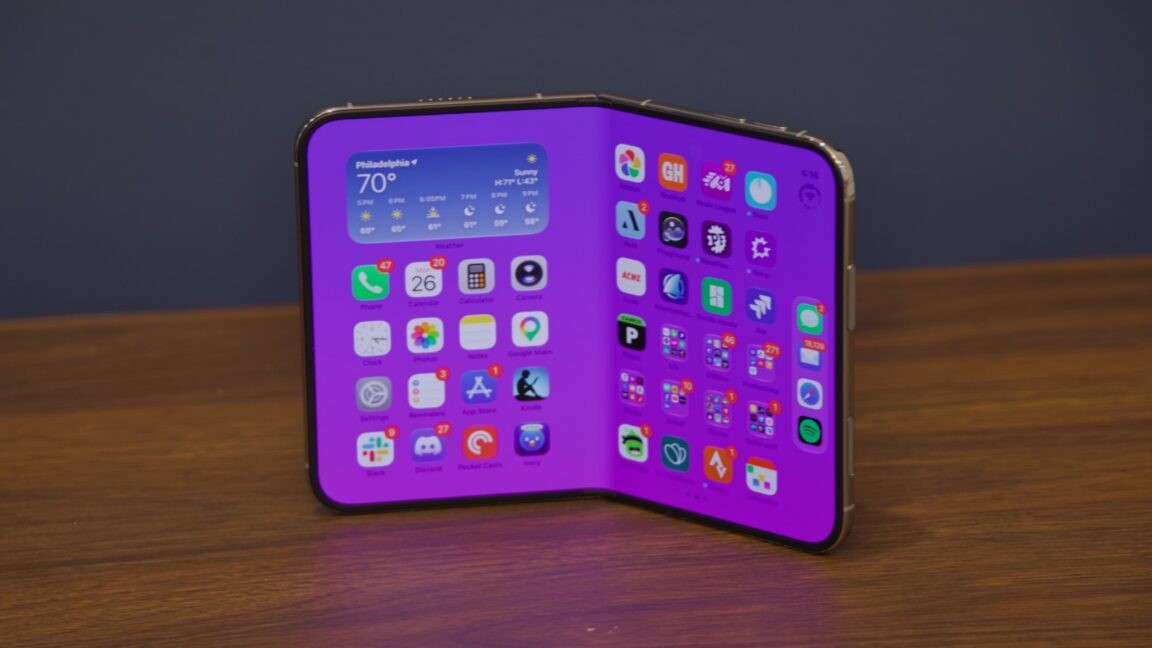
I respect Apple’s first crack at a foldable phone, but I’m not sure I like it.
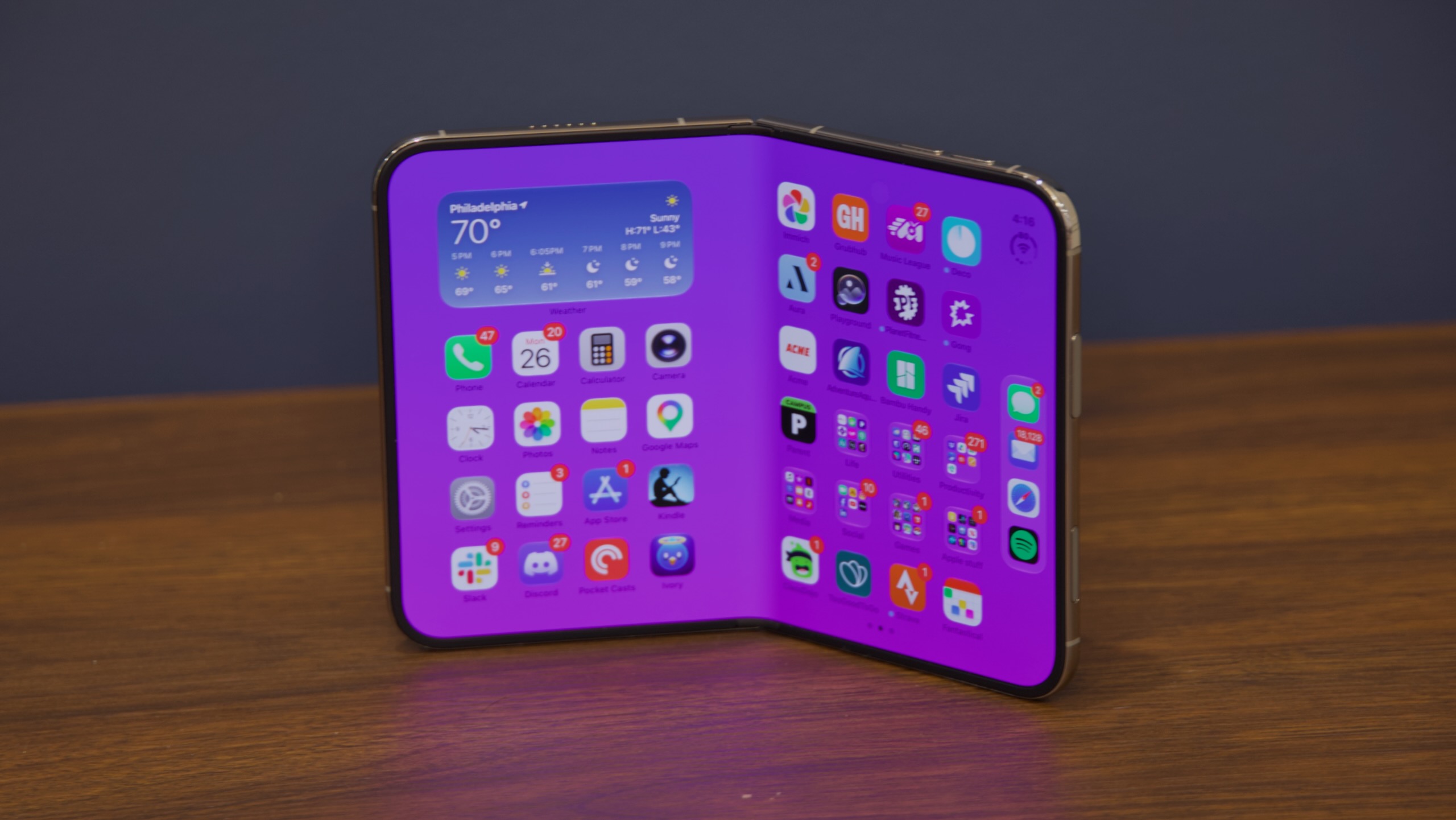
Apple's new $1,999 iPhone Duo. Credit: Andrew Cunningham
Apple's new $1,999 iPhone Duo. Credit: Andrew Cunningham
I understand the appeal of foldable phones—they let manufacturers keep expanding screen sizes while still producing devices that can reasonably fit in a pocket. In practice, though, every foldable Android phone I’ve seen in public has had a ridiculously visible seam between the two halves of the screen, often with what looks like delamination from the underlying surface, giving the display an ugly, bubbly appearance.
Back when Android phones began shipping with bigger and bigger screens and the iPhone was stuck at a miserly four inches, I was jealous. But I’ve never looked at anyone using a chunky, fragile-looking foldable phone in public and pined for Apple’s take on the idea.
Nevertheless, that take has arrived, in the form of the iPhone Duo. This $1,999-and-up foldable is the biggest change to the iPhone in years, with both hardware and software updates that dramatically change how you interact with the device.
Like most Apple products, it looks and feels solid, and Apple has managed to engineer its way around at least some of the problems that have bedeviled other foldables (in particular, it has wrangled the between-screen crease so close to invisibility that I rarely thought about it while using the phone unfolded).
But like most first-generation Apple products, it has some odd rough edges and costs more than most people will want to spend. Some aspects of its design feel like steps backward from the standard iPhone design, as exemplified by the current iPhone 17 and iPhone 18 Pro.
The result is something that is technically impressive but not always enjoyable to use. As a little iPad, it’s surprisingly good. As an iPhone, though, I struggle to think of a single way I prefer it to a regular old iPhone.
The iPhone Duo in phone mode
The iPhone Duo is the first iPhone I’ve used in a long time that comes with a learning curve. It’s the first time since 2018’s iPhone X that a hardware update has fundamentally changed how you interact with the software.
For the first day or two, I found this pretty off-putting. I kept losing track of the iPad-style button-mounted Touch ID sensor and flipping the phone around with the camera upside down. When fully opened, the phone acts like an iPad: It’s orientation-agnostic, and it will work in portrait or landscape, regardless of which end is up. But in its folded one-handed mode, the Duo still has a right-side-up and an upside-down just like any iPhone, and it took a couple of days of retraining my muscle memory before I was consistently pulling it out of my pocket and looking at it the right way without thinking about it.
When folded up, the iPhone Duo has a more compact footprint than Apple’s other phones and a screen that’s both shorter and wider. The titanium frame looks and feels a lot like last year’s iPhone Air, which plenty of people (us included) pegged as a half-step toward a foldable design. The outer screen looks and feels like a typical glassy iPhone screen, and the “back” of the phone where the camera is (the only quadrant of the phone that isn’t a screen) uses familiar-looking and -feeling Ceramic Shield glass.
Despite having a familiar-looking camera cutout and Dynamic Island on the front screen, the Duo totally lacks a Face ID scanner, which is a pretty big behavioral change following years of face-scanning phones. The Touch ID button has been migrated to the power button, iPad-style, which is in the upper-right corner of the phone when it’s folded (when unfolded, the positioning depends on which direction is “up” because the phone flips its screen orientation no matter which way you’re holding it).
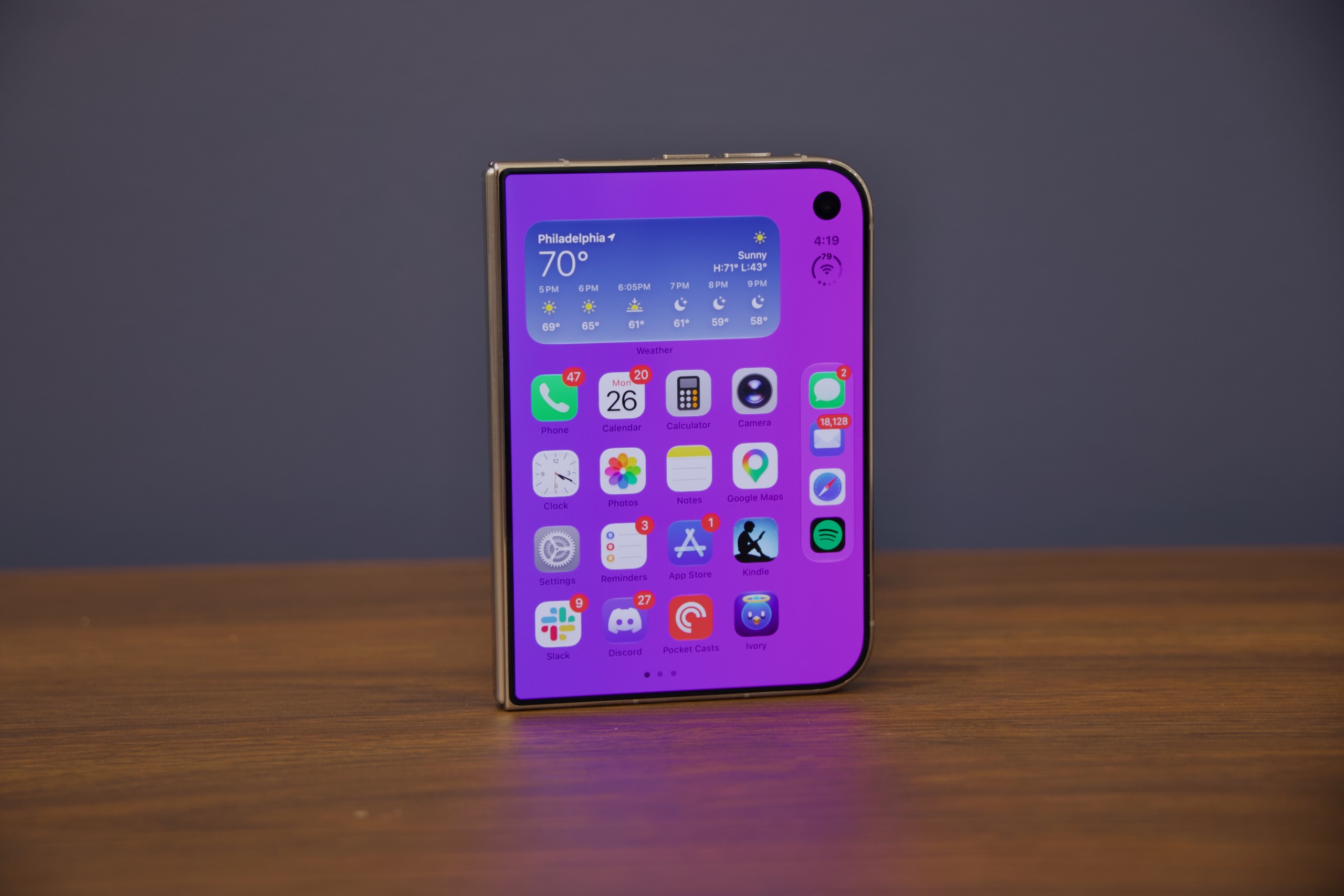
The outer screen of the iPhone Duo has a camera pinhole and Dynamic Island but no Face ID.
Credit: Andrew Cunningham
The outer screen of the iPhone Duo has a camera pinhole and Dynamic Island but no Face ID. Credit: Andrew Cunningham
In general, the Duo’s button positioning is strange. The power button’s position is… fine. It’s the only placement that makes Touch ID authentication even remotely possible with one hand, even though I felt like I was about to drop the phone every time I tried. But the volume buttons are on the top of the phone in this mode. The left button is volume down and the right button is volume up in this orientation, like on a landscape iPad, even though the volume indicator itself is a tiny bar that lives in the Dynamic Island and travels up and down vertically.
The Duo’s other physical button is the Camera Control button. I would vastly prefer it be a customizable Action Button, which I use constantly on my iPhone 17 Pro. For a phone with this many acres of edge, it feels like the Action Button should have room to exist somewhere, but it doesn’t.
That shorter, wider screen leads to the biggest and most noticeable of the iPhone Duo’s software design changes, at least in folded-phone mode: Your dock moves to the right edge of the screen, and that’s where most app controls move, too. Controls for apps that normally appear on the top or the bottom of the screen are now generally relocated to the right side of the screen, which is still something I’m still getting used to, even after nearly a week of daily use.
These side-mounted controls feel like they’re swimming upstream against almost two decades of smartphone app design—and they don’t even really solve the “lack of vertical space” problem because as soon as the iOS keyboard pops up, the viewable area still shrinks to just a few lines of text.
This right-hand navigation area also feels weirdly underutilized, given the percentage of the front screen it takes up. Your dock is there, but Apple still limits it to four icons, leaving a ton of unused space above and below it. The nav area feels too wide, with too much negative space.
In the end, I only really liked the Duo in folded-down phone mode when it was sitting on a desk, couch, or table next to my laptop, serving as a separate compact notification screen—in other words, when I was not actively holding or touching it. And this isn’t something no other phone can do; it’s just a regular phone thing that the Duo doesn’t make worse.
Lefty troubles
While folded, the Duo is fundamentally designed for right-handed use. Controls throughout iOS and Duo-optimized apps have been scooted to the screen’s right edge to make up for the loss of vertical screen area. The screen is wide enough that any attempt by lefties to reach across with their thumbs to tab that part of the screen will be difficult to impossible, and I say this as someone with fairly large hands.
The Touch ID sensor—integrated, iPad-style, into the phone’s long, flat power button—is also mounted on the right side. Even if iOS did flip around the other way when you hold the Duo with the rounded edge on the left (and it doesn’t, to be clear), the camera would then be on the bottom of the phone, blocked by your fingers.
But even as a right-hander, I don’t find the Duo to be especially comfortable to use one-handed. Sure, I can reach everything, but the phone is so heavy and thick that the standard “rest the phone on my pinkie and use it with my thumb” move is fatiguing. A left-handed friend who held and tested the Duo found it extremely uncomfortable, particularly the stretch you need to do to hit any app icon in the side-mounted dock.
The iPhone Duo as a tablet
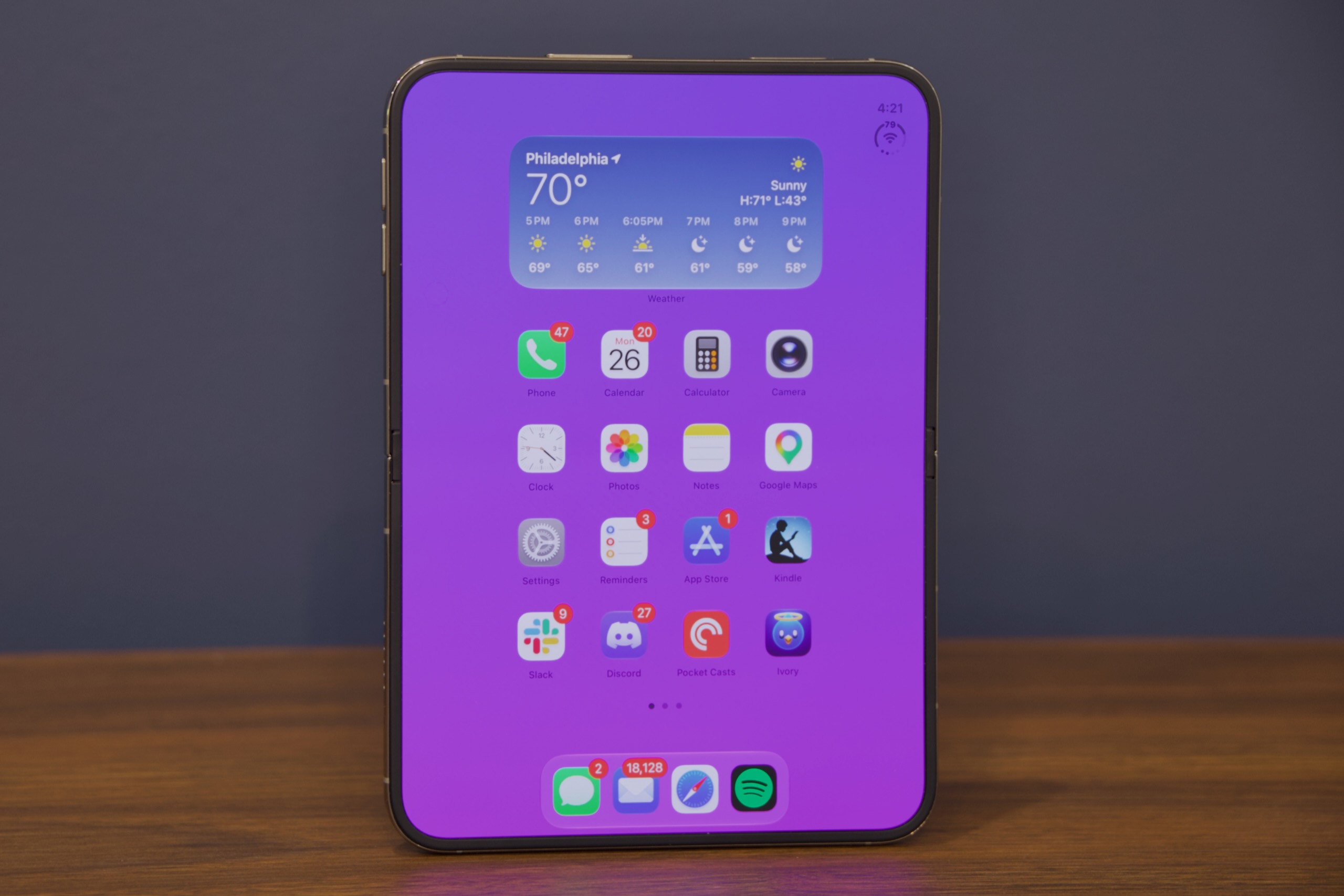
I much preferred using the Duo as a small iPad.
Credit: Andrew Cunningham
I much preferred using the Duo as a small iPad. Credit: Andrew Cunningham
As frustrating as the Duo is when it’s folded, I genuinely enjoy it when it’s unfolded. Think of an iPad Nano, and you’ll be pretty close to what the experience is.
To answer the biggest question first: Yes, you can see and feel the seam between the screens if you’re looking for it. But most of the time, if you’re just holding it and watching video or reading a webpage and using a thumb to scroll in the corner of the screen, you just don’t notice it. Apple has gotten very close to making it invisible.
Frankly, I’m much more bothered by the under-screen camera, which is visible pretty much constantly. The seam is visible from some angles if you go looking for them. The under-screen camera pinhole is only invisible from some angles if you go looking for it. It’s out of the way enough not to be experience-ruining, but I did find it distracting, and I don’t know that I find it to be a net improvement over the actual-pinhole-with-Dynamic-Island solution that Apple has used for the last few iPhone generations.
When unfolded, the Duo’s screen expands from a squat 5.4 inches to a more comfortable 7.6 inches, which isn’t so far off from the new iPad mini’s 8.5-inch screen. The dock is still limited to four app icons, like a regular iPhone, but it moves back to a familiar place at the bottom of the screen, and apps have more room to breathe.
In landscape, apps usually retain the same side-mounted controls you see on the phone’s front screen, but when you pivot to portrait mode, they revert to more familiar positioning at the top and bottom of the screen—portrait mode looks pretty much like an iPad, while landscape mode looks more like a pair of iPhone home screens next to each other (more on that in a minute).
The inner screen has a matte nano-texture finish, which shares a name with the technology used in some Macs and iPads. But Apple says that both the materials used and the actual nano-texture pattern are both different, changes that were necessitated by the fact that this is a foldable phone and not an inert glass slab. A slightly raised rim around the edge of the screen keeps it from resting directly on a table or desk and leaves room for tiny bits of dust or crud to get trapped without grinding into the screen. If the inner screen does get damaged, this cover layer can apparently be removed and replaced without too much trouble.
I find the screen mostly pleasant to look at and interact with, and I really appreciate the lack of glare. My only gripes are that it picks up smudges that are slightly harder to wipe off than they are on regular glass and that contrast (particularly for dark/black elements) is visibly worse than on the front glassy screen. The inner screen does use OLED display panels, the same as the front screen, but this specific benefit of OLED is missing from the inner screen.
While an unfolded Duo is decidedly iPad-like, it’s still running iOS, not iPadOS, and Apple has gone back to the drawing board for yet another take on split-screen iDevice multitasking. What the company landed on is most similar to the iPad’s old Split View interface, but with some limitations and benefits that help it feel somewhat more at home on the Duo.
To enter split-screen multitasking, open an app and swipe up from the bottom of the screen, then drag the window to the areas that appear on the left and right of the screen. Once you’ve anchored an app in this way, the unused half of the screen simply becomes a standard iPhone home screen, with all your icons, widgets, and the side-mounted dock (which can appear on the left side of the screen when the phone is unfolded).
Launch another app from that home screen, and it will take up the other half of the screen. Both apps can be used and dismissed independently, as though you were using two separate iPhones next to each other; you can even launch the same app twice if you really want to.
The center of the screen, where the fold is, is mostly treated as a dead zone by default, but drag it one way or the other to resize one of the apps to full screen, and tap the divider to lock two apps together so they always appear and are dismissed in tandem. If you close the phone’s screen, what you were doing on the right half of the inner screen is preserved on the outer screen, giving the transition a seamless feel.
The hardware’s design makes sense when you look at multitasking mode. Half of an unfolded iPhone Duo is exactly the same as using the iPhone Duo in its folded-down phone mode. The side-nav is pinned to the left side of the screen instead of the right side, but it otherwise feels very similar to having a pair of iPhones you can use in tandem (I would say “two iPhones for the price of one,” but that doesn’t work when the base Duo model is even more expensive than buying two regular iPhones).
Third-party apps need to be updated in one way or another to support the Duo, with baseline support granted at least partly for “free” to apps that target the Xcode 27.1 SDK. Apps that haven’t been updated look mostly OK on the outer screen, since its strip of usable space is roughly the same width as a regular iPhone. Apps that haven’t been updated look like iPhone apps running on an iPad when the screen is unfolded, though: little phone-sized windows with black borders all around, with an option to expand them so they take up the entire screen.
I’ve been surprised how many apps have added Duo support in the few days since the device came out, given that Apple didn’t even make these tools available to developers until just a few weeks ago. But early adopters will run into tons of apps that don’t know what to make of the Duo’s larger inner screen, and I suspect it will be a while before you can assume that any given app will work properly on it.
The iPhone Duo in between
The Duo can be a phone. The Duo can be a tablet. But it also supports several liminal states that exist somewhere in between the two (nomenclature mine):
- A “tent mode,” where the phone functions as its own stand and the outer screen shifts to one of several dedicated StandBy views.
- A sort of “bent tablet” mode, where content scoots away from the middle of the screen and treats the hinge area as a dead zone.
- A “laptop/clamshell” mode, with one half of the inner screen lying flat on a table and the other half sticking up. The device’s hinge will hold its position at almost any angle rather than opening to a few specific hinge points, so how you use it and the angle you choose is pretty much up to you.
Not all apps that support the Duo do different things in every one of its modes, but apps can treat them all as their own unique views if they want to. (I asked a developer from the New York Times Cooking team at an Apple-hosted developer showcase how many distinct views they needed to support to cover every possible position that an app can appear in on the Duo. “Seven. It’s seven,” he replied without hesitation.)
But we’ve already seen a few examples of developers doing things that wouldn’t be at home on a regular iPhone or an iPad. The Headroom app uses a remote desktop connection to connect to a remote Mac and simulate a tiny MacBook; the Delta emulator app has been updated with a Nintendo DS mode; and the Tiny Computers app will change it into arguably copyright-safe facsimiles of distinctive classic computers. I can’t vouch for the quality of any of these apps, and Headroom and Tiny Computers in particular have a distinct air of “quickly vibe-coded to catch the wave of early adopter interest” to them. But the ideas are interesting, and they wouldn’t work as well on different hardware.
About those cases
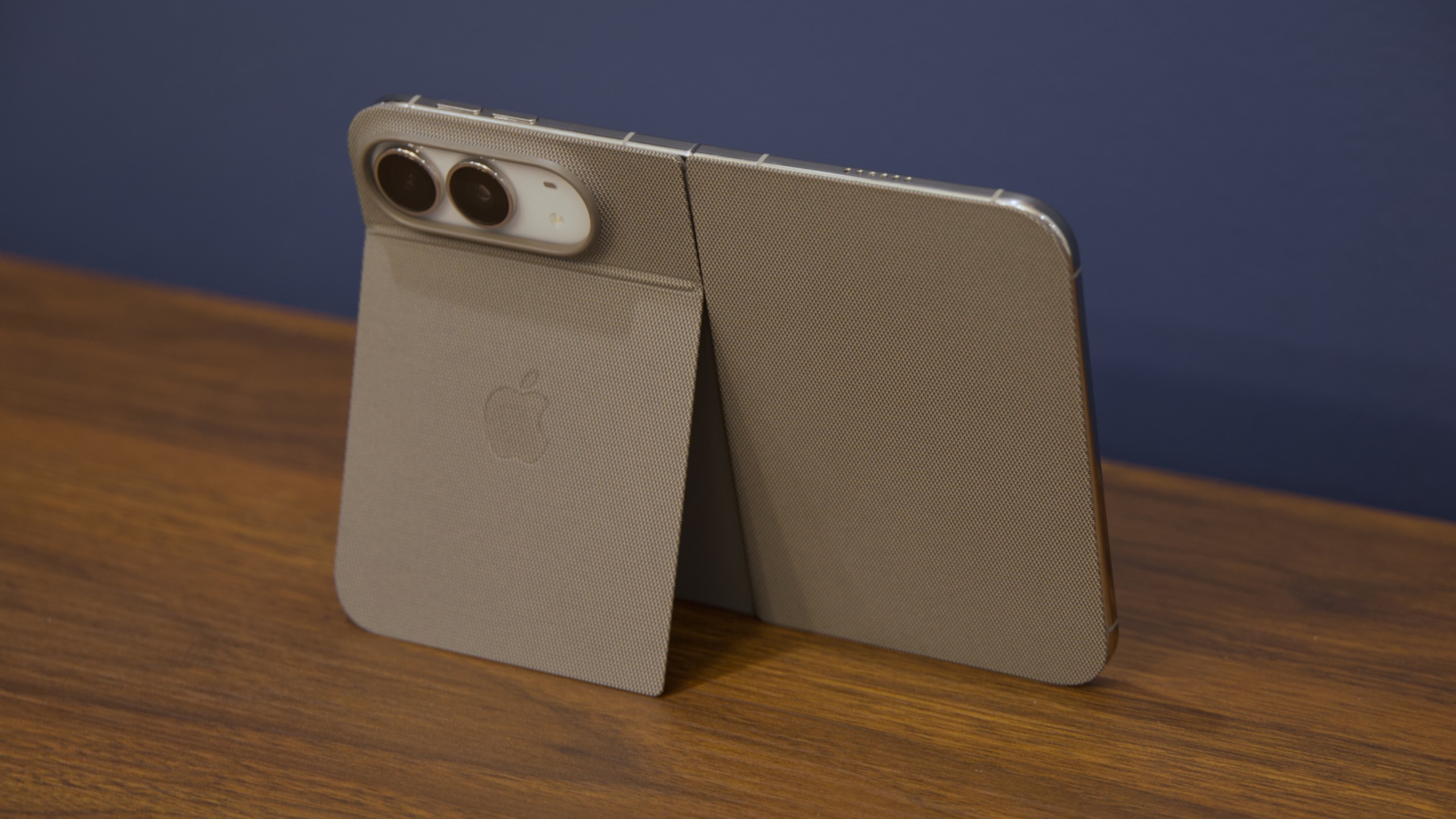
The iPhone Duo Folio case and its kickstand.
Credit: Andrew Cunningham
The iPhone Duo Folio case and its kickstand. Credit: Andrew Cunningham
Along with the review unit, Apple included a $79 iPhone Duo Case and a $129 iPhone Duo Folio with Kickstand. The case provides a basic level of protection without really changing anything about how the Duo works (though the fact that it sticks to the phone using adhesive raises concerns about its longevity).
The Folio is more interesting. It attaches with magnets, and it has a retractable strip between its two halves that stretches to cover the hinge when the phone is folded and retreats into the case when it’s opened. The kickstand that props the phone up in tablet mode is genuinely useful; in phone mode, it solves one problem while creating another.
Here’s the problem it solves: By default, if you’re using the Duo in tablet mode and you fold it closed, the phone transitions your current app to the outer screen rather than putting the phone to sleep. Flipping the Folio cover open and closed does put the phone to sleep and wake it up. It makes the question of “is my phone awake or isn’t it” easier to answer.
The problem it creates is that this cover is opaque, and when you fold it around to the back of the phone, it covers both the camera and the flashlight. These are two things I regularly need fast access to when I pull my phone out of my pocket, and the Folio case asks you to leave the cover flopping around, remove the case temporarily, or snap the phone open into tablet mode instead of using it in phone mode.
Internals and performance
The chip and the camera in the iPhone Duo are way less interesting than the brand-new hardware and software changes, so apologies if this section feels like an afterthought. But it kind of is.
The Apple A20 Pro is Apple’s first 2 nm phone chip, and its second 2 nm chip overall after the M6 that debuted in the new Mac mini. It still uses two large CPU cores and four efficiency cores, the same as the last few generations of A-series chips, but it’s the first phone chip to include “super” cores instead of performance cores. Unlike the M6, which ships all three kinds of cores, the A20 Pro just uses super and efficiency cores.
The A20 Pro does ship with 7 GPU cores, up from the 5-6 cores in the A19 Pro, plus Apple’s upgraded 32-core Neural Engine (Apple usually refers to this as a “dual Neural Engine” with 16 cores each). The A20 Pro still includes 12GB of RAM, the same as the A19 Pro (both upgraded from the 8GB of RAM in the A18 Pro—either chip would be a solid upgrade option for a future MacBook Neo).
In the benchmarks I ran, Apple’s performance promises for the A20 Pro end up in the ballpark of the figures Apple has published: around 20 to 30 percent better single- and multi-core CPU performance compared to A19 Pro, and between 40 and 50 percent faster GPU performance (the 73 percent performance improvement for the 3DMark Wild Life Extreme test is an outlier). If you own any iPhone made within the last three or four years, the chip isn’t the reason to buy the phone, but it’s a respectable upgrade.
Cameras
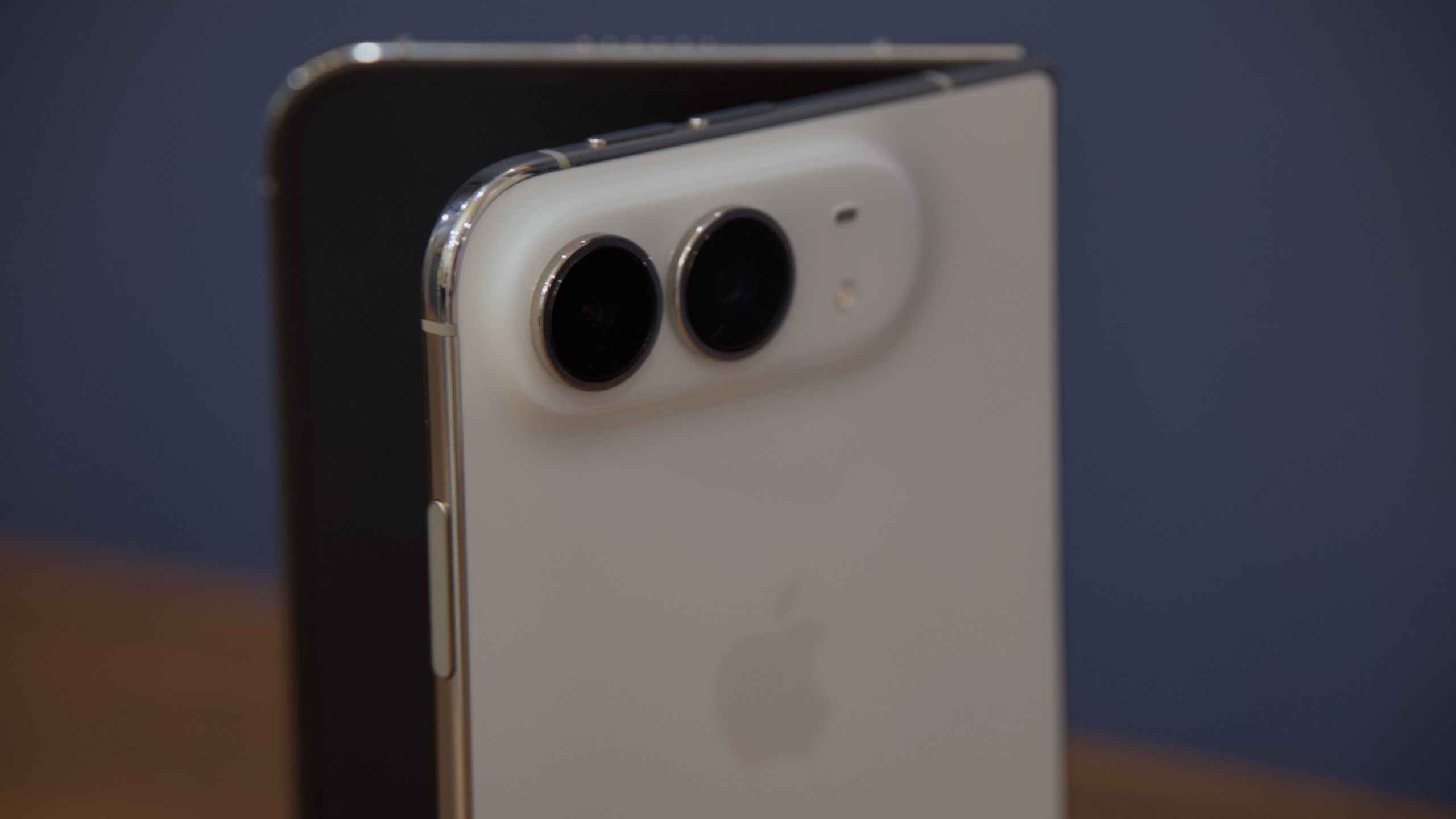
The iPhone Duo’s camera system is roughly equivalent to the one in the basic iPhone, not the Pro.
Credit: Andrew Cunningham
The iPhone Duo’s camera system is roughly equivalent to the one in the basic iPhone, not the Pro. Credit: Andrew Cunningham
The Duo’s camera system is fine. Like the iPhone Air, this hardware is priced well into iPhone Pro territory while lacking the camera system that makes the Pro my default iPhone choice.
The Duo uses the same basic camera configuration as the basic iPhone. It has one 48 MP main sensor and one 48 MP ultrawide sensor, both of which enable a 2x optical zoom feature by cropping a 12 MP patch out of the middle. (Apple’s tech specs page also claims that the ultrawide lens can zoom out by 2x, giving it a “4x optical-quality zoom range,” which feels hand-wavy even if you accept “optical-quality zoom” as an accurate description of what Apple’s cameras are doing).
What keeps me away from the standard iPhone these days is that I find the ultrawide lens to be by far the least useful one Apple ships and the telephoto lens to be the most useful. The Duo’s camera asks you to make the same kind of downgrade from a Pro iPhone, though it at least improves on the one-camera setups Apple ships in the iPhone 17e and iPhone Air.
Once you get past the lack of a telephoto lens, the Duo’s camera system is perfectly competent. Apple’s year-to-year camera quality improvements generally happen around the margins—a little less noise here, a little better low-light performance there—and that’s what I observed while comparing it to my iPhone 17 Pro. To my eye, the differences between the 17 Pro and Duo in good lighting were minimal, but the Duo did capture marginally better detail in low light (see the cat pictures). Of course, when you try comparing the Duo’s digitally zoomed 4x and 8x photos to the 17 Pro’s telephoto lens, there’s zero contest.
iPhone 17 Pro, main camera. Andrew Cunningham
iPhone Duo, main camera. Andrew Cunningham
The front cameras, like Face ID, are another casualty of the Duo’s design changes. There are technically two front-facing cameras: a typical-ish pinhole cutout on the front of the outer screen and the one hidden underneath the inner screen (as we discussed before, “hidden” is generous; the camera is almost always visible underneath whatever you’re looking at).
The outer camera is lower-resolution than most other iPhones (12 MP, down from 18 MP), but it’s in the ballpark when you’re on a FaceTime call or taking a selfie. The under-screen inner camera is noticeably worse, capturing noisier video and photos that look excessively digitally sharpened to try to cover for its reduced quality and lack of detail. Apple doesn’t list a resolution for the inner camera, but its 2432 x 1824 resolution works out to around 4.4 megapixels, just one-third the resolution of the outer camera.
That the inner camera is so much worse than the outer camera is made even more obvious by the fact that the inner screen is twice as large; when you fire up a FaceTime call, you’re looking at a lower-resolution image on a larger screen. This isn’t a dealbreaker; the bi-directional FaceTime call that shows the person on the other end of the line on both the outer and inner screens remains genuinely cool, even with the potato-esque quality of the inner camera. But it’s yet another place where the core/traditional iPhone experience is degraded to make room for the Duo’s hero features.
Wrapping folding things up
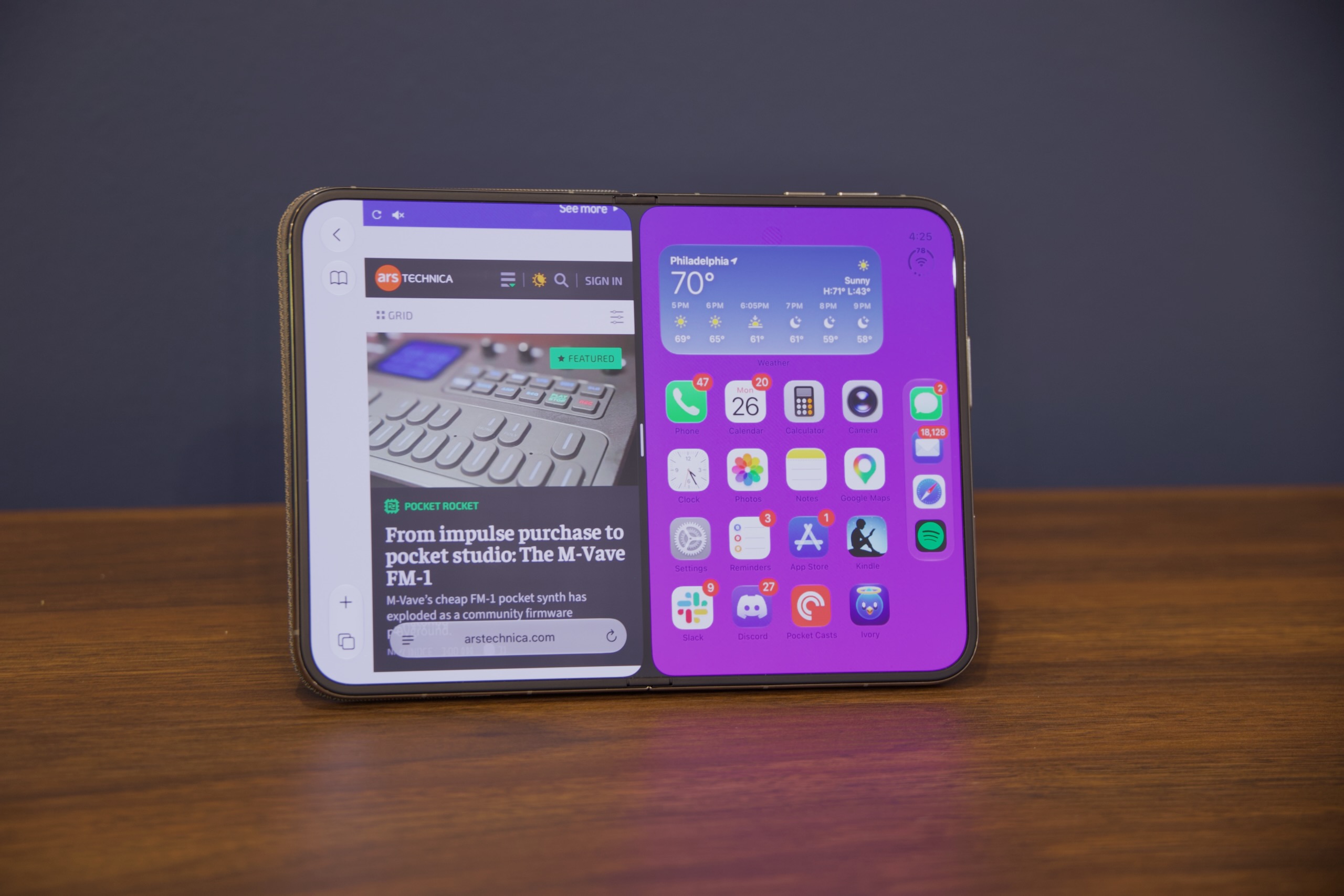
The iPhone Duo.
Credit: Andrew Cunningham
The iPhone Duo. Credit: Andrew Cunningham
In some ways, foldable phones remind me of the PC industry’s push toward convertible tablet PCs in the early 2010s. In the wake of Apple’s original iPad, Microsoft and its partners clearly thought that they had to figure out tablets or get left behind, but even the designs with staying power (mainly Microsoft’s Surface and Lenovo’s Yoga) aren’t as good at being laptops as a purpose-built laptop or as good at being tablets as a purpose-built tablet.
For me, the iPhone Duo straddles a similar line between the iPhone and the iPad. As a regular one-handed iPhone, it feels deeply compromised—too thick and heavy to comfortably hold in one hand for long, no Face ID, no action button, and power/volume/camera button positioning that feels like it was dictated by “where the buttons can physically fit on the phone” rather than ergonomics. It costs nearly twice as much as the iPhone Pro but has an inferior camera system.
I do really like the Duo as a Kindle-sized iPad. But if that’s what I want, I can buy something like it for less money without saddling myself with a regular phone I don’t particularly like using.
I see the promise of the Duo. It feels well-built—some users have had problems with screen breakage, but it’s not something we ran into. Its hardware and software are cleverly designed. It mostly solves the visible-seam problem that most Android foldables come with. An updated version of the Duo with Face ID support would be just about the best possible version of this form factor, given the limits of battery technology and physics. But for me personally—and for many happy iPhone users—it requires too many compromises to enable features I don’t want badly enough.
The good
- A premium look and feel with a satisfying hinge. We didn’t encounter any issues with screen breakage.
- Seam between screens is functionally invisible most of the time, a big step up from most other foldables.
- Thoughtfully designed multitasking.
- Comfortable to hold and use when unfolded.
- Apps are being updated to support it reasonably quickly.
- Characteristically competent camera system.
- Characteristically excellent performance, thanks to the Apple A20 Pro chip.
The bad
- $2,000 entry price. That’s more than a pair of iPhone 17s and the same price as the cheapest MacBook Pro.
- Outer screen feels cramped.
- Camera system isn’t as good as the iPhone Pro’s.
- Visible pinhole camera on the inner screen is sometimes distracting.
- Matte finish on inner screen shows smudges and makes black levels look less black.
- Tacked-on Apple Pencil support.
- Fundamentally right-aligned in a way that may be frustrating for lefties.
The ugly
- The lack of Face ID and the awkward positioning of the Touch ID button is a small speed bump, but it’s one you’ll hit nearly every time you interact with the phone.

Andrew is a Senior Technology Reporter at Ars Technica, with a focus on consumer tech including computer hardware and in-depth reviews of operating systems like Windows and macOS. Andrew lives in Philadelphia and co-hosts a weekly book podcast called Overdue.
What's Your Reaction?
 Like
0
Like
0
 Dislike
0
Dislike
0
 Love
0
Love
0
 Funny
0
Funny
0
 Wow
0
Wow
0
 Sad
0
Sad
0
 Angry
0
Angry
0








Comments (0)