

Dell XPS 13 review: The first budget laptop to rival Neo raises the bar for all PCs

pros and cons
Pros
- Gorgeous build.
- Excellent battery.
- Display punches above its price point.
- Very thin and light.
Cons
- 8GB of RAM is limiting.
- Only two USB-C ports.
Follow ZDNET: Add us as a preferred source on Google.
Dell's new XPS 13 dropped with a singular purpose in mind: compete with (and take down) the MacBook Neo. Does it do that? It depends. But it absolutely does raise the bar for "budget" Windows laptops -- something PC makers realized they could no longer avoid post-Neo.
Perhaps, then, the question is not so much about the Dell XPS 13's relationship to Apple's most affordable MacBook and more about how it relates to other inexpensive Windows devices. Seen in that light, the XPS 13 is the best budget Windows laptop on the market right now.
Also: Dell's new XPS 13 is a MacBook Neo rival that costs $599 and retains premium features
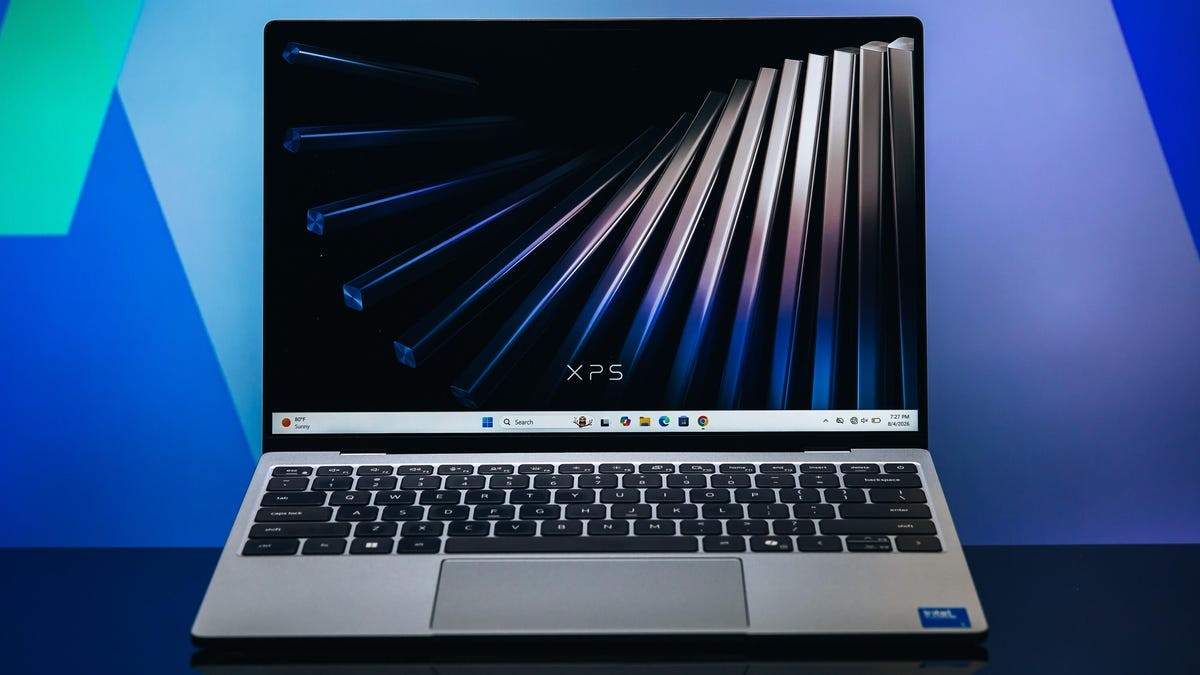
That's not hyperbole. The XPS 13 would be a fantastic device even if it weren't considered "budget" -- it's exceedingly thin and light, has an airtight build with no cheap-feeling components, and the keyboard, trackpad, and display are not just acceptable, they're quite good.
Best laptop deals of the week
Deals are selected by the CNET Group commerce team, and may be unrelated to this article.
Build and design
Review score: 4/5
The reason the XPS 13 is such a home run is simple: it's a great laptop on its own, regardless of any justification of its price point, position in the ecosystem, or its "mission" to dethrone the Neo. That said, if you had given me this laptop a year or two ago and asked me to guess the price, there's no way in hell I would have said $699.
Its origin story might begin, then, with Dell's veritable mea culpa ahead of CES this year, when company execs got on stage and admitted their questionable Pro/Plus/Premium branding decisions didn't actually pay off financially, pledging to bring back the XPS and committing to making more accessible (read: cheaper) products.
Also: Framework Laptop 13 Pro review: Plenty premium, but pummeled by RAM crisis
The XPS 13 is a direct result of that approach: an affordable laptop that adheres to Dell's ethos to "make no sacrifices" in build or construction. And it comes pretty close. The 13.4-inch IPS display looks great at 120Hz refresh and 500 nits of brightness. It runs a 2.5K (2560 x 1600) resolution and has a matte finish that resists glare. The display is also sufficiently vibrant, covering 100% of the DCI-P3 color spectrum, and even supports touch.
For comparison, the screen on the XPS is nearly half an inch bigger than the Neo's, which is saying something, since the XPS 13 is both lighter than the Neo (2.2 pounds compared to 2.7 pounds) and has a slightly smaller overall footprint.
Dell XPS 13 (left) vs. the MacBook Neo (right).
The other external elements keep up with the display. The trackpad doesn't feel cheap and is comparatively large and responsive. I really like the keyboard as well, as it has just enough resistance in the 0.8 mm key travel to feel responsive and tactile, even after long hours typing. In an effort to one-up the Neo, the keyboard is fully backlit and, aligning with its student user demo, is completely silent.
In terms of ports, things are minimal. You've got two USB-C (10Gbps) ports -- one on each side -- that both support power delivery and DisplayPort functionality. I wouldn't exactly say this approach is surprising, given that even the high-end XPS 14 only has one more USB-C port. It's also worth noting that both support a new form of Kensington lock slots integrated into the ports themselves.
Hardware and performance
Review score: 3/5
Here's where things start to get interesting. Up until now, I've had nothing but praise for the XPS 13, but the processor and hardware are where the trade-offs become evident. The computer features an Intel Core 5 or 7 processor (Series 3) from Intel's Wildcat Lake line of chips, designed specifically for low-cost, battery-efficient devices with limited performance. The XPS 13 is limited in raw performance (particularly with the low-end memory configuration): either 8GB, 16GB, or 32GB of RAM.
Unfortunately, 8GB of RAM on a PC just isn't the same as 8GB of RAM on a Mac. We took a closer look at this provision earlier this year, and concluded that 16GB of RAM is the ideal amount for most people. So, does 8GB of RAM in Windows 11 work? Yes, but just barely.
Also: MacBook Neo review: My biggest concern with Apple's near-perfect budget laptop
It's not that things are (always) bogged down and slow; it's that Windows tends to get... funny when it's at its limits. UI components glitch or act strangely, apps close randomly, don't open at all, or there's just a few seconds of delay between input and execution. All of these issues are, essentially, just normal Windows behavior at 8GB, and no critique of Dell's machine.
On the other hand, the computer is fine for what it's designed: working in the browser, hopping between different tabs and Microsoft 365 docs -- even hitting some (let me stress: casual) games in your downtime. This is a laptop (like the Neo) designed for basic tasks, and as long as the user understands that focus, it's all good. I used the XPS 13 as my main driver for over a week doing these sorts of things and had no problems other than occasional patience issues while multitasking in Windows.
So, what's the limit? I opened a bunch of tabs on Google Chrome, and once I got above 30, things started to become noticeably restrictive. This point is when you start to see significant delays in actions: navigating the UI, clicking the Start menu, or alt + tabbing between apps. My advice? Keep it lean. You probably don't need 38 tabs open anyway. Instead, use reading lists and favorites; they're incredibly useful in Chrome.
The XPS 13 with 8GB of RAM is just not as snappy as the Neo with the same amount of memory, because it's ultimately hamstrung by Windows. The Neo is higher-performing on the low end, but the XPS goes up to 16GB -- bringing with it a potentially significant jump up in power (and running you $899). The Neo caps out at 8GB.
Bang for buck
Review score: 4/5
The XPS 13 nails the value score. Dell made a PC that hits all the right notes to create a true XPS experience, but with trade-offs that make sense. My biggest issue, however -- and this is my critique of the Neo as well -- is concern for the device's longevity over time. Yes, 8GB of RAM in Windows feels mostly OK on a brand-new laptop, but how will it feel in two years or five years?
Also: Dell XPS 14 (2026) review: A Windows laptop I wouldn't mind returning to from Mac
The same can be said for the physical build, which doesn't feel cheap or disposable, but is very thin and light, leading me to wonder about its durability after a barrage of inevitable bumps, drops, and falls on campus. These two things together point to a laptop that might not have the lasting power of a flagship XPS, but also comes down to how it's treated.
ZDNET's buying advice
The 2026 Dell XPS 13 is one of the best Neo competitors on the market. Dell succeeded in countering Apple's affordable MacBook with a well-designed device that feels distinctly premium and punches above its price point -- even if using lower-end configurations is more punishing in Windows than MacOS.
Does it dethrone the MacBook Neo? No way. But it is one of the best Windows PCs in this price range, and absolutely raises the bar for competing "budget" devices. Sure, there are other PCs in this price range that offer better performance -- take the Acer Aspire 14 AI for example, a solid budget laptop and personal pick -- but the XPS 13 is just such an elegant statement (and its display is so much better) that it's an easy sell.
Why the Dell XPS 13 gets an Editors' Choice Award
The Dell XPS 13 raises the bar for budget Windows PCs by bringing a solid build, nice display, and good battery to the $699 price point. Dell succeeded in two respects: countering Apple's widely popular budget MacBook, and following up on its claims of more accessible products.
What's Your Reaction?
 Like
0
Like
0
 Dislike
0
Dislike
0
 Love
0
Love
0
 Funny
0
Funny
0
 Wow
0
Wow
0
 Sad
0
Sad
0
 Angry
0
Angry
0








Comments (0)