

DxO Releases PhotoLab 10 With AI Add-Ons, Masking, and Color Grading Updates
DxO has rolled out PhotoLab 10, the latest version of its chief photo-editing program, focusing much of it on adding features that lean more on RAW images and AI-driven masking. These features aim to plug gaps left by previous versions while also adding new elements for a tighter workflow.
Part of that also includes integrating with Affinity by handing over images for pixel-level work, like retouching, compositing, and fine detail manipulation. More may come out of this collaboration, along with talk of building a bridge or two for Adobe workflows.
Masking Adds Depth and More
The Depth Mask is a new tool within the local adjustment palette rather than tucked away in a hidden submenu. Activating it builds a depth map of the scene that you can adjust with a slider to isolate a specific “band” of distance. It can be tight (sticking to a specific plane) or broad (applicable to everything behind a set point).
A feathering option applies smooth transitions between the masked area and the rest of the image, so in cases where, for instance, natural sunlight hits a specific part of the scene, edits can be precise by selecting that zone based on perceived depth. AI handles the initial selection because it measures natural depth, but tweaking it beyond that is a manual exercise.
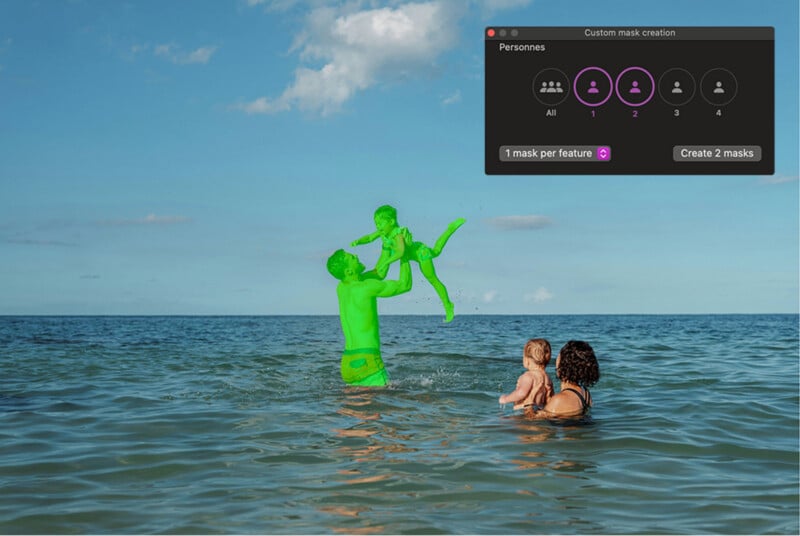
Similarly, AI masking also changes how it handles people in an image. In prior versions, selecting people applied a mask to everyone in frame as a group. PhotoLab 10 now sees individuals as separate subjects, making it much easier to apply a sub-mask on one or multiple people all at once.
Faces also get their own much-needed level of granularity. It’s now possible to isolate eyes (iris, pupil, sclera), teeth, facial hair, face skin, and lips, alongside the existing list of sky, subject, background, people, animals, flowers, and vehicles as AI Mask categories.
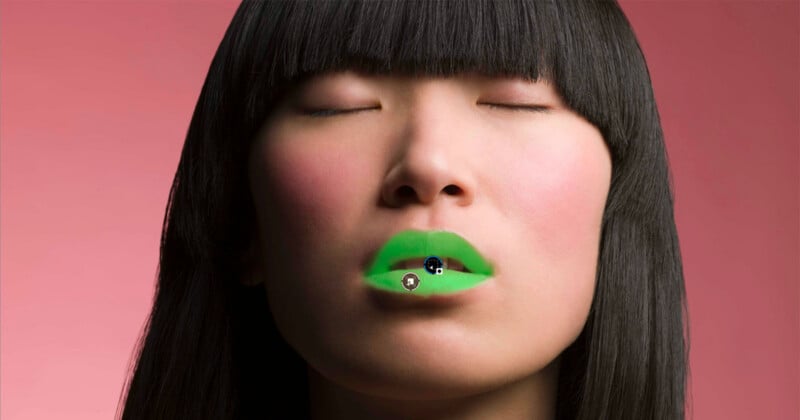
However, face segmentation seems to only apply to human faces, not animals, so these masks don’t latch on the same way when capturing pets or wildlife. You can select multiple animals as subjects, but you must drag a manual selection box with the Eye Mask tool to target their eyes. Moreover, it also doesn’t seem to work with items within the other categories, so the AI masking doesn’t isolate, say, headlights on a car or windows in a home real estate shot, for example.
Other variables may apply with people as well, like longer beards tripping up the AI mask, or color blends between foreground and background potentially causing some bleed or confusion. DxO says it is working to improve the accuracy but sees it as a big step forward for the software.
In any case, processing is no longer deferred, meaning the software doesn’t pause to process the image until you explicitly click the AI masking button to keep the flow smooth. All AI data is retained once it’s processed, so subsequent masks don’t require re-processing. If you crop an image and inadvertently remove an element that was part of an active AI mask, a warning triangle appears to alert you.
New Controls for Color and Local Adjustments
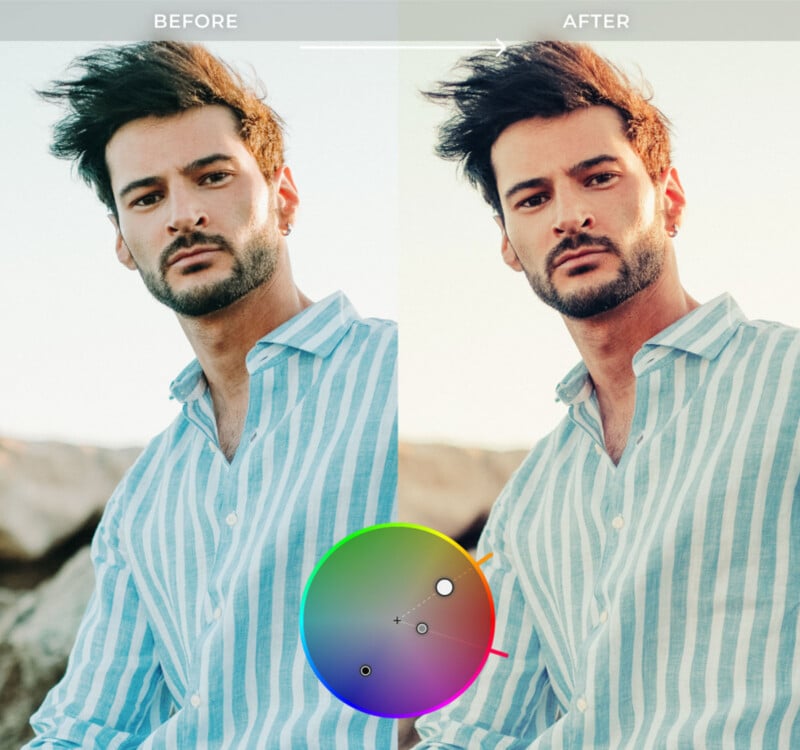
Color grading gets something of a new look by way of a single hue wheel that handles all adjustments: shadows, midtones, highlights, and global adjustments. Adjustments preview in real time, but more importantly, it’s easy to save custom presets. A “Move All” shortcut takes all three tone pickers simultaneously to preserve the saturation and luminance initially created, negating the need to re-adjust each wheel individually.
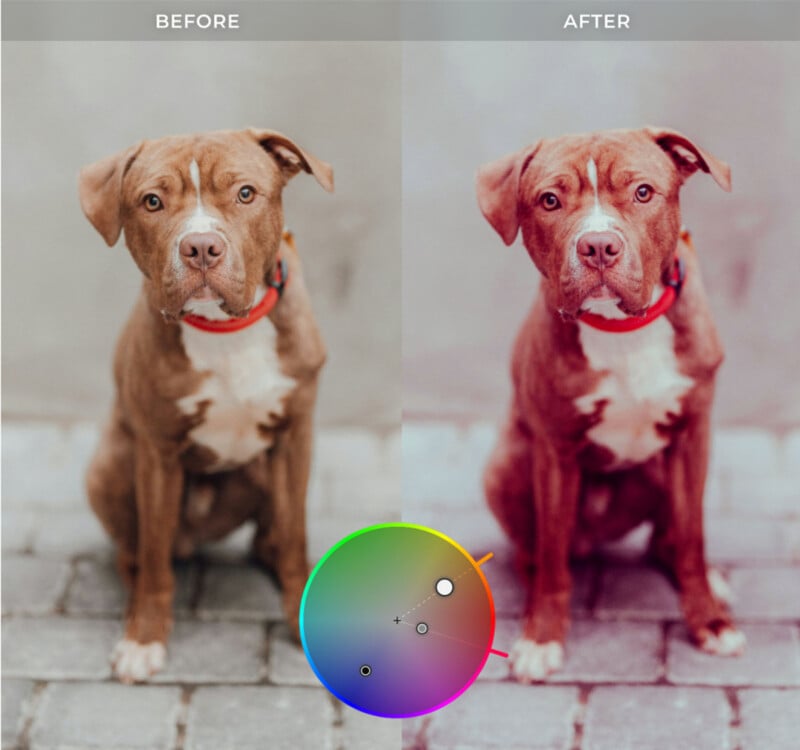
DxO’s U Point technology now merges with brush-based workflows. The Control Brush lets you brush over a zone and then use a picker to define the color or luminance range within that stroke. Using a negative brush, you can clean up the selection and refine it.
Also, DxO no longer restricts control points to circles; drag the edge to create an ellipse. Move the cursor outside the lines of the box and a rotation handle appears. Holding Command/Alt while dragging an edge resizes the shape while keeping the center point fixed. Hold Shift and the shape can revert back to a circle. These become useful for combining or subtracting masks through any combination of control points, lines, and brushes to increase precision.
Crop as Shot is a newer feature that sticks to in-camera aspect ratios (e.g., 1:1, 16:9) for RAW files without applying any crop. You can always change it yourself, but the gist is that the software goes with the original shooting intent. AI Sensor Dust Removal looks for sensor dust and replaces it using context-aware fill from the surrounding area. DxO says this isn’t an AI feature, just offline image analysis not unlike the healing brush in Photoshop.
PhotoLab 10 also offers no upgrade in noise reduction. It continues to use the same technology as PureRAW 6.
Integrations and Migrations
The biggest external element is the ability to export to external apps like Affinity. The idea is for a “roundtrip” workflow in moving images between the two apps without leaving the DxO environment. To use it, you would need to add the Affinity button to the interface (Settings->Process Tab->Affinity), which would go where other export and Nik Collection icons generally do. Making edits there saves back to the original file, appearing alongside the original in PhotoLab for easy comparison.
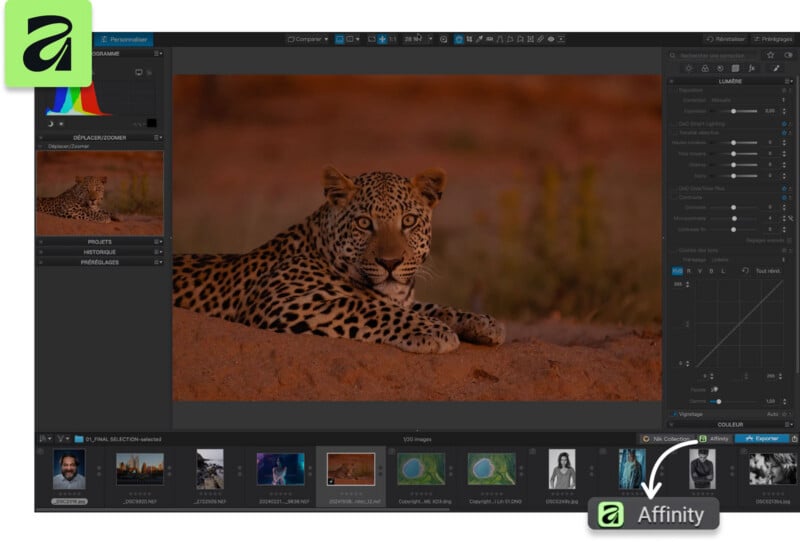
As for Lightroom, nothing really changes on that front — including no direct preset import yet. DxO reps say a project is “underway” to enable some form of converting Lightroom presets into PhotoLab presets. Custom shortcuts (including Lightroom mapping) are also apparently on the roadmap.
One limitation affecting Mac users is with folder management. While you can move folders within the library module on Windows, macOS won’t do it due to OS-level file permission differences. There is no clarity on when, or if, that will get resolved.
It’s also not clear when the software will natively support Sony’s compressed RAW format and Ricoh GR 4 lens profile correction/RAW compatibility.
Pricing and Availability
In true DxO style, PhotoLab 10 is available under a lifetime license for $249.99 for new users, whereas those upgrading from versions 8 or 9 can get a discounted rate of $129.99. The free 30-day trial is an option if you want to try it out; there are no feature restrictions, nor do you have to provide payment information when downloading directly from DxO.
Image creditsDxO
What's Your Reaction?
 Like
0
Like
0
 Dislike
0
Dislike
0
 Love
0
Love
0
 Funny
0
Funny
0
 Wow
0
Wow
0
 Sad
0
Sad
0
 Angry
0
Angry
0









Comments (0)