

Google’s Pixel Watch 5 is promising — but it isn’t finished
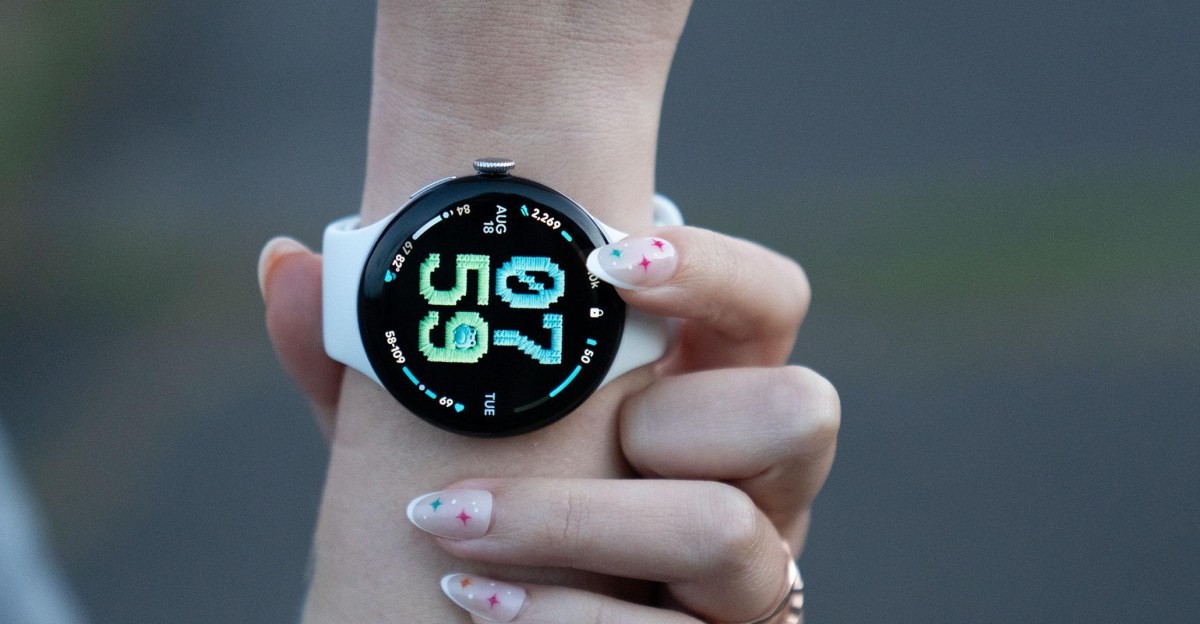
The Google Pixel Watch 5 has, in many ways, been the hardest Pixel Watch to accurately review. Barely anything has changed in terms of hardware. The sizes are the same, the chips and battery got an itty-bitty boost, and there’s a new pyrite satin case finish. Instead, the big updates are all software-related: This year’s watch gets ambitious new health features that expand on the overhauled Google Health app and its AI coach introduced with the Fitbit Air earlier this year.
The only problem is those health updates aren’t here. The watch’s most interesting new features — blood pressure and insulin resistance trends, nightly sleep breathing quality, and strength training cues from the wrist — won’t start rolling out until next month. And in the case of breathing emergency detection, which calls emergency services if the device detects you’ve stopped breathing, the feature is still pending FDA clearance. (Europe will get it at launch, but this isn’t the sort of feature you can test anyway.)
That leaves me and the Pixel Watch 5 on my wrist in a bit of a reviewer’s pickle. All those features sound smart to me, but I can’t weigh in on whether they’re worth $399.99 — a $50 price hike over last year’s model — until they’re available. Given that half of those new metrics are meant to be viewed monthly, it’ll be a hot minute before I can write about them.


$400
The Good
- Improved GPS is good so far!
- Offline Gemini can come in handy
- Gesture controls are great
- While not overhauled, the hardware is still good
The Bad
- Your mileage may vary with proactive Gemini suggestions
- The new health features haven’t rolled out yet
- A $50 price hike
Which leaves the rest of the Pixel Watch 5 software updates: Wear OS 7, offline Gemini, a more accurate Raise to Talk feature, Proactive Assistance, more integrated gesture controls in the UI, AI watchfaces, some improved bedtime automations, and better GPS maps for outdoor activities. Broadly, I get the vibe Google’s going for — subtly helpful AI that enables glanceable, quickly actionable information — and I like it. However, except for GPS, these are refinements. They’re not mind-blowing updates that warrant morphing into the “Shut up and take my money!” meme. At launch, these will be exclusive to the Pixel Watch 5, but Google does have a history of software updates trickling down to older models with time.
Wear OS 7 isn’t a major departure from Wear OS 6. The double pinch and wrist turn gestures are now more directly integrated into the UI. At certain points (e.g., scrolling or selecting), you’ll see an animated chip of the pinching gesture. It’s a handy way of teaching you when a gesture can be used. During “live” activities — say, a workout or timer — another chip will appear on the main watchface. Flipping your wrist will dismiss your current screen or a call. These aren’t unique ideas. The Apple Watch has had them for a while. However, I love that they’re more prominently featured on the Pixel Watch (and not just the Watch 5). You’ll never see me pooh-pooh well-executed gesture controls on smartwatches simply because they’re not 100 percent new.

You’ll see this gesture chip appear more frequently in the Wear OS 7 UI.

Raise to talk has been improved. Excuse this… sad brown tabby cat inspired AI watchface.

Setting timers, launching apps, starting workouts, and opening your calendar are some things offline Gemini can do on the wrist.

You’ll also see chips for live activities on the main watchface.
I was less enamored with Proactive Assistance. As my colleagues Dom Preston, David Imel, and Cameron Faulkner have noted in their Pixel 11 reviews, these Gemini-powered suggestions don’t always work as intended. You may also never notice them! On the watch, it was helpful when a friend texted me via Google Messages about my availability for plans. A chip for my Google Calendar instantly popped up. Except those were orchestrated scenarios for testing. In real life, I mostly plan hangouts over Slack or phone calls, where Gemini isn’t integrated. I get the concept, and I can see this improving with future updates. But for now your mileage will vary.
Offline Gemini was more convenient in testing than I’d anticipated. I had zero intention of running with the Pixel 11 Pro Fold that I’d paired with my Watch 5. I’ve dropped way too many a smartphone to risk wrecking a caseless, $1,900 phone. Nevertheless, Gemini was able to start a workout via voice command, as well as quickly obtain a GPS signal well out of Bluetooth range of the phone, and therefore internet. (I did this exact testing scenario before setting up cellular.) There’s still some latency when you use wrist-based Gemini — offline or otherwise — but not so egregious that it’s unusable. Especially for basic tasks.
Speaking of GPS, I called Google bold when it claimed the GPS on the Pixel Watch 5 outperforms that on the Apple Watch Ultra 3 and Garmin Fenix 8 Pro. It does this by utilizing 3D models of buildings, weather data, dual-frequency GPS, and other sensor signals to “correct” wonky GPS data after an activity. When I poked and prodded Google’s Pixel Watch reps at my demos, they didn’t flinch. There was no hedging, no caveats. Just a “we tested it in Manhattan, a GPS nightmare, go forth, Vee, and run till your little legs give out” kind of confidence. I still have a lot more GPS testing I want to do (different terrains, durations, and outdoor exercises), but I have to say — the GPS is dramatically improved, and it outperformed the Ultra 3 in my testing.
To test the GPS, I recorded three separate 20-to-30-minute walks in the West Village in Manhattan. During each of these walks, I walked in zigzags, annoyed cabbies by jaywalking across streets I wasn’t supposed to, and annoyed a friend by walking literal circles around her. As you can see in the screenshots here, the Ultra 3 overcorrected, so it appears like I’m mostly walking in a straight line. The Pixel Watch 5 didn’t catch all of my tests — but it did accurately register some of my zigzags, instances where I doubled back on purpose, and one time where I circled my friend. (I currently don’t have a Garmin Fenix 8 Pro, so I wasn’t able to compare it to that device, though you can check out DC Rainmaker’s more hardcore Pixel Watch 5 GPS tests here.)
1/6In this loop, you can see how I’ve stuck to these West Village sidewalks, but the squiggles account for me walking around other pedestrians.
I doubt most Garmin or Ultra 3 fans will be enticed to switch based on improved GPS alone. I mean, the Pixel Watch’s design still doesn’t scream rugged durability — something most outdoor enthusiasts like. This is more Google leaning into its strengths to deliver a clever solution to a long-standing problem with Pixel and Fitbit wearables. I wouldn’t say it’s perfect. No GPS tracking is. It’s more that GPS accuracy is no longer a reason to hold back from getting a Pixel Watch if you want one.
Which leaves me to regale you with the most bizarre feature I tested: AI watchfaces.
I get why Google made this feature. It acknowledges that there’s a contingent of smartwatch fans who want as many watchfaces as possible and don’t want to rely on a company’s artistic curation. (Cough, Apple.) Theoretically, prompting an AI to generate a watchface of your specific idea makes sense.
But this is also AI. See: this incredibly dooftastic AI-generated watchface of a manta ray. This is not a manta ray. This is number-shaped blobs with eyes and cartoony dinosaur fins.

Pray tell, in what world is THIS a manta ray? It’s cute! It’s just not a manta ray!
I had more success asking for a cute Kirby-inspired watchface with “a playful font in a pink and purple theme.” Is it a tad unsettling that these are, again, Kirby-shaped numbers and Kirby’s face plastered onto them? Yeah, but it works. I had the most success with a cross-stitch-themed watchface featuring “fat and cute forest creatures and a retro font.” Sure, portions of the numbers are an embroidered satin stitch and not cross-stitches, but the spirit is there. My main gripe is how limited the customization is. You can tweak the appearance of the clock numbers, colors, and font, and choose one of three basic layouts, but little else. Is this a feature worth boiling oceans for? No, but it’s whimsical enough to please the people it’s intended for.
The hardware tweaks this year aren’t that noticeable. Swiping through screens is snappy but not radically improved. Like its predecessor, the 45mm Watch 5 lasted roughly 36 to 40 hours on a single charge in testing. A year later, I still like the watch stand charger. Fast charging is good enough that you can stick it on the charger while you shower and make it through the day (or night).

This prompt was not a keeper.
Right now, I feel comfortable saying the Pixel Watch 5 is a great Android smartwatch. RIP OnePlus, and Samsung has been coasting since the Galaxy Watch 6. So, like last year, this is the Android smartwatch to beat. It’s the one I’d recommend to Android smartwatch newcomers, and the $50 price hike thanks to RAMageddon isn’t as bad as it could’ve been.
If you’re an owner of a recent Pixel Watch, I don’t think this is the year to upgrade, though. And even if you’ve got a Pixel Watch 2 or earlier, I’d still wait until the new health features are out and tested before buying. Alternatively, you could opt for doubling up with a Fitbit Air instead of a new watch if you’re mainly annoyed about having to charge frequently for sleep tracking.
I don’t love feeling like a review is unfinished, but alas — that’s how it is this year. See you back in October for part two after the rest of the health features drop.
Photography by Victoria Song / The Verge
Agree to Continue: Google Pixel Watch 5
Every smart device now requires you to agree to a series of terms and conditions before you can use it — contracts that no one actually reads. It’s impossible for us to read and analyze every single one of these agreements. But we started counting exactly how many times you have to hit “agree” to use devices when we review them, since these are agreements most people don’t read and definitely can’t negotiate.
To use the Google Pixel Watch 5, you must pair it with an Android smartphone. That includes the phone’s Terms of Service, privacy policy, and any other permissions you grant, such as Bluetooth access and location services. You may also want to familiarize yourself with settings regarding opting in or out of your health data being used for AI training. Integrating other third-party health APIs (e.g., connecting to Strava) means you’re also agreeing to each service’s terms and privacy policy.
By setting up the Google Pixel Watch 5, you’re agreeing to:
Final tally: Five mandatory policies and several optional permissions.
Follow topics and authors from this story to see more like this in your personalized homepage feed and to receive email updates.
- Victoria Song
What's Your Reaction?
 Like
0
Like
0
 Dislike
0
Dislike
0
 Love
0
Love
0
 Funny
0
Funny
0
 Wow
0
Wow
0
 Sad
0
Sad
0
 Angry
0
Angry
0







Comments (0)