

I found a stunning Apple Notes alternative for my Mac - and it's (mostly) free

Follow ZDNET: Add us as a preferred source on Google.
ZDNET's key takeaways
- Transparent Note replaced Apple Notes for me.
- The UI is second to none in the note-taking app space.
- There is a limited free version.
During my day, I take a lot of notes. I might be doing something when inspiration for a new book hits me. When that happens, I don't always want to take the time to open my To Be Written file and jot down the information about the story. Instead, I might want to simply jot down a quick note and move on.
Or maybe I remember there's something I need to buy, but I don't want to have to get to Keep Notes, open my shopping list, and then write it down.
Also: How to decide between Linux and MacOS - if you're ready to ditch Windows
Or maybe I'm on the phone with a company, and its representative recites a tracking number or case number to me.
For all of those instances, I want quick access to a note-taking app I can leave open, call up, and type in.
Of course, given my constant need for a pleasing aesthetic, I've tried a lot of note-taking apps, only to find that the developer decided that a nice-looking UI wasn't necessary.
Also: This free Mac tool lets me see which apps are quietly accessing the internet - and block them fast
Au contraire, mes amis. If I have to look at an app over and over again, I want it to be not only functional but also pleasing to the eye. I realize that might be a quirk of taste that not everyone suffers, but I know it's been a part of my makeup since I was a child.
The other day, I decided that I wasn't a fan of the MacOS Notes app. Not only was it too busy for simple note-taking, but the UI was, well, a disappointment. Now that I've experienced what Liquid Glass should have been all along (thank you, System76), apps like Apple Notes just look boring. So I went on a quest to find a note-taking app that was equal parts function and fashion. What turned up was Transparent Note.
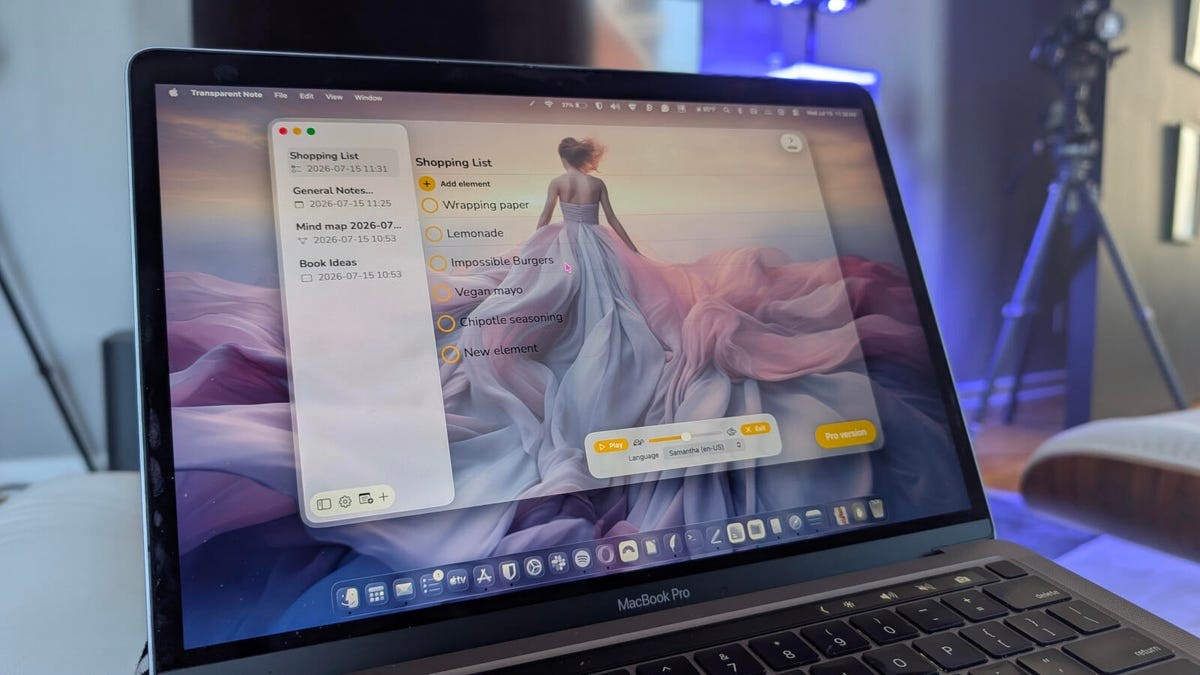
Isn't she lovely...
What is Transparent Note?
Transparent Note is a fairly basic note-taking app (especially the free version). With this app, you can create notes, checklists, mind maps, and boards. What's different about Transparent Note is the UI. With this app, you can alter the transparency of the UI so that it's almost entirely opaque or transparent, meaning you can make it blend in perfectly with Apple's Liquid Glass effect.
Although that might not be a big selling point of the app, for me it is (especially given that the note-taking aspect of the app is rock solid).
Also: 6 note-taking apps for Mac and PC I swear by after trying them all
The one downfall of Transparent Note is that the free version is quite limited. You can only create one note, one board, one checklist, and one mind map. There's also the persistent reminder of the Pro version, which is only dismissed upon purchasing a license for $35.99 a year. That's a bit high for a note-taking app. I could see paying $35.99 for a lifetime license, but the developer wants a whopping $299 for a lifetime license.
Yeah, that's not gonna happen.
Also: I tested my USB-C cables with this free Mac app - some weren't what they claimed
Instead, I've been making do with the free version, hoping that maybe the price will come down to a more reasonable rate. Given that you can save either locally or to iCloud, even the free version starts to be more appealing.
I will say that the Pro version does include some other features that could be quite handy, such as a teleprompter mode, speech-to-text, and unlimited notes, boards, mind maps, and checklists.
Even so, the free version works fine, and it's a beautiful app.
Where to get Transparent Note
Transparent Note can be installed from the official Apple App Store and is available for both MacOS and iOS, which also means that if you're saving to iCloud, you can take your notes with you on your phone. Nice touch.
Also: Have a lot of stuff to track? My 5 favorite home inventory apps can help
Installing Transparent Note is just a matter of locating it in the App Store and clicking Get. If you want to purchase the Pro version, it's an in-app purchase that can be accessed by clicking Pro Version > Continue > Go Premium.
Is the price too high for such an app?
Using Transparent Note
Using Transparent Note is simple. Click + on the bottom-left toolbar and then click one of the options.
You can then start typing a note, create a checklist, or build a mind map, as needed. You can rename notes, do minimal formatting with text inside a note, and even have notes read aloud (select the note to be read, click Speech, and then click Play).
The voices are a bit "80s robot," but they're still effective.
One feature that I have yet to figure out how to use is the Transcribe option. I've attempted to do a speech-to-text note, but it never actually adds the spoken text to a note. Either the feature is broken or it only functions in the Pro version. Either way, it would be nice if the developer would make that known.
Also: Live and work by lists? I found two genius apps that make them even easier to create
Another feature that could use a bit of improvement is the checklist option. When you create a checklist, you can typically create the first item, type out what you want, hit Enter on your keyboard, and type the next item immediately. Unfortunately, the checklist workflow in Transparent Note is a bit awkward. What you have to do is click Add Element to create a new element, delete the placeholder text (New Element), type your checklist item, click Add Element, delete the placeholder text, type your checklist item, and so on.
Also: This free Android app makes sharing files across Windows, Mac, and iOS so easy for me
The developer should change this to make it much simpler to create elements in a checklist, because the way it's used now is less than efficient.
If you want to change the transparency of the UI, click the gear icon in the bottom-left toolbar, click the General tab, and drag the transparency slider to the left to make it more transparent. You can also adjust the theme and the font.
Move the slider to change the transparency of the app UI.
Even with this app's caveats, the UI is quite beautiful, and the basic features are functional enough to keep me coming back. Maybe if the developer lowers the price a bit, I'll consider purchasing a Pro license; until then, I'll enjoy using the free version in all its transparent beauty.
What's Your Reaction?
 Like
0
Like
0
 Dislike
0
Dislike
0
 Love
0
Love
0
 Funny
0
Funny
0
 Wow
0
Wow
0
 Sad
0
Sad
0
 Angry
0
Angry
0











Comments (0)