

What Photographers Can Expect From the Zoner Studio Summer Update
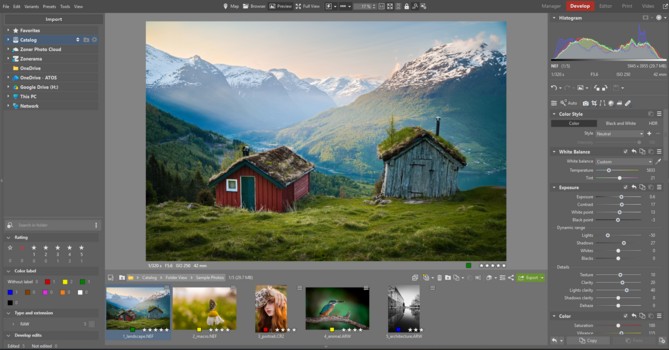
Zoner Studio has released its Summer 2026 update, bringing a substantial suite of multi-frame stacking tools, an overhauled global search panel, and content-aware retouching tools to the Windows-based editing platform. Rather than focusing exclusively on generative AI novelties, this biannual release targets everyday workflow efficiency, with a focus on simplifying the processing of multi-shot stacks.
For photographers unfamiliar with the platform, Zoner Studio operates as an all-in-one alternative to the traditional Adobe ecosystem or other competitors. It combines raw development, layer-based editing, and basic video production within a unified file-browser environment. This layout eliminates the need to maintain a separate catalog database or jump between different programs just to handle advanced stacking and merging operations.
Assembling Multi-Shot Sequences
The structural centerpiece of the Summer 2026 update is the new multi-frame workflow features, which streamline both file organization and advanced stacking. On import, the new Autostack and Stack Detection engine scans metadata and visual content to automatically group related bursts, brackets, and panoramic sequences, helping to keep the grid view clean. This same automated pipeline powers the expanded Exposure Bracketing tool that now supports up to 9-shot brackets with built-in deghosting for wind or foliage. The overhauled Focus Stacking engine allows macro and product photographers to blend multiple focal planes into a single, sharp image with hands-off efficiency.
Once grouped, these files can be passed directly into the updated stitching engine. To evaluate how the software handles real-world alignment claims, I tried it out on three images for a pano I captured earlier this summer. These frames were shot quickly on a whim, without a tripod, resulting in noticeable camera rotation and some vertical shifts between the exposures.
Under the architecture settings of the (multi-row) Panorama tool, the engine includes a dedicated Panini projection method. Unlike standard cylindrical mappings that stretch and warp the extreme corners of wide frames, the Panini projection is mathematically built to keep vertical lines straight while reducing corner distortion in merged compositions. The engine mapped the overlapping details and resolved the handheld perspective variances, outputting the resulting photo as a high-quality, lossless TIFF file for further development.
The stitching process was very easy, and the live preview of the result helped me make the final adjustments needed before the images were merged. The dialog box provides interactive yaw, pitch, and roll parameters right alongside the preview, which makes tweaking slight camera tilt from a handheld shoot a highly visual process rather than a guessing game. I'm happy with how it turned out.
Retouching and Creative Control
The latest update to Zoner Studio features a new Smart Healing Tool, a brush-and-fill pixel replacement engine designed for rapid object removal and spot retouching. Together, these help to make final touches a breeze.
In practice, the tool functions as a direct canvas adjustment. If a photograph contains distracting elements like a stray light pole or debris on the ground, you simply paint over the target area. The software analyzes the surrounding pixel structure to generate a clean replacement patch that blends with the surrounding tones and textures. If you find the initial replacement unsatisfactory, a single click allows you to cycle through alternative variations until it reads correctly. This provides a fast approach to standard cleanup tasks without requiring manual cloning or a trip into a dedicated pixel editor.
When the distractions in your frame are moving rather than static, the update includes a dedicated Remove Moving Objects tool that cross-references a sequence of frames to automatically erase pedestrians or passing cars. For those looking to lean further into time-based adjustments, the toolkit adds a Simulated Long Exposure engine to mimic fluid water or motion blur by blending rapid sequences without requiring a physical ND filter or a tripod. Zoner Studio also now offers an Animation from Photos feature that ports raw stills directly into quick video formats for sharing.
Library Search and System Performance
Beyond individual image adjustments, the 2026 summer updates include a completely redesigned Search System, which replaces the old quick search with a permanent, global utility panel. Unlike traditional library search filters that require you to exit your current workspace and return to a master grid view, this new search engine operates continuously across every workspace module. Whether you are actively working inside the Manager, Develop, Editor, Video, or Print tabs, the filtering tools remain accessible on the side of the screen.
Crucially for quick turnarounds, the search engine fully operates outside Zoner Studio's catalog system. Photographers can point the browser to any loose folder on a hard drive, and the interface populates interactive checkboxes based on that specific folder's live metadata. This allows you to combine multiple specific criteria, such as filtering an unindexed archive by precise focal lengths, exposure values, date ranges, or ratings instantly. This structural change targets catalog navigation lag, letting you isolate specific files without disrupting your development workflow or forcing a time-consuming database import.
Also supporting post-processing speed are core Color Processing updates that refine how the engine renders global saturation, vibrance, and tone curves, making micro-adjustments to color shifts more predictable. And for photographers managing multimedia projects under one roof, the update drops a royalty-free Music Library with over 500 tracks directly into the built-in Video module.
Final Thoughts: A Practical Focus
The value of an update like this is best measured by how much time you spend thinking about your software versus thinking about your images. By pulling these multi-frame workflows and retouching tools into a single interface, Zoner Studio is making a strong case for an organized, self-contained workspace that keeps you in the creative flow.
For photographers looking for an alternative to the more aggressive subscription models, Zoner Studio remains a compelling option at $59 per year, with the guarantee of these twice-a-year functional updates included in the price. If you want to see how the new stacking engine or global search handles your own files, Zoner Studio offers a fully unrestricted, free 7-day trial on their website with no payment details required.
What's Your Reaction?
 Like
0
Like
0
 Dislike
0
Dislike
0
 Love
0
Love
0
 Funny
0
Funny
0
 Wow
0
Wow
0
 Sad
0
Sad
0
 Angry
0
Angry
0










Comments (0)