

How to Find Great Photographs Within Walking Distance of Home
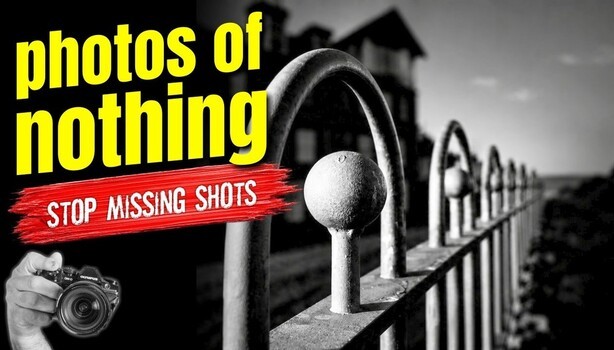
The railing you pass on the way to the shop, the peeling door down the street, and the traffic marker on the corner rarely look like photographs, which is why most people never point a camera at them. Learning to see images in those ordinary things means you can shoot well on any free evening, without a long drive or a planned trip.
"Photos of nothing" is how the video describes its own subject matter, and the phrase is only half a joke. Andrew Banner spends an evening within walking distance of his front door, working a railing he has already photographed five or six times, along with a traffic marker, a yellow flower, and a weathered door. He deliberately avoids subjects only some people have access to, like the sea, and sticks to the kind of things every neighborhood has. The railing shot depends entirely on light. Unless the sun breaks through the clouds and catches a section of the rail, the frame falls flat. He exposes for that lit strip and lets the background drop into complete darkness, while the long line receding into the distance pulls your eye through the image and gives a plain fence a moody, almost foreboding feel.
Banner shoots in a high-contrast black-and-white mode while recording raw alongside the JPEG. The screen shows the monochrome version as he composes, and the raw file keeps all the color data if the black and white doesn't hold up later. Because you're judging the mono preview in real time, the black and white version usually does work. What grabs him again and again is strong lines and strong shapes, often hit by strong light, though some frames stay in color because the color carries the story. His working rule is short: if something catches your eye, it will probably catch someone else's, and your job is to find the framing that makes it happen. Decay shows up often in his picks, since peeling paint and worn wood bring texture and a sense of history to a subject as plain as a door.
A red filter has been a black and white staple since the film era, and knowing what it does makes your camera's filter simulation far more useful. The filter passes red light and holds back much of the blue and green, so blue skies go dark, green foliage deepens, and red brick, rust, and warm skin tones lighten. Fujifilm, OM System, Olympus, Nikon, and Canon all build color filter effects into their monochrome modes, applied live to the preview. Try cycling through them on one subject, a painted wall with a hedge in front of it, say, and you'll start predicting how a color scene will translate before you raise the camera. A fixed walking radius helps too. Revisit the same handful of subjects at different times of day and in different weather, and you'll learn which ones come alive under low sun, which need overcast light, and which only work after rain. Squinting at a scene is an old painter's trick that still works: it blurs detail and leaves you looking at blocks of light and dark, which is where the strongest frames tend to start.
The second half of the video tackles the harder problem of spotting these subjects at all, since plenty of people simply don't notice them on their own. Banner's eye is tuned to one element above the rest, and that's contrast, first between light and shadow and a close second in color. Shape alone is easy to overlook, and he uses the example of a red circle on a red background, which disappears until you change one of the colors. He shows a frame from a busy photography show, where everyone else aimed at models on lighting stands, and walks through why one tiny detail stood out. He also leans on shallow depth of field and soft focus to hold the viewer on a single element, usually the brightest and largest thing in the frame, and explains how he sets up a custom monochrome mode on his older mirrorless body to preview the finished image before he presses the shutter.
Banner's full walk, the trade show frame, and the rest of his local images are waiting in the video above.
What's Your Reaction?
 Like
0
Like
0
 Dislike
0
Dislike
0
 Love
0
Love
0
 Funny
0
Funny
0
 Wow
0
Wow
0
 Sad
0
Sad
0
 Angry
0
Angry
0










Comments (0)