

Adobe Adds More User Control to AI Features Inside Lightroom and Photoshop


“Have you ever spent hours manually reviewing thousands of photos from an event or portrait shoot to find the selects your clients will love?” Adobe asks. It’s a safe bet that for many photographers, the answer is, and Adobe believes its latest Creative Cloud updates will help solve this issue and save photographers time.
Lightroom Updates: Lots of AI and New Sony RAW Support
Although artificial intelligence (AI) inside of photo and video editing applications remains a hot-button issue, the vast majority of working photographers are using AI to help save them time, handling tedious tasks that aren’t necessarily all that creative.
To that end, Lightroom’s promised AI-assisted culling features, first shown off at Adobe MAX last October, are fully available inside Lightroom and pack some new features. Developed in close collaboration with its users, Assisted Culling can now evaluate each person in a photo independently and check whether everyone has their eyes open and, if so, that their eyes are sharp.
Assisted Culling now also automatically stacks similar images into groups and automatically suggests the “strongest one.” Users can, of course, overrule the AI’s decision and now also use customizable filters to change how it behaves. Users can dial in how strong they want the Assisted Culling system to be, gaining more control over the process while still saving time compared to a fully manual culling and selection workflow.
Lightroom has a new Photo to Video feature that uses Firefly and Google Veo to turn a still photo into “polished b-roll or reels with AI-generated motion,” Adobe says. Users can write prompts to accompany their photos, giving the software creative direction for the generated video.
Lightroom’s AI Sharpen tool can now use Topaz Labs’ Noise-Aware Sharpen model directly in the app. This promises to recover fine details more effectively, per Adobe.
Finally, rounding out the list of improvements is a feature that was quietly added a few weeks ago but has renewed relevance now that the Sony a7R VI is shipping to customers. Adobe Lightroom, Lightroom Classic, and Adobe Camera Raw all support the Sony a7R VI RAW formats, including Compressed and Compressed HQ, the latter of which proved a tricky file type for many photo editors to handle when Sony introduced it late last year in the Sony a7 V.
Photoshop Tweaks
There are some minor changes to Photoshop as well, although one of them could be quite a big deal for some photographers.
First up is Reflection Removal. Adobe first showed off this tool way back in December 2024, and since then, it has been implemented across Adobe’s photo-editing apps.
In Photoshop’s case, the existing tool has been upgraded. Reflections are now isolated on a separate layer, giving users control over opacity for more natural-looking results. Previously, Reflection Removal just removed the reflections, and that was that. Now users can keep some reflections while still making them less distracting.

Another welcome change is that Photoshop’s Remove Tool, which uses generative AI to erase a selected object and replace it with realistic-looking pixels, can now be used offline using an on-device AI model. It previously required an active internet connection to be used.
Premiere Updates
New Adobe Premiere updates promise significantly faster AI masking, new effects, better audio controls, and improved integration with Stock and Firefly.
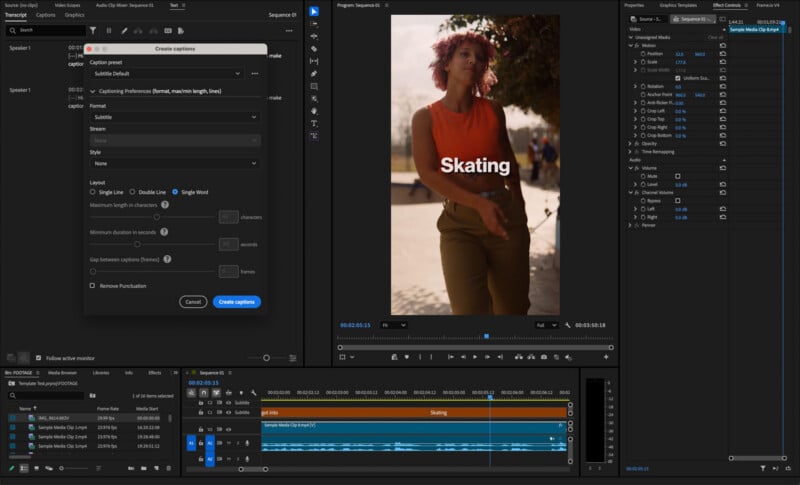
A new Global Audio Mute lets users silence audio across the entire app; users can now perform single-word captioning, and there’s a new Stock Panel Checkout to enable previewing and licensing of Adobe Stock assets without ever leaving Premiere.
Another welcome improvement is a faster, more refined Object Mask, as Adobe says.
“You get softer, more natural masks, and if media goes offline and gets relinked, you can regenerate the mask without starting over,” Adobe explains.
Adobe Creative Cloud Updates Available This Week
All the latest Adobe Creative Cloud updates are rolling out this week.
“Together these bring you more creative control with less friction,” Adobe says.
Image credits: Adobe
What's Your Reaction?
 Like
0
Like
0
 Dislike
0
Dislike
0
 Love
0
Love
0
 Funny
0
Funny
0
 Wow
0
Wow
0
 Sad
0
Sad
0
 Angry
0
Angry
0










Comments (0)