

Why 'countdown mode' is the task manager feature I can't live without

ZDNET's key takeaways
- This TickTick app setting changed my productivity.
- The default option shows a due date or time.
- Countdown shows minutes or days until your deadline.
I've never been the most organized person. While I call my approach "working better under pressure," my family tends to call it "procrastinating." Either way, I'm the type of person who often puts things off until they're due and then knocks out whatever the task is in a flurry of productivity. As much as I hate to admit it, this strategy means I occasionally miss something.
I've turned to a variety of note-taking, list-making, and to-do apps through the years. I still use several to keep my thoughts together, but even a calendar of things-to-do creates another problem. There are times during the summer when my kids are home, and normal schedules don't exist, when I don't know what day it is, much less the date. Seeing an arbitrary date on a calendar, or even "Due Friday," might not convey how pressing the deadline is.
Also: Android 17 is out now, with a fresh Pixel Drop for June - here's what's new
TickTick is my main to-do and reminder app. The app is available on iOS and Android, and it's immensely helpful. However, I was missing out on a critical setting, and when I discovered it, my whole perspective shifted.
How countdown mode works
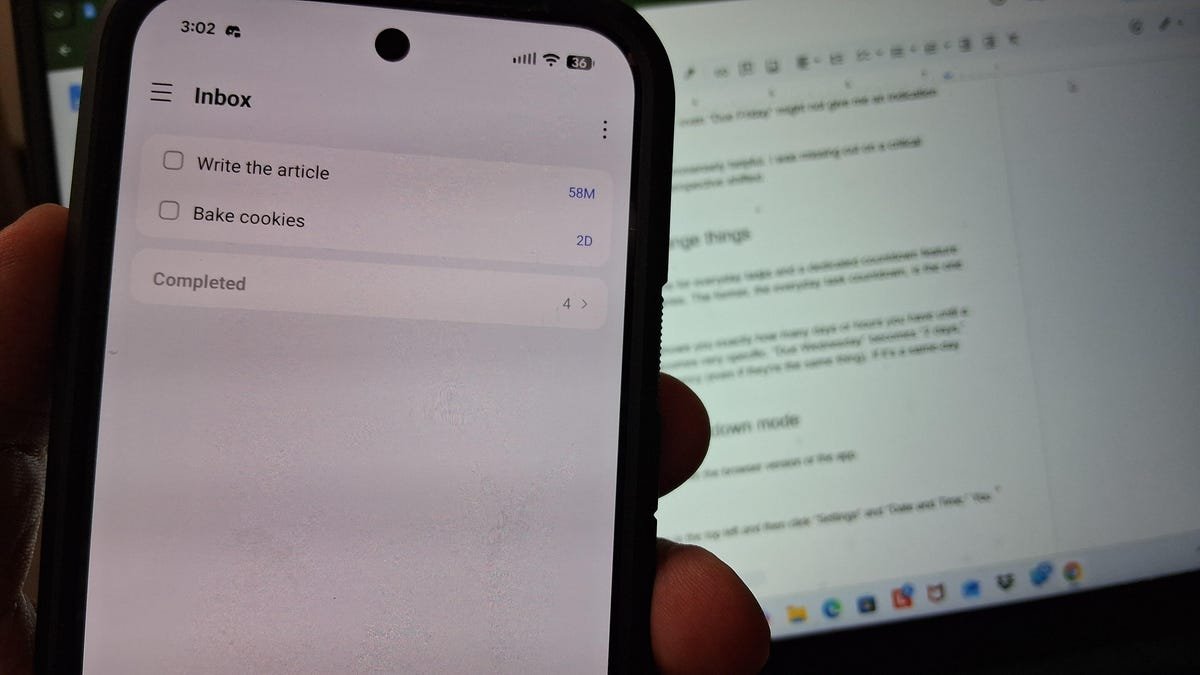
There are two countdown options in TickTick -- one for everyday tasks and a dedicated countdown feature for milestone events like birthdays and anniversaries. The former, the everyday task countdown, is the one that served as my biggest productivity boost. The feature debuted last summer, but I didn't discover it until early this year.
When you toggle the everyday task countdown on, the feature shows you exactly how many days or hours you have until a task is due, and an abstract target suddenly becomes very specific. "Due Wednesday" becomes "2 days," which, at least in my brain, sparks much more urgency (even if the deadlines mean the same thing).
Also: The best project management software of 2026: Expert tested
If it's a same-day task, the countdown shows how many hours you have left. This approach forces me to confront my schedule in real time, making it much more difficult to be caught off guard when a due date pops up unexpectedly.
I've found myself using the countdown for everything, including big annual events, everyday tasks, remembering bills, and weekly meetups. It helps remind me that, no, I might not have time to get to that task later.
How to turn on countdown mode
In the TickTick app, click your profile picture in the top-left and then click "Settings" and "Date and Time." You can toggle on countdown near the bottom. When the feature is on, you can tap the remaining time to see the actual due date or time.
Also: I'm a devoted iPhone user, but Android 17 is tempting me with its new video and social features
If you're anything like me and have a -- fine, I'll admit -- procrastination problem, countdown might provide the subtle pressure you need to get things done.
What's Your Reaction?
 Like
0
Like
0
 Dislike
0
Dislike
0
 Love
0
Love
0
 Funny
0
Funny
0
 Wow
0
Wow
0
 Sad
0
Sad
0
 Angry
0
Angry
0










Comments (0)