

I installed a $17 solar panel onto my doorbell camera, and it's easily my best smart home investment
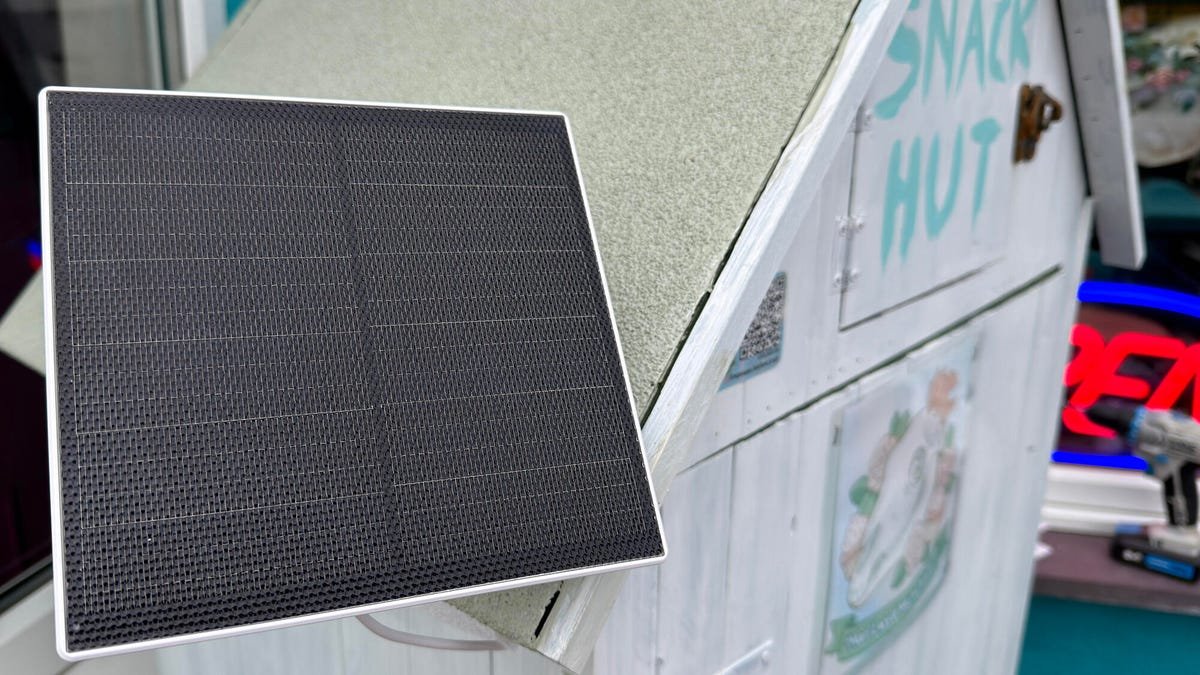

EverExceed 5V weatherproof solar panel
pros and cons
Pros
- A solar panel that actually works, even in subdued weather
- Lengthy cable allows flexibility in placement
- Fully weather-resistant.
Cons
- The wall mount is plastic (albeit tough plastic)
- Claims to not work with some cameras.
Follow ZDNET: Add us as a preferred source on Google.
Trust, but verify.
I was asked to help set up an honor box along a popular trail here in the UK. You know the drill — a box that offers cakes, drinks, and snacks to weary hikers, who, in turn, are trusted to pay for the stuff they take, either by putting cash in a box or using an electronic payment method.
Also: I've tested solar power at home for years - 12 myths you shouldn't fall for in 2026
While I think most people are honest and trustworthy, with honorable intentions, there are a few who aren't. So I suggested installing a security camera in this box. I had a bunch of cool battery-powered cameras sitting here doing nothing, so I suggested using them.
The problem is, these would need to be taken down and recharged every few weeks. While there's nothing backbreaking about that task, it is "something else to remember." That got me wondering if I could MacGyver a solution and leverage the power of the sun!
I had a couple of small EverExceed solar panels lying about that I'd been sent for testing, but hadn't gotten around to it. Would it do the job? There's only one way to find out!
Best solar deals of the week
Deals are selected by the CNET Group commerce team, and may be unrelated to this article.
It's built for the great outdoors
I'm not normally a fan of tiny solar panels. Most of what you come across, built into power banks or other cheap accessories, is a gimmick and doesn't do much in the way of charging. In fact, I've seen cheap solar panels that will actually discharge items attached to them!
The panels I had were rated 5W, measured approximately 7 x 6.5 inches, and came attached to a 10-foot cable with a convertible microUSB/USB-C connector on the end. The panels claimed to be IP65 water resistant, and had an operating range of -4°F to 122°F.
Also: Why lithium-ion batteries fail us - and the gadgets I'm relying on to protect myself
Sounds perfect for the UK weather!
The panel also includes a 360°-adjustable wall bracket. While being mostly made of plastic, it is tough enough for the job.
The mount is tough enough to survive high winds and storms. I know that for a fact!
The kit includes screws and wall fasteners. Most of what you need. Well, apart from a drill, a drill bit appropriate to whatever you're attaching the panel to, and a screwdriver. And you'll also need some way to secure the cable so it doesn't flap about in the breeze.
Nothing will destroy a cable quicker than having it rub against something in the wind for a few weeks. And if this cable breaks, it can't be replaced without tearing the panel apart.
For a clean, professional job, you could use cable clips (either self-adhesive or with nails), but since I'm attaching the unit to a wooden shed, I used duct tape and a staple gun.
Positioning is key
You need to plan the solar panel's positioning. You have 10 feet of cable to play with, so that offers a fair bit of flexibility. If you're in the northern hemisphere, you want it as south-facing as possible, and away from shadows (and the less sun you have, the more important this is to maximize the sunlight the panel captures).
Perfect due south positioning.
You want the panel angle to be roughly the elevation of your location (or about 45 degrees if you can't be bothered figuring it out).
Getting the angle right.
There are apps that will help do this. I used the built-in Measure app on my iPhone to do both, but Android users have plenty of options too.
It's no gimmick
Attaching the camera is simple. You figure out where you want it to go, screw the bracket to the wall, attach the panel, orientate it to the sun, run the cable to the device you're charging (remember to put a drip loop in the cable at the point it enters through a wall into a building or shed as this stops water running along the cable, and you can fill the hole with silicone caulk), and finally connect the cable to whatever you're charging.
Whenever a cable goes into a wall, a drip loop is recommended.
I set this up a few weeks ago, and it's worked great. Not only did it charge up the camera from about 75% to 100% in a day, but it's kept it fully charged since.
Also: Why lithium-ion batteries fail us - and the gadgets I'm relying on to protect myself
And it's been far from sunny most of the time. I also checked the solar panel the other day for any signs of damage or corrosion, and there were none, which is very promising.
It works!
You could give the solar panel a hand and make sure the doorbell camera is fully charged, especially if the weather isn't all that sunny.
ZDNET's buying advice
For $16, this EverExceed 5V solar panel is a winner. You can pick them up individually, or in a 2-pack or 3-pack. You do need a camera with a battery that can charge via USB. The sales page for the panel on Amazon claims that it doesn't work with Arlo, Blink, or Ring cameras. I've tested it with a few cameras that I have here from these brands, and it seems to work fine, but I don't have them all.
Arlo cameras use a magnetic connector, and for those, you'll need a USB-C-to-USB-C adapter to bridge the cable to the solar panel (cover it in shrink tubing to waterproof).
So if you have one of these cameras, you might need to call on your inner MacGyver.
Also, no matter which camera you have, you might need to get creative with waterproofing the connection between the camera and the charging cable. A little bit of silicone caulk should do the job.
But this is a great solution for those who don't want to take their cameras or doorbells off the wall to charge up every few weeks.
What's Your Reaction?
 Like
0
Like
0
 Dislike
0
Dislike
0
 Love
0
Love
0
 Funny
0
Funny
0
 Wow
0
Wow
0
 Sad
0
Sad
0
 Angry
0
Angry
0









Comments (0)