

How ChatGPT's new Lockdown mode protects you from data theft (and what else it does)

Follow ZDNET: Add us as a preferred source on Google.
ZDNET's key takeaways
- Lockdown mode aims to prevent data theft from attackers.
- This mode is now available to all ChatGPT users.
- It does limit what you can do on the live web.
AIs can be vulnerable to different security threats. And one of the biggest is prompt injection. By feeding malicious commands into your prompts, an attacker could infiltrate your chats, access external files and services, and steal your personal data. An optional setting in ChatGPT called Lockdown mode tries to protect your account by limiting what you can do and where.
(Disclosure: Ziff Davis, ZDNET's parent company, filed an April 2025 lawsuit against OpenAI, alleging it infringed Ziff Davis copyrights in training and operating its AI systems.)
Also: How indirect prompt injection attacks on AI work - and 6 ways to shut them down
First kicked off in February to subscribers of ChatGPT for Enterprise, Edu, Healthcare, and Teachers, Lockdown mode is now also available to all other plans, including Free, Go, Plus, Pro, and Business. Though accessible to everyone who uses ChatGPT, the option is designed for people and organizations that work with sensitive information in need of extra protection.
To combat data theft through prompt injection, Lockdown mode limits outbound network requests, such as those to the internet or to an external file service. The idea is to stop any live sensitive information from falling into the hands of an attacker.
Also: Use an AI browser? 5 ways to protect yourself from prompt injections - before it's too late
The mode doesn't prevent actual prompt injection attacks. A hacker could still infect your prompts with malicious commands that tap into cached web content or uploaded files. Plus, there are some decided tradeoffs, namely those that involve live web searches or information.
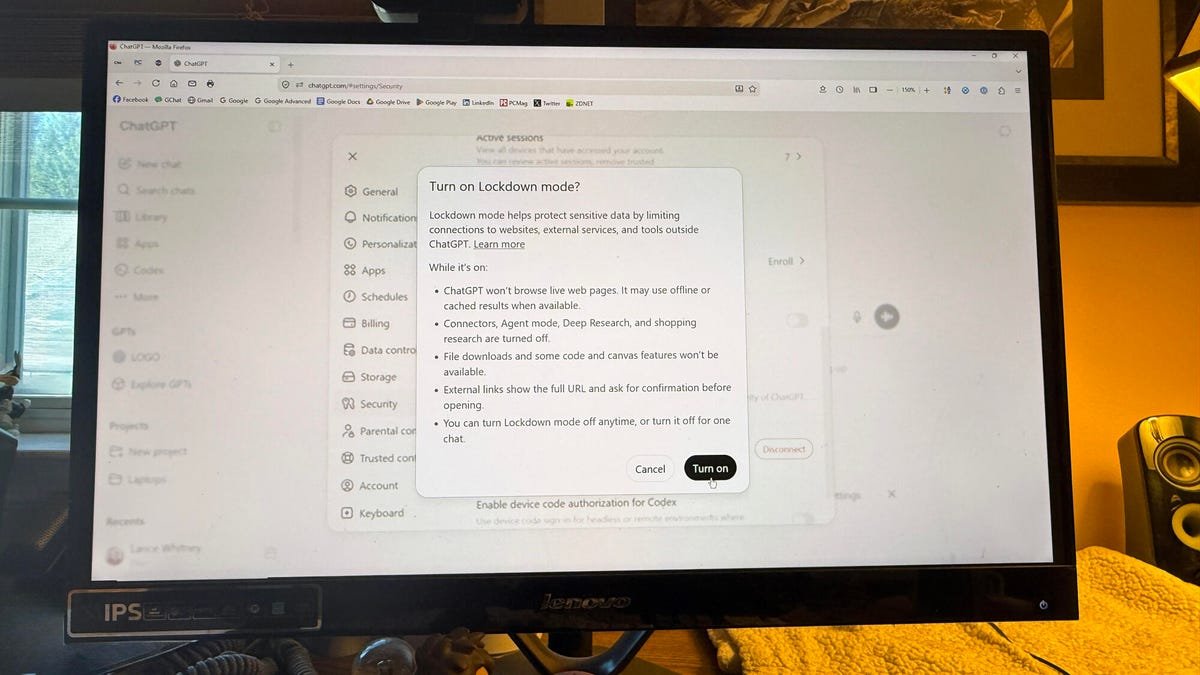
With Lockdown mode enabled, you can't perform any of the following tasks:
- Live web browsing. ChatGPT can't access the live web and instead is limited to cached content. That means any search results may be out of date or even unavailable.
- View images from the web. ChatGPT can't display images in regular responses or retrieve them from the live web. You can still upload your own images and ask the AI to generate an image.
- Deep research. Deep research is unavailable.
- Agent mode. Agent mode is also unavailable.
- Canvas networking. You can't use code that you generate through the Canvas tool to access your network.
- File downloads. ChatGPT can't download files to analyze them, though it can still handle any files you upload.
With these restrictions in mind, you may still want to try Lockdown mode if you're working with highly sensitive or confidential data, either personally or professionally. Just keep in mind that you'll be limited with any requests that need access to the live web or a live file service.
Lockdown mode is in the process of rolling out, so it may not yet be accessible to all accounts. To enable it on your end, make sure you're signed in to ChatGPT with your account. Click your account name in the lower left and select Settings. At the Settings window, select Security, scroll down to the section for Advanced Security, and then turn on the switch for Lockdown Mode. A pop-up window explains the restrictions of this mode. To proceed, click the Turn on button.
What's Your Reaction?
 Like
0
Like
0
 Dislike
0
Dislike
0
 Love
0
Love
0
 Funny
0
Funny
0
 Wow
0
Wow
0
 Sad
0
Sad
0
 Angry
0
Angry
0











Comments (0)