

Panasonic L10 in-depth review
 |
Product Photos: Mitchell Clark

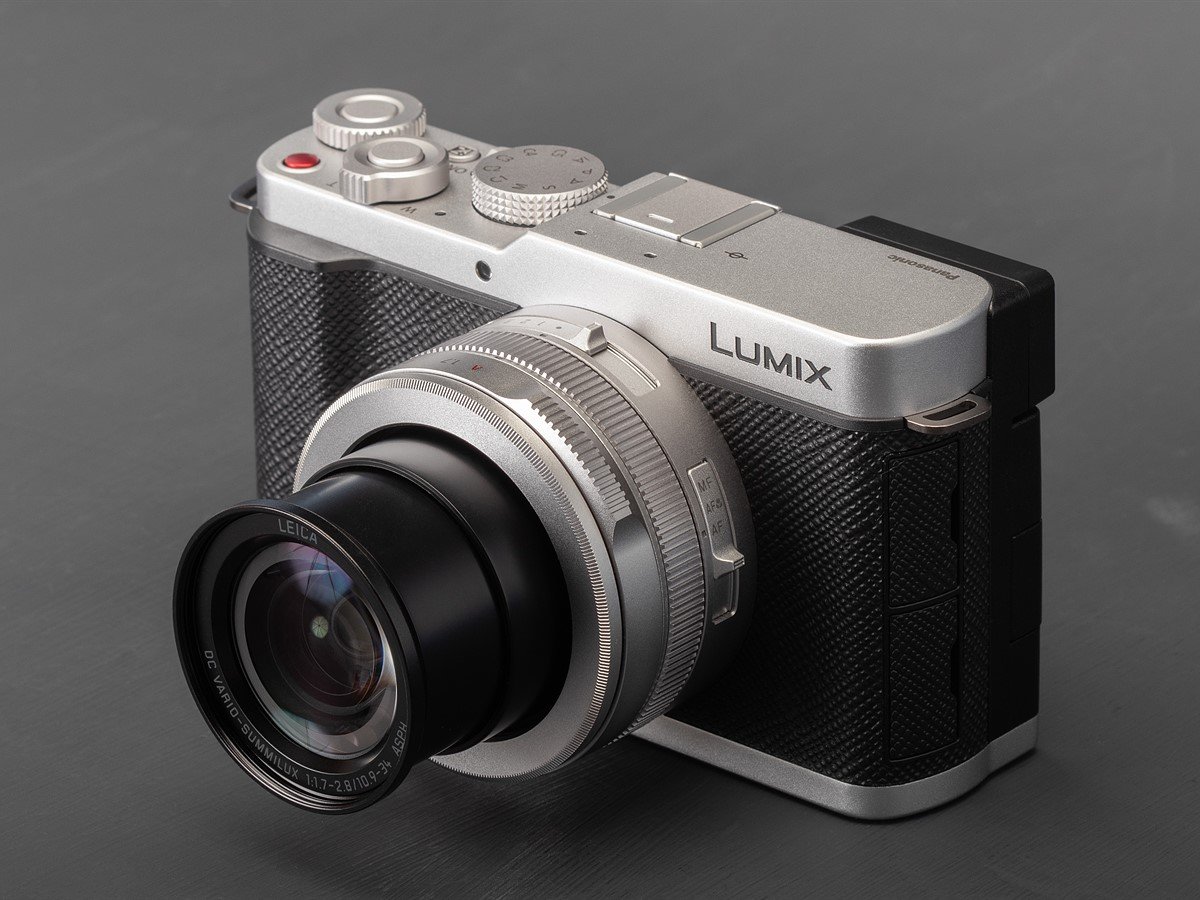
The Panasonic DC-L10 is an enthusiast compact with a Four Thirds sensor and an optically stabilized 24-75mm equiv. F1.7-2.8 lens with motorized zoom. Like the Panasonic's LX100 and Leica's D-Lux series of cameras, the camera doesn't use its entire sensor, instead letting you preserve the same diagonal angle of view for 4:3, 3:2 and 16:9 crops of it, which use up to 81% or around 183mm² of the sensor.
Key Specifications:
- Up to 20.3MP images from a 26.5MP BSI CMOS Four Thirds sensor
- 10.9 - 34mm (24-75mm equiv.) F1.7-2.8 lens with OIS
- 2.36M dot OLED viewfinder
- 1.84M dot 3" fully articulating display
- Phase-detect autofocus with 6 subject recognition modes
- Metal body
- 5.2K open-gate video up to 30p
- 1x UHS-II SD card slot
The black and silver versions of the L10 cost $1499, and there's a special edition "Titanium Gold" version for $100 more, available from limited outlets (typically direct from Panasonic). It includes a threaded shutter button, leather strap and a color-matched automatically-opening lens cap (the latter accessory is available to buy separately for the standard editions in silver and black).
Index
- What's new
- How it compares
- Body and handling
- Autofocus
- Video
- In use
- Conclusion
- Sample gallery
- Specifications
What's New?
 |
| The LX100 II (left) is a fair bit smaller than the L10 (right). |
Panasonic is pitching the L10 as the start of a new line of compacts, rather than a direct successor to the LX100 II from 2018, but the cameras' shared DNA and place in the market make it worth seeing what else the removal of an X and a zero has changed. The biggest difference is, of course, the design, which will be covered in the body and handling section.
Updated sensor
The L10 uses the same 26.5MP Four Thirds (225mm²) sensor that's found in the GH7 and G9 II. This results in images that have better dynamic range and are slightly higher resolution than you could get out of the LX100 II: up to 20.3MP in its 4:3 mode, rather than 17MP.
 |
|
The L10 continues Panasonic's tradition of cropping in on its sensor to produce a multi-aspect ratio shooting experience, where the different crop modes it offers generally have the same diagonal angle of view. Graphic: Richard Butler |
The bigger improvement, though, is the addition of phase detect autofocus. The L10 has essentially the same autofocus we've seen in all of Panasonic's most recent cameras, with algorithms for recognizing six kinds of subjects (humans, animals, cars, motorcycles/bikes, trains and planes), as well as part priority (e.g., focusing on a rider's helmet, or the cockpit of a plane) derived from machine learning.
New processor
Panasonic has used its latest processor in the L10, the same one found in recent models like the S1RII. The camera runs Panasonic's latest-generation of firmware, so it's compatible with the company's Lumix Lab app and has features like HLG HEIF output, Live View Composite (a multi-exposure mode that shows you the image as it builds up, and lets you stop it when you choose), in-camera processing of focus stacking bursts and the Real-Time LUT system, which lets you bake custom-designed color profiles into your JPEGs and videos.
A cornucopia of colors
While the Real-Time LUT system (for which there's a dedicated button on the rear plate) lets you use custom color modes for your JPEGs, the camera includes a few new built-in color modes too, which Panasonic says are "film‑inspired." These are "L.Classic," which the company says is low-saturation and highlights greens, and "L.ClassicGold," which gives your photos a very warm, amber look.
 |
|||
| Standard Color Profile | L.Classic Neo | L.Classic | L.Classic Gold |
The decision to include these new modes was apparently based on the popularity of the L.ClassicNeo profile that it's included in its cameras for years. For video shooters (or photographers looking for a video-like look), the camera also includes a suite of "Cinelike" modes such as Cinelike D2, which is designed to give you a pleasingly flat look that, unlike the also-included V-Log, can be used for output, while still offering some editing flexibility in post.
How it compares
One of the most exciting things about the L10 is that it's a new enthusiast compact camera aimed at photographers, which is something we haven't seen in quite a while. Companies like Canon and Sony still sell the latest entries in their G7X and RX100 lines, but both cameras were introduced in 2019, around 7 years ago.
While it can be tempting to compare the L10 to cameras with fixed prime lenses like the Ricoh GR IV and Fujifilm X100VI, the use of a zoom lens means it's targeting a different kind of photographer. Likewise, vlogging compacts like Canon's PowerShot V1 and Sony's ZV-1 II are much more focused on pleasing videographers than photographers.
| $1499 | $999 | $1499 | $879 |
| 26.5MP BSI CMOS Up to 183mm² |
21.8MP BSI CMOS Up to 183mm² |
20.1MP stacked CMOS 116mm² |
20.1MP stacked CMOS 116mm² |
| 24-75mm | 24-75mm |
24–200mm | 24-100mm |
| F1.7-2.8 (F3.8-6.2) |
F1.7-2.8 (F3.8-6.2) |
F2.8-4.5 (F7.6-12.2) |
F1.8-2.8 (F4.9-7.6) |
| No | No | No | 3EV ND |
| 11fps mech. (AF-S) / 9fps (AF-C) 30fps e-shutter (AF-C) |
11fps mech. (AF-S) 5.5fps (AF-C) |
10fps mech. 20fps e-shutter |
8fps (C-AF) 20fps e-shutter (S-AF) |
| Human Animal Car Motorcycle/Bike Train Airplane |
Face/Eye | Face/Eye | Face/Eye |
| Yes | No | No | No |
| 3" 1.84M dot Fully-articulated |
3" 1.24M dot Fixed |
3" 921K dot Tilting |
3" 1.04M dot Tilting |
| 2.36M dot OLED 0.74x Fixed |
2.76M dot equiv. field sequential 0.7x Fixed |
2.36M dot OLED 0.59x Pop-up |
No |
| No (Hotshoe) | No (external included) | Yes (pop-up) | Yes (pop-up) |
| 410 / 420 shots | 270 / 340 shots | 240 / 260 shots | - / 235 shots |
| 5.2K/30 Open Gate 4K/120 (full-width) 10-bit |
4K/30 (1.34x crop) | 4K/30 (1.08x crop) | 4K/30 (full-width) |
| Yes, HLG HDR / Log | No | No | No |
| USB-C 10Gbps Wi-Fi 5 Bluetooth 5 Mic jack |
Micro USB 480Mbps Wi-Fi 3 Bluetooth 4.2 microHDMI |
Micro USB 480Mbps Wi-Fi 3 Bluetooth 4.1 Mic jack |
USB-C Wi-Fi 3 Bluetooth 4.2 Mic jack microHDMI |
| 127 x 74 x 67mm (5.0 x 2.9 x 2.6") |
115 x 66 x 64mm (4.5 x 2.6 x 2.5") |
102 x 58 x 43mm (4.0 x 3.3 x 1.7") |
105 x 61 x 41mm (4.1 x 2.4 x 1.6") |
| 508g (17.9oz) | 392g (13.8oz) | 302g (10.7oz) | 304g (10.7oz) |
By virtue of being the newest camera on this list by at least seven years, the L10 has the benefit of many modern features we've come to expect: subject recognition for more than just faces, fast Wi-Fi transfers to a modern app, pre-burst capture, full-width video even at ambitious resolutions and frame rates and more. And while Panasonic typically hasn't matched the autofocus performance of Sony and Canon's latest systems, the systems used by the compacts discussed here are noticeably less advanced.
Body and Handling
 |
The L10 isn't a tiny camera by any means; it's noticeably larger and heavier than its Type-1 competitors, and even the LX100 II, though it's essentially the same size as Fujifilm's ever-popular X100-series. It feels solid, with ample grip and some breathing room for its controls. While the top plate controls aren't the most premium feeling – they're similar to the S9's – they're well-placed for one-handed use.
Controls and customization
 |
The L10 has a wide variety of customizable dials, buttons and switches along almost every surface. While this affords a lot of flexibility to customize the camera how you want – you can easily set it up in a way that lets you largely avoid the main menus while shooting – some of the defaults aren't the most sensible in our view.
As an example, when you're in aperture priority or manual mode, the top plate command dial is set to control aperture... which it won't do unless the dedicated aperture ring is in the 'A' setting. When it's not, turning the wheel does nothing, wasting the camera's single top plate dial. In our view, it'd have made more sense to control exposure compensation by default, at least in aperture priority mode.
 |
| Most of what were dedicated controls on the LX100 cameras have become customizable. What was previously a shutter speed dial is now a mode dial, and what was once a marked exposure compensation dial is now a customizable dial with a button in the middle. |
Speaking of aperture, though, we appreciate that the ring to control it is clicked, and that it handles the variable aperture in a sensible manner. For example, if you have it set to F1.7, but have the lens at 75mm equiv., it'll set the aperture to F2.8. The aperture setting will stay the same as you rotate it, until you hit F2.8, at which point it'll begin to change.
Behind the aperture ring is a smoothly-rotating, customizable control ring. By default, it's set to control the power zoom (another redundancy; the toggle rocker around the shutter button does that, too), but you can have it control things like exposure compensation, ISO, white balance, AF mode and more.
 |
| Switching between the 'A' setting on the lens and the aperture range takes a bit of force – it'd be difficult to accidentally knock it out of your preferred position. Conversely, we found the focus mode switch to be a bit too easy to knock into macro mode. |
Finally, there's the four-position sliding switch on the top barrel of the lens. By default, it controls your aspect ratio, and you can customize what the 1, 2 and 3 positions do; the first position hands off control of your selected parameter to the body. If you prefer, you can remap the control to do something else, like switching between three color modes, focal lengths or subject recognition settings.
You can also set any of the physical zoom controls to work continuously, smoothly zooming in through the lens's entire range, or to jump between common preset focal lengths (24, 28, 35, 50, 70 and 75mm equiv.). If you're using the sliding switch for zoom control, you can also set it to take different levels of crop from the 75mm setting for additional reach, though they'll just take you to 75mm equiv if you're shooting Raw. You can also have the camera remember what focal length it was at when you turned it off, and return to it when you start it up again.
EVF and display
 |
The OLED panel in the L10's view finder is bright and high-resolution for a compact. While its eye point is only 20mm, we found it was relatively easy to see, even when wearing glasses. Thankfully, the color tearing of the field-sequential displays that Panasonic used in the LX100 models is no longer an issue.
The rear monitor is fully-articulating, offering nearly unlimited flexibility in what angle you shoot from, though not the quickest deployment if you're just trying to shoot from above or below. Panasonic has created a vertical version of its on-screen UI, so if you're shooting in portrait, the details on the screen will be much easier to read, as they'll be in the correct orientation.
Fully-articulating screens aren't to everyone's taste, but this represents a big increase in flexibility over the LX100 cameras, on which we found the wide-angle lens and fixed screen were an awkward combination. And, while some photographers will inevitably have preferred a flip-up rear panel to keep things discreet, anyone traveling is likely to appreciate the ability to fold the screen in, leaving it protected from scratches when thrown in a bag.
Ports
 |
| You can have audio input, but you can't monitor due to the lack of a headphone jack. |
The L10 doesn't have an immense amount of input and output options. There's a USB-C port for charging and data transfer, which it can do at 10Gbps, and a 3.5mm microphone jack. The camera also has a fully functional hotshoe, which can be used to connect to a flash, digital microphones, and even Panasonic's XLR2 accessory that lets you record four-channel and 32-bit float audio, all but eliminating the risk of clipping.
Battery
 |
| The SD card slot gets its own dedicated door, rather than having to share one with the battery. |
The L10 uses the same 16Wh BLK22 battery found in many of Panasonic's full-frame mirrorless cameras, providing a CIPA-rated 410 shots per charge when using the EVF, and 420 shots when using the display. It's not unusual to get double those ratings in real-world use, so many users may be able to get through even relatively heavy weekends of shooting without having to recharge.
Image Quality
Our test scene is designed to simulate a variety of textures, colors, and detail types you'll encounter in the real world. It also has two illumination modes, full even light and low directional light, to see the effect of different lighting conditions.
Shooting in Raw at its base ISO, the L10 captures a good amount of detail, on par with the Sony and Canon, and slightly more than the LX100 II. Despite using the same amount of sensor area as the LX100 II, it provides an image that can be 1EV cleaner thanks to its ability to gather more light by shooting at ISO 100 instead of 200. Likewise, it produces slightly less noise than its Type-1 peers, thanks to its 66% additional sensor area.
This advantage continues through to higher ISOs, though if you find yourself shooting in the dark often, it's worth considering the noise advantage that APS-C compacts like the Ricoh GR IV or Fujifilm X100VI provide, at the cost of less versatility thanks to their prime lenses. The L10's JPEG engine does a decent job of retaining details while reducing noise, though the older cameras that act as its competition are decent in this regard, too.
Where Panasonic's processing has improved is when it comes to its JPEG colors. Overall, they're pleasing and more punchy, and we've enjoyed them in the pictures we've taken with it outside of the studio. And if you don't enjoy the colors in its built-in modes, it's almost infinitely customizable thanks to the L10's Real Time LUT system, which lets you download new looks from its app, or create your own.
Dynamic Range
 |
|
The L10 provides plenty of latitude to shoot to preserve highlights, then brighten in post. Panasonic L10 | 75mm equiv. | F2.8 | 1/500 sec | ISO 100 | Edited to taste in Adobe Camera Raw |
The sensor used in the L10 has been shown to have very good dynamic range in the other cameras we've tested that use it, and we're happy to say the L10 is no exception. While its deepest shadows aren't quite as clean as those of the cameras that use the sensor's entire area, you still have plenty of room to exploit them. There's perhaps not as much difference as we might expect from a camera that can combine high and low gain readout in a 16-bit space, vs the 12-bit, single-read approach from the LX100 II, but you should still find them pretty flexible.
Exposure Latitude | ISO Invariance
Likewise, the sensor has very little read noise, giving you the option to choose an exposure, then lower your ISO to preserve highlights in low light situations, without having to worry about a ton of additional noise showing up in post when you raise the shadows. Shots at ISO 100 pushed 4EV will show a little more noise than shooting at ISO 1600 in the first place, but even by ISO 200 the difference isn't particularly distinguishable.
Lens performance
When we reviewed the LX100 II in 2018, we said that camera's 17MP sensor was showing the limits of the lens. With the L10 essentially using the same optics, paired with a higher-resolution sensor, that's even more true today, with noticeable softness in the corners even when stopped down to F4 or 5.6 (though doing so provides noticeable improvement versus faster apertures like F2.8).
The bright, complex, foldable lenses on compacts of all brands are quite susceptible to sample variation. Putting them in the studio scene also pits them against extremely high-quality primes, many of which are larger and heavier than the L10 in its entirety, and holds them to a higher standard than most would expect from their real-world shooting. In the process of shooting our sample gallery, we haven't come across many situations where the L10's lens felt inadequate for what we were trying to capture.
Autofocus
 |
|
The L10's autofocus can recognize several types of subjects, not just humans. Panasonic L10 | 30mm equiv. | F2.1 | 1/60 sec | ISO 800 |
The L10 has several modes for selecting your autofocus point: the fine-grained pinpoint, a resizable single area, area-plus, a customizable zone, horizontal/vertical zone, full area, and tracking.
It doesn't have an autofocus joystick, so positioning your AF point will require using the touchscreen, or setting up the four-way controller to move it around. You can also set the screen (or a portion of it) to act as a touchpad to move it when your eye is up to the viewfinder.
Besides pinpoint, all of those modes can be combined with subject detection, which can be set to recognize several different types of subjects. If there are multiple recognized subjects, the camera draws a box around each of them, highlighting which one is selected, and allowing you to switch to another one. In general, it does a good job of respecting your chosen AF point; it won't jump to a recognized subject unless it's quite close to your selected area, letting you leave it on most of the time.
The L10's tracking mode won't fall back to generic tracking if you have it in subject recognition mode and it doesn't recognize a subjectThe one exception is if you're a fan of the track to recompose focus method. Like the S1II-series, the L10's tracking mode won't fall back to generic tracking if you have subject recognition on and doesn't recognize a subject. The AF point will stay in the same place in the frame, instead of trying to stick to whatever you placed it over. This means you'll have to constantly engage and disengage subject recognition mode depending on what you're shooting, which you can do with a custom button or using the lens's sliding switch.
AF performance
As we've come to expect from Panasonic's current autofocus system, the L10 is at its most accurate and snappy when you're using one of its subject recognition modes, which we've found work well in a wide range of scenarios. They occasionally need tuning for best results – choosing the right human detection mode depending on how active your subject is, or manually switching between subject types, as there's no auto mode – but for most uses it's not something you'll have to worry about.
The generic tracking mode works well in proper lighting, but can lose track of subjects in darker settings, or if they're moving erratically. We found, though, that for the types of photography we'd typically use this kind of camera for, the system worked well without requiring too much attention (beyond the mild awkwardness of controlling the selection point).
Video
 |
| The L10 has a lot of video capabilities, but cuts down on at least some complexity due to its lack of advanced codecs like ProRes and ProRes Raw (which would likely be too much for an SD card to handle). |
While the company mainly pitches it as a stills camera, the L10's use of the GH7's sensor means it has an extremely robust set of video features. In its H.265 mode, it can capture 5.2K 4:3 open gate at up to 30p, and full-width 4K at up to 120p. As we'd expect, there are a lot of other options too; 60 in total, with All-I recording modes, 1.89:1 'DCI' aspect ratios and >4K options.
It also incorporates Panasonic's MP4 (Lite), which is designed to produce files that are good enough quality for social media, but that are relatively small and therefore easy to transfer and upload. That codec supports 4:3 open gate at around 4K at 30p, which gives you the flexibility to take both horizontal and vertical crops for different platforms, as well as output-ready UHD 4K and FullHD, but, strangely, only in 60 and 120p.
The L10 mostly continues the tradition of offering every video assist featureThe L10 mostly continues Panasonic's tradition of including almost every video feature under the sun*. It has Log and HLG recording modes, and view assist tools for them, waveform exposure monitoring, multiple customizable frame guides, the Focus Transition tool that lets you do automated, repeatable focus pulls and more. All of its autofocus subject recognition modes are available in video, even when shooting at high frame rates, and you have a lot of control over which settings are or are not shared between your stills and video modes.
This means that it can be used as both a simple point-and-shoot video option for photographers who occasionally want to just capture something in motion without thinking too hard about it, and as a tool for someone serious about getting good video (though its form-factor comes with plenty of inherent limitations, despite its 43mm thread technically allowing you to attach an ND filter).
* There are a few omissions: unlike other Panasonic cameras, it doesn't offer a false color overlay for judging exposure, nor is there the option to use shutter angle instead of shutter speed.
In use
 |
| The L10 isn't comfortably pocketable, but it's a world away from the size of most mirrorless cameras once you factor in a lens. |
Where the L10 really shines is being so easy to bring along if there's any chance at encountering interesting things to photograph, without having to worry about lugging something big and heavy around for no reason. When there are photographs to be taken, it's proven capable at capturing most of what I've asked it to, without demanding I compromise on features and autofocus capabilities I've grown used to from Panasonic's interchangeable lens cameras. And having something like that with me all the time has lead to me feeling more creative in my photography than I have in a while.
There are a few annoyances. Chief among them is the lens, which is ponderous to deploy and zoom. It takes around two seconds to extend when booting the camera up (and to retract when shutting it down), and another few beats to make its way through its range. And while I have no reason to doubt its build quality, it doesn't quite feel as premium as its price tag suggests.
 |
|
The L10's use of a leaf shutter means you can sync flash at any speed, which can be a lot of fun when paired with a relatively inexpensive Godox iT32. Panasonic L10 | 24mm equiv. | F1.7 | 1/2000 | ISO 100 | Shot with external flash | Cropped and edited to taste in ACR |
By default, the camera only uses its mechanical shutter, which I found frequently left me wishing for an internal ND, as it maxes out at 1/2000 sec. Switching the shutter type to Auto, and allowing it to go faster using the electronic shutter – up to 1/32000 sec – helped in most scenarios, though it introduces the risk of rolling shutter, and won't help if you're trying to shoot video with traditional amounts of motion blur. Any external ND you add will need to be pretty small to avoid putting too much force on the lens.
Conversely, it's lovely to be able to sync flash all the way up to that 1/2000 sec limit, because of its use of a leaf shutter, so there are definitely pros as well as cons.
The rear dial is extremely fiddly, to the point of it being a constant frustration when scrolling through the main menus, often deciding to jump to different pages or levels. This means the best navigation option is directly using the touchscreen; something you can, thankfully, do, but that usually requires two hands.
 |
Where the dial is more annoying is in certain shooting modes. Panasonic has made the odd decision to move away from the dedicated shutter speed and exposure comp dials on the LX100 cameras, which closely mimicked the early Fujifilm X100 models and meant you rarely had to use the fiddly rear face dial. Instead the L10 can, particularly before customization, feel like it's running a different camera's firmware: a camera with front and rear command dials.
While there were plenty of complaints around the original LX100's propensity to gather dust, we've seen fewer about the LX100 II, after Panasonic said it worked to mitigate the issue. Realistically, it's a bit of a concern with most compacts – even more so if you put them in your pocket – and we wouldn't be more concerned about dust or weather resistance with the L10 than with, say, a GR IV or X100 VI (though the latter camera gives you the option of screwing on an adapter and filter for additional sealing if it starts to rain).
Conclusion
by Mitchell Clark
|
|
|
The L10 is, essentially, the camera we asked Panasonic for in our LX100 II review. If you look at our list of cons for that camera, almost all of them have been addressed. Add to that the other improvements – its battery has gone from good to great, and it has a majority of the company's latest and greatest features – and it feels like it should be an instant classic. After a string of great prime lens compacts, the people who want the versatility of a zoom finally have something to be excited about.
It gets close to that exciting potential. You can set the controls up to provide an engaging shooting experience, and its sensor and relatively ambitious lens provide image quality that's a step above what you can get from a camera with a Type 1 sensor or a phone (especially when you're comparing its telephoto performance with the latter). Its autofocus is among the most capable and responsive we've seen on a compact, and that, paired with blistering burst rates and precapture, means it can adapt to a wider range of moving subjects than the LX100 II.
 |
|
I suspect the L10 produces better photos than my iPhone 15 Pro. I know it's more fun to use. Panasonic L10 @ 33mm equiv. | F2.8 | 1/125 sec | ISO 125 |
Despite its clear focus on enthusiast photographers, it offers a lot to people looking for a capable and portable video camera, or beginners looking to upgrade from shooting on a phone, too. It may not be the perfect option for either camp – the lack of a headphone jack and IBIS limit its video ambitions, and the price may be a bit steep for someone looking for their first camera – but it's certainly a workable one, and it offers people just beginning their photography journey a lot of room to grow while still being approachable.
Richard's take"There’s a lot to like about the L10, even though every change made to its controls feels like a step backward, to me. It still isn't quite the X100-with-a-zoom that it wants to be, possibly as a result of the distancing effect of the zoom lag or because the image quality doesn’t ‘Wow’ in the way the X100’s can. But the larger battery, protected screen and added responsiveness make it a cracking travel camera and I really like it." – Richard Butler |
But despite all of that praise, the L10 isn't quite the unalloyed success that it seemed at first glance. While the new battery brings with it a lot of benefit, and there's not a centimeter of wasted space on or in it, the fact of the matter is that you used to be able to get this lens in a substantially smaller package (though with a slightly less impressive sensor, and much less advanced autofocus). And while the buttons now have room to breathe, that benefit is offset by its somewhat clumsy new control scheme and stuffed menus that feel grafted on from another camera, rather than custom-made to match the experience this camera wants to provide.
We appreciate the lens's fast aperture, but the actual experience is better described as sluggish. There just enough lag from when you push the zoom rocker and when it actually starts zooming to be annoying, and it's not in any hurry to make it through its range.
Despite those complaints, we've always said that a Gold isn't meant to say that camera is perfect. It indicates that if you're shopping for this kind of camera, the model in question should be at the top of your list. And the L10 should be. Not just because it's the first truly new enthusiast zoom compact we've seen in nearly a decade, but because it actually delivers the benefits of modern sensor and processing tech in a body that can provide an engaging shooting experience.
Scoring
Scoring is relative only to the other cameras in the same category. Click here to learn about what these numbers mean.
Panasonic Lumix DC-L10 Category: Enthusiast Large Sensor Compact Camera |
Build quality Ergonomics & handling Features Metering & focus accuracy Image quality (raw) Image quality (jpeg) Low light / high ISO performance Viewfinder / screen rating Optics Performance Movie / video mode Connectivity Value | PoorExcellent | ||||
Conclusion The Panasonic L10 offers an engaging shooting experience for enthusiasts, with a relatively versatile and ambitious lens. | |||||
| |||||
| |||||
Compared to its peers
Compared to the Panasonic LX100 II (and its updated and more pedigreed sibling, the Leica D-Lux 8), the L10 is noticeably larger, no longer comfortably fitting in a jacket pocket. However, for the reduction in portability, you get better battery life, a much nicer viewfinder, and modern autofocus and connectivity. Its controls and interface aren't as refined as those of its predecessor or the Leica, but it's also capable of capturing a broader range of subjects and scenarios.
We find the L10 more engaging to shoot with than the Sony Cyber-Shot RX100 series, and appreciate its lens' speed (even if we wouldn't mind having at least a bit of the extra reach provided by Sony's most recent VII models). The L10's modern USB-C port and compatibility with Panasonic's most recent app are also big conveniences over the Sony as well. The cameras are relatively equally matched when it comes to autofocus performance, but the L10's inclusion of more extensive subject recognition will make it easier to capture certain kinds of subjects.
The Canon PowerShot G7X III suffers from being perpetually out of stock, but matches many of the L10's modern conveniences, while offering that bit extra reach at the cost of a bit of image quality. We find the L10 a bit more engaging to shoot with, perhaps because of its EVF, and despite the G7X III's focus on content creators, it doesn't come close to matching the L10's video capabilities.
Sample Gallery
Please do not reproduce any of these images on a website or any newsletter/magazine without prior permission (see our copyright page). We make the originals available for private users to download to their own machines for personal examination or printing (in conjunction with this review); we do so in good faith, so please don't abuse it.
What's Your Reaction?
 Like
0
Like
0
 Dislike
0
Dislike
0
 Love
0
Love
0
 Funny
0
Funny
0
 Wow
0
Wow
0
 Sad
0
Sad
0
 Angry
0
Angry
0











Comments (0)